17
7.3 Checking the Baery Capacity
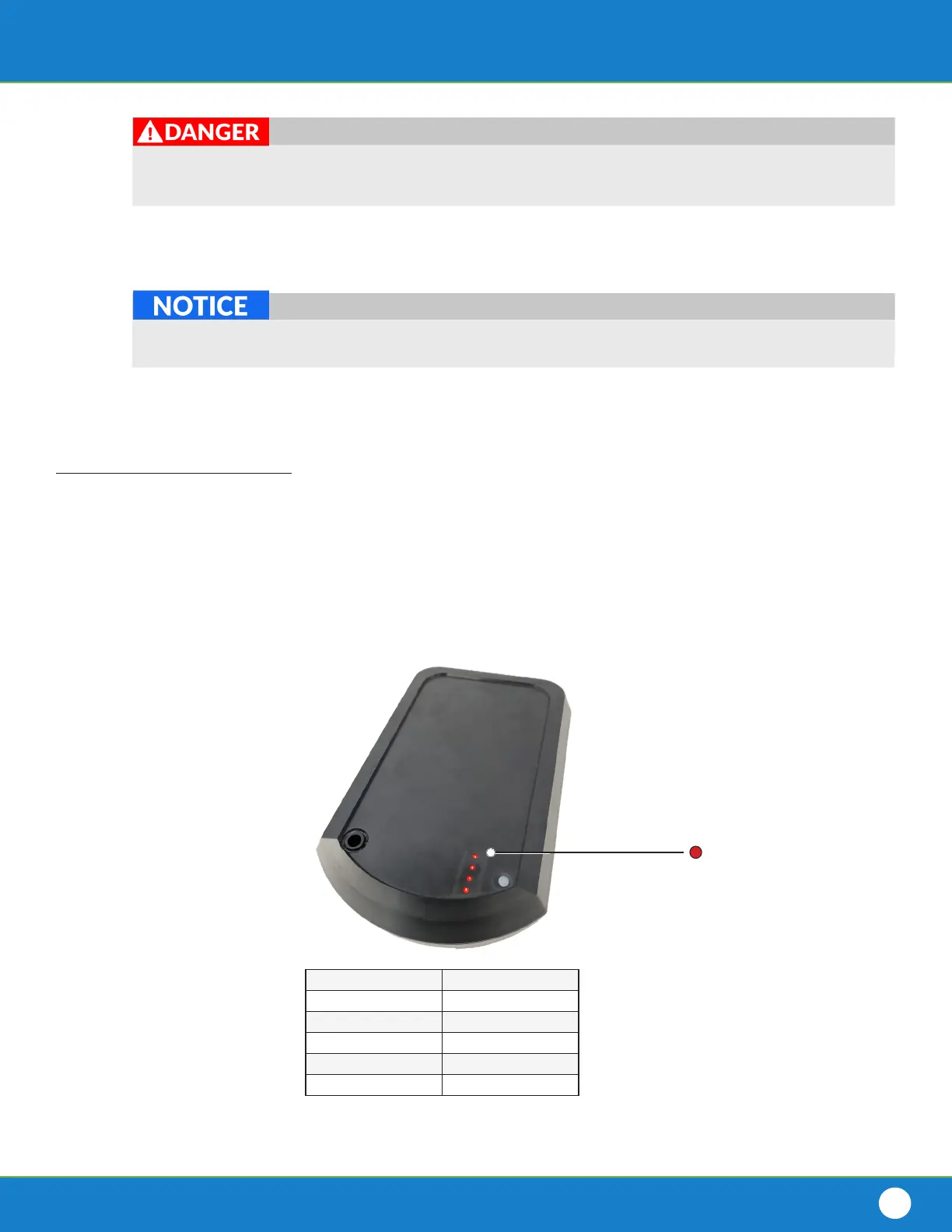
The Baery has an LED gauge used to esmate the remaining charge in the Baery.
Follow these instrucons to interpret the capacity remaining in the Baery:
# of Green LEDs Baery Capacity
4 76-100 %
3 51-75%
2 26-50 %
1 1-25 %
0 0 %
Do NOT leave the Baery Charger and Baery unaended while charging. Failure to monitor the
Baery Charger and Baery while charging may result in res or explosions, possibly resulng in serious
injury or death. In case of res, contact your local emergency departments.
Conrm the Baery’s Dust Cap is clean and dry prior to connecng it to the Baery connector.
Installing the Dust Cap with water inside of it could lead to corrosion of the terminals on the Baery.
1. Remove the Baery from all connected devices.
2. Locate the Baery’s LED gauge.
3. Press the buon on the LED gauge.
4. Observe the color and number of LED’s that light up.
5. See the Baery Capacity Chart below.
Figure 7.3: Baery Capacity Chart
11. Store the Baery and Baery Charger in a cool, dry place unl you are ready to dive.
8. Unplug the Baery Charger from the wall outlet.
9. Disconnect the Baery Charger connector from the Baery connector.
10. Push the Dust Cap onto the Baery Connector.
Red LED


 To Next Page