Color Condition
Green (on) Socket is use
Yellow (on) Cobranet interface is conductor
Table 6.12: Right LED
When you connect the cobranet interface to a CobraNet network, you must:
– Give an IP address to the cobranet interface with CobraNet Discovery (refer to CobraNet
Discovery, page 199).
– Configure the CobraNet network with CNConfig (refer to CobraNet Configuration, page
201).
Notice!
When the interlock mode is None (refer to DCN-IDESK Interpreter Desks, page 221), the audio
inputs of the digital audio expander are disabled for translation channels only. Audio input
channels can route to floor channels.
Control inputs and outputs
The cobranet interface has eight control inputs and five control outputs. With the control
inputs remote systems can control the cobranet interface. With the control outputs, you can
send the condition of the cobranet interface to external devices. The control inputs and
outputs of the audio expander and the cobranet interface do the same (refer to LBB4402/00
Audio Expander, page 117).
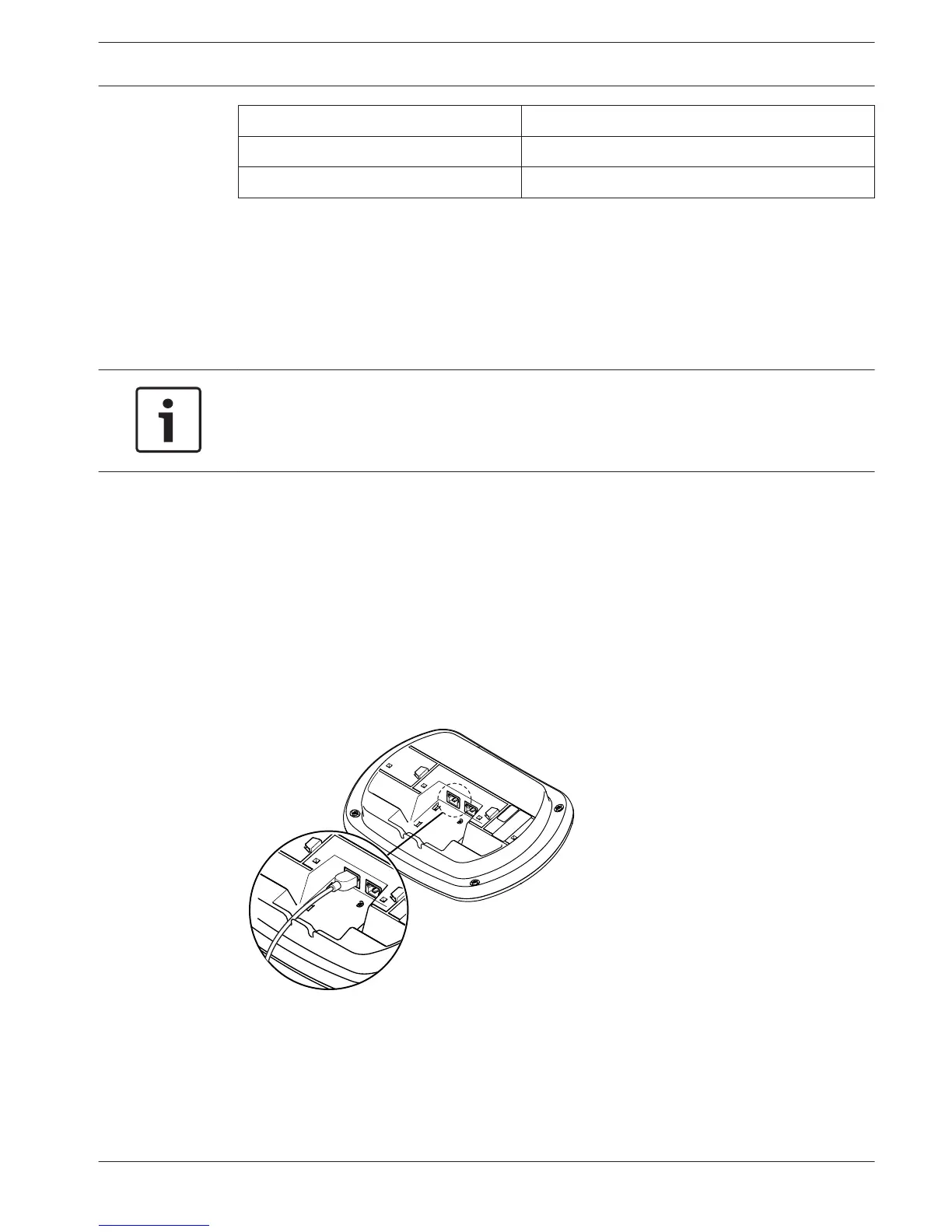
DCN-WAP Wireless Access Point
Optical network
Connect the optical network sockets of the wireless access point to the optical network with
optical network cables.
Figure 6.16: Optical network
6.6
Conference System Connection | en 123
Bosch Security Systems B.V. Operation Manual 2013.11 | V2.0 | DCN-NG_OM_V4.x





 To Next Page