External contact
You can connect an external contact to the voting panel. The external contact must be
connected to the external contact plug.
Notice!
The external contact function is only available in systems that operate with a control PC that
has one or more of these software modules: • Parliamentary Voting software module • Multi
Voting software module • Attendance Registration software module
Refer to the applicable Software User Manuals for the instructions that tell you how to use
the external contact.
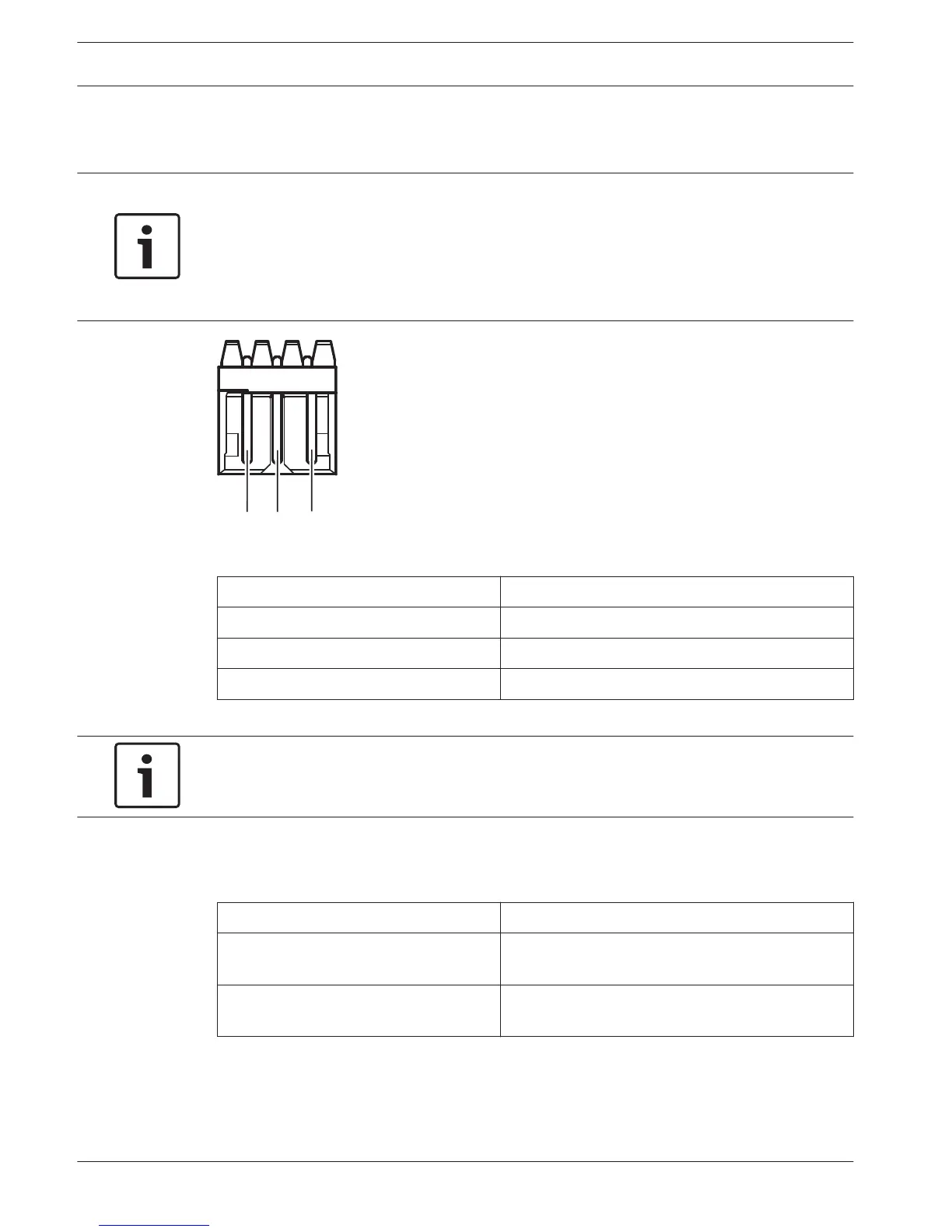
Figure 6.34: External contact, connection
Pin
Signal
1 +5 V(DC) (max. 20 mA)
2 Input, +
3 Input, -
Table 6.21: External contact, connection
Notice!
You can connect, for example, an AMP173977-3 socket to the external contact plug of the
voting panel.
Use the solder spot (refer to DCN-FV(CRD) Voting Panel, page 43, no. 5) to configure the
external contact plug. With the solder spot, you can configure the galvanic separation of pin 3
and the ground of the external contact plug.
Solder spot Description
Not soldered* Pin 3 and the ground of the external contact plug
are not internally connected.
Soldered Pin 3 and the ground of the external plug are
internally connected.
Table 6.22: Solder spot (* = default)
Refer to the figure for a circuit diagram of an external contact connection that uses the
galvanic separation.
136 en | Connection Conference System
2013.11 | V2.0 | DCN-NG_OM_V4.x Operation Manual Bosch Security Systems B.V.












 To Next Page