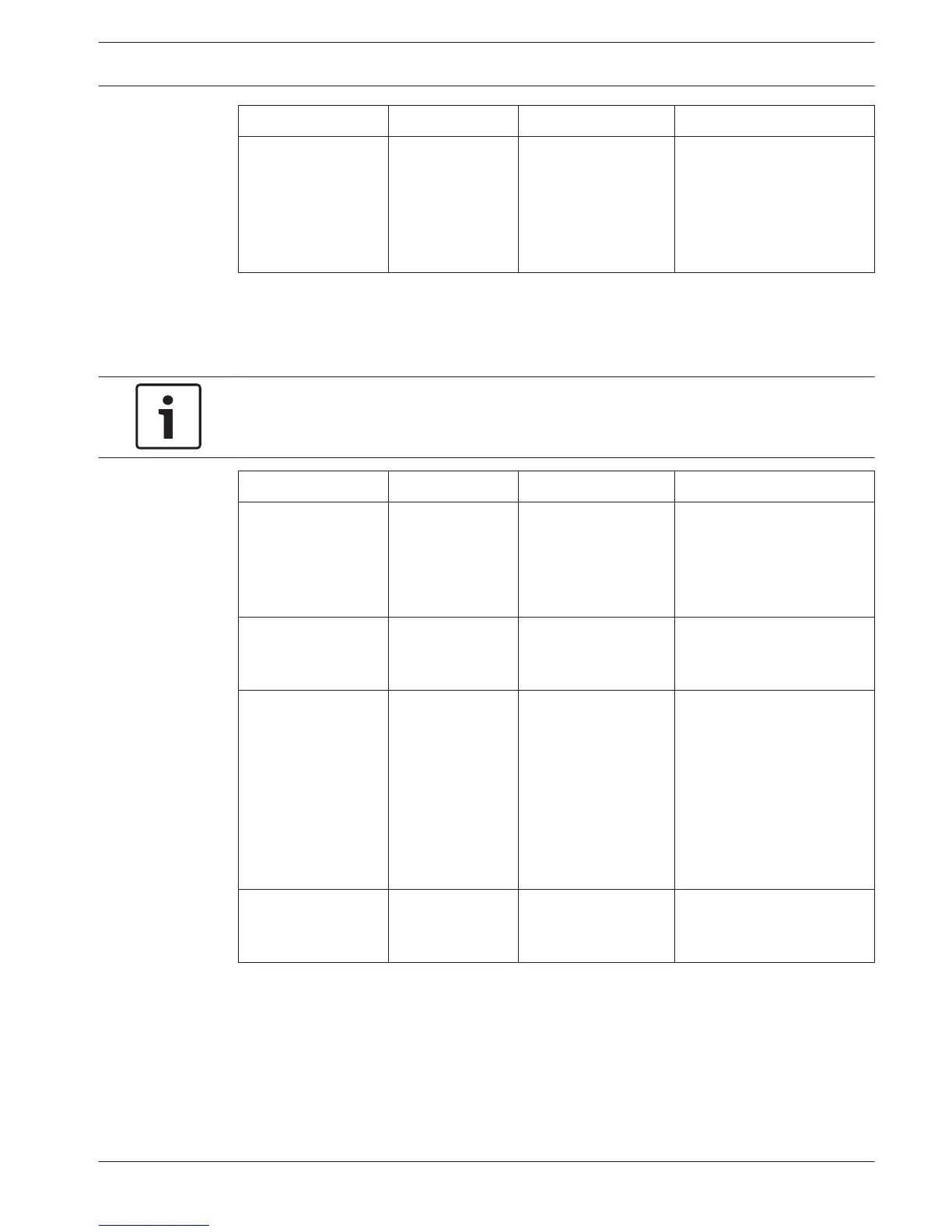
Menu item Parameter Value Description
2C Audio in / output:
Input 1 *
Input 2
Format:
AES/EBU, SPDIF
AES/EBU, SPDIF
Shows the format of the
digital audio (read-only).
When ‘No valid signal’ is
shown, the audio input
does not contain a valid
signal.
Table 7.18: Monitoring sub-menu (* = default)
Setup
Use the 4 Setup menu item to open the Setup sub-menu. Use the menu items in this sub-menu
to configure the digital audio expander.
Notice!
To open the Setup sub-menu, you must push and hold the knob for more than 3 seconds.
Menu item Parameter Value Description
4A AGC Input:
Input 1L
Input 1R
Input 2L
Input 2R
AGC:
On, Off
On, Off
On, Off
On, Off
Sets the automatic gain
control (AGC) of the audio
inputs on and off
4B Output Mode Output:
Output 1
Output 2
Format:
AES/EBU*, SPDIF
AES/EBU*, SPDIF
The format of the digital
audio for audio output 1
and audio output 2.
4C Routing Input/output:
Input 1L
Input 1R
Input 2L
Input 2R
Output 1L
Output 1R
Output 2L
Output 2R
Channel:
--*, 00 to 31
--*, 00 to 31
--*, 00 to 31
--*, 00 to 31
--*, PA, 00 to 31
--*, PA, 00 to 31
--*, PA, 00 to 31
--*, PA, 00 to 31
The channel that is attached
to the audio input or audio
output of the digital audio
expander. (PA = public
address system.)
4D Unit Name --- Name: Digital
Expander* Custom
name
The name of the audio
expander (max. 16
characters).
Conference System Configuration | en 195
Bosch Security Systems B.V. Operation Manual 2013.11 | V2.0 | DCN-NG_OM_V4.x







 To Next Page