Notice!
Except for beep on and beep off, all beeps are only available when beeps have been enabled.
PRS-NSP Network Splitter
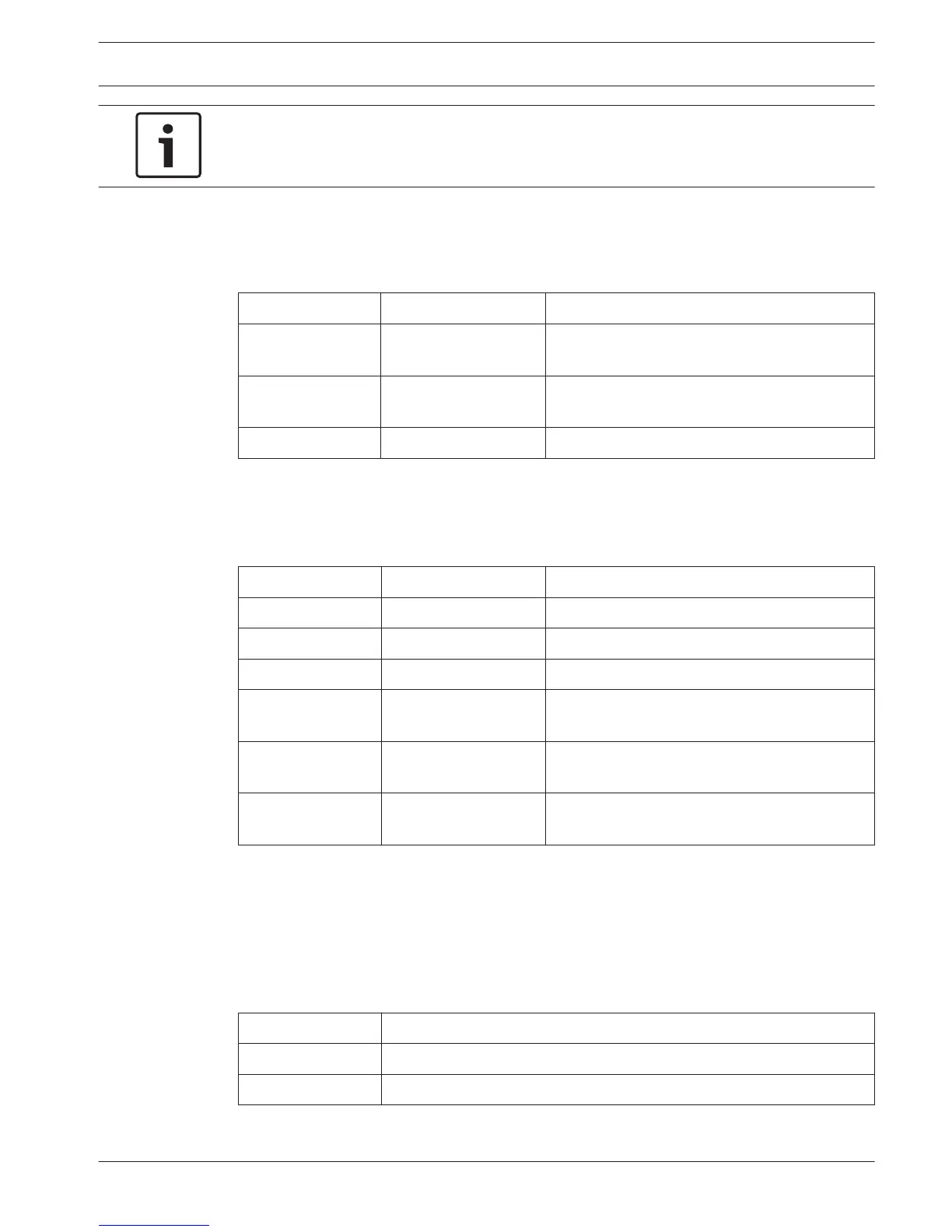
The two LEDs on the network splitter give information about the condition of the network
splitter.
Green (Power) Yellow (Fault) Condition
Off Off The network splitter does not receive any
power.
Off On There is no optical network available or there is
a fault in the optical network.
On Off The network splitter functions correctly.
Table 8.31: Status LEDs
PRS-FINNA Fiber Interface
The two LEDs on the fiber interface give information about the condition of the fiber interface.
Green (Power) Yellow (Fault) Description
Off Off Off; no external power available.
Off On Stand-by; external power to POF turned off.
On On Operating; external power to POF turned on.
On Off Operating, no external power available, but
powered from the POF side.
Flash Off Fault, no external power available and no
protocol received.
Flash On Fault, external power available, but no protocol
received.
Table 8.32: Status LEDs
DCN-DDB Data Distribution Board
Communication
The data distribution board sends serial data to the hall display through the RS232 port. The
serial data consists of ASCII text with ANSI escape codes for special functions. Refer to the
table for the descriptions of <CR> and <LF> control characters.
Character Description
<CR> Moves the cursor to the first location on the current text line.
<LF> Moves the cursor one row down in the current column
Table 8.33: ASCII control characters
8.17
8.18
8.19
Conference System Operation | en 255
Bosch Security Systems B.V. Operation Manual 2013.11 | V2.0 | DCN-NG_OM_V4.x


 To Next Page
 Loading...











