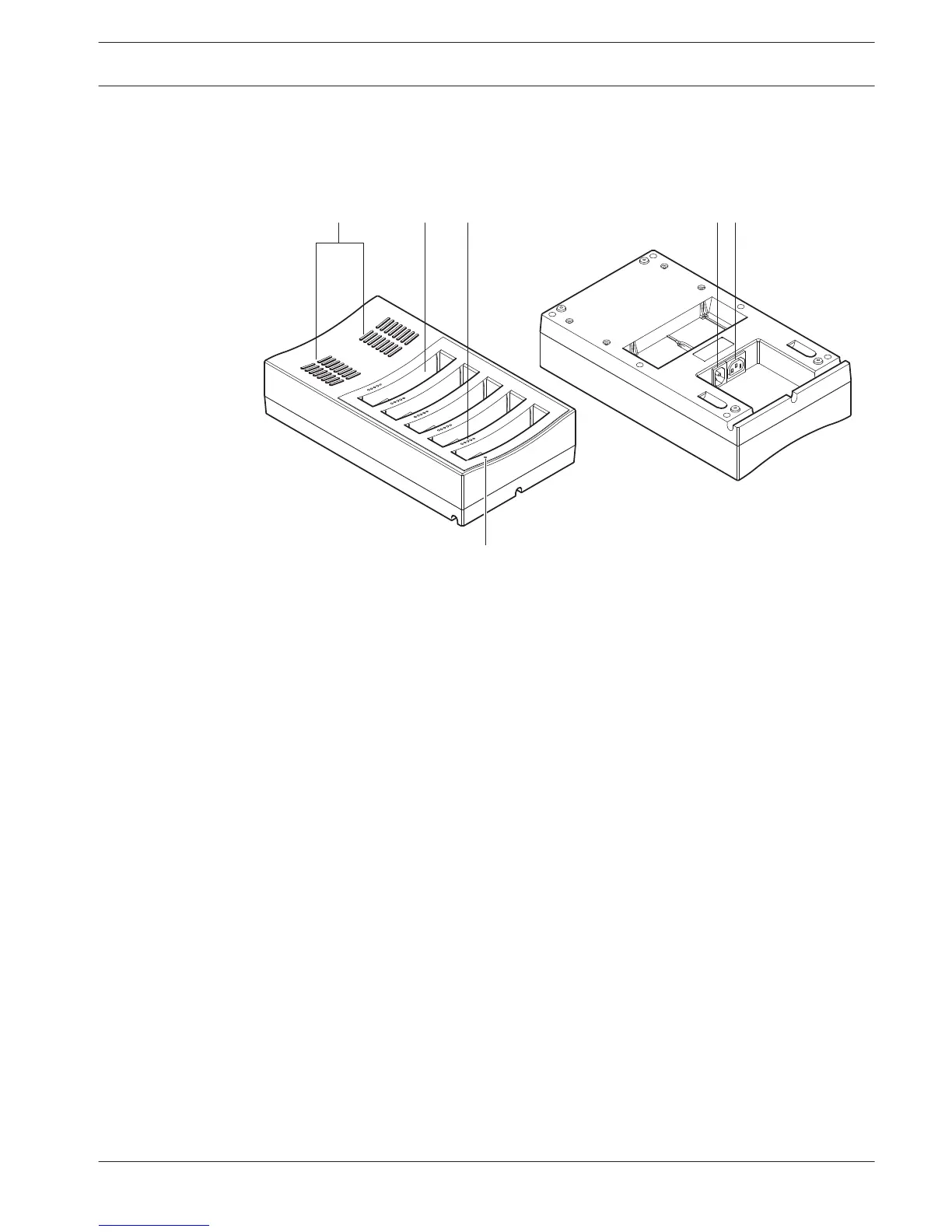
DCN-WCH05 Battery Charger
The Battery Charger charges the Battery Packs (DCN-WLIION). The battery charger can charge
a maximum of 5 battery packs at the same time.
Figure 3.27: Overview
1. Ventilation grilles - Make sure that the temperature of the battery charger does not
become too high.
2. Battery pack containers - Holds the Battery Packs (DCN-WLIION).
3. Charge level LEDs - Shows the charging level of the battery pack.
4. Power on/off LED - Is on when the power cable is connected to the mains power supply.
5. Power inlet - Mains power supply connection.
6. Loop-through socket - Connects the battery charger to another battery charger with a
power cable.
The following sections give more information about the mentioned subject:
– Installation: DCN-WCH05 Battery Charger, page 101.
– Connection: DCN-WCH05 Battery Charger, page 131.
– Operation: DCN-WCH05 Battery Charger, page 248.
– Technical Data: DCN-WCH05 Battery Charger, page 280.
DCN-WPS Power Supply Adapter
The DCN-WPS Power Supply Adapter is used with the wireless devices. Refer to DCN-WPS
Power Supply Adapter, page 281 for more information.
3.9
3.10
Conference System System Overview | en 35
Bosch Security Systems B.V. Operation Manual 2013.11 | V2.0 | DCN-NG_OM_V4.x















 To Next Page