EasyManua.ls Logo

Bosch DDU S2 Plus - CAN Input; Input Configuration

Bosch DDU S2 Plus
136 pages
Print Icon
To Next Page IconTo Next Page
To Previous Page IconTo Previous Page
Loading...
Payload Area
Row
Counter
Row
Counter
Payload Area
Message
Id
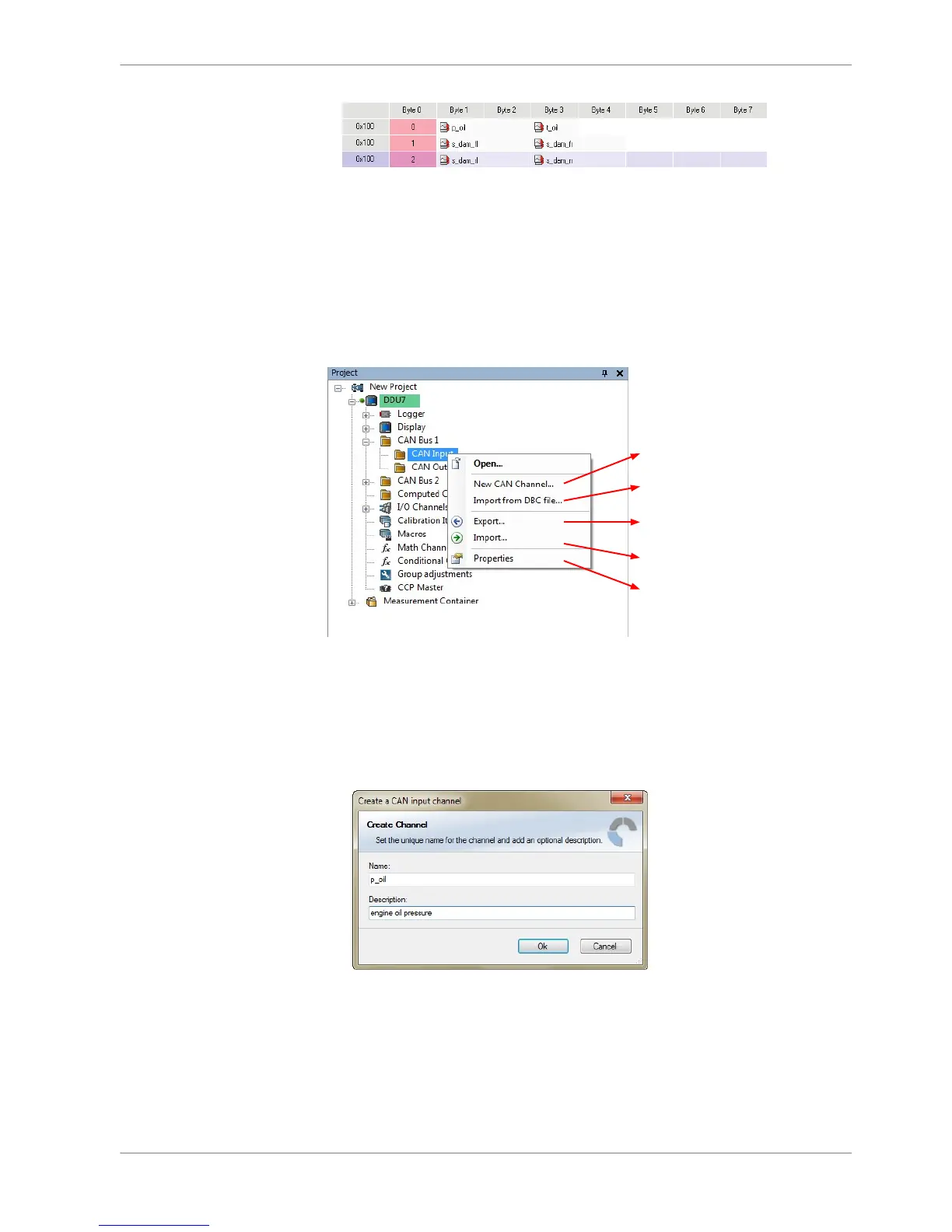
CAN input
Input configuration
Create new channel to read from CAN bus
Import Vector CAN database (DBC)
channel configuration
Export RaceCon CAN input configuration
to file
Import RaceCon CAN input configuration
from file
Display CAN bus properties (Baudrate)
Create new CAN channel
1. Right‐click on CAN Input of desired bus (CAN1, CAN2 or CAN3).
2. Select ‘New CAN Channel’ from menu.
3. Insert name and description of channel.
4. Click ‘OK’ when done.
The channel is listed in the Data window and a CAN channel configuration win‐
dow opens.
9.2
9.2.1
9.2.2
CAN Bus | 9
Bosch Motorsport DDU S2 PLUS Manual 67 / 136

Related product manuals