EasyManua.ls Logo

Bosch DDU S2 Plus - Setting up an Online Measurement

Bosch DDU S2 Plus
136 pages
Print Icon
To Next Page IconTo Next Page
To Previous Page IconTo Previous Page
Loading...
Setting up an online measurement
DDU 8 supports online measurement of sensor values and diagnostic variables.
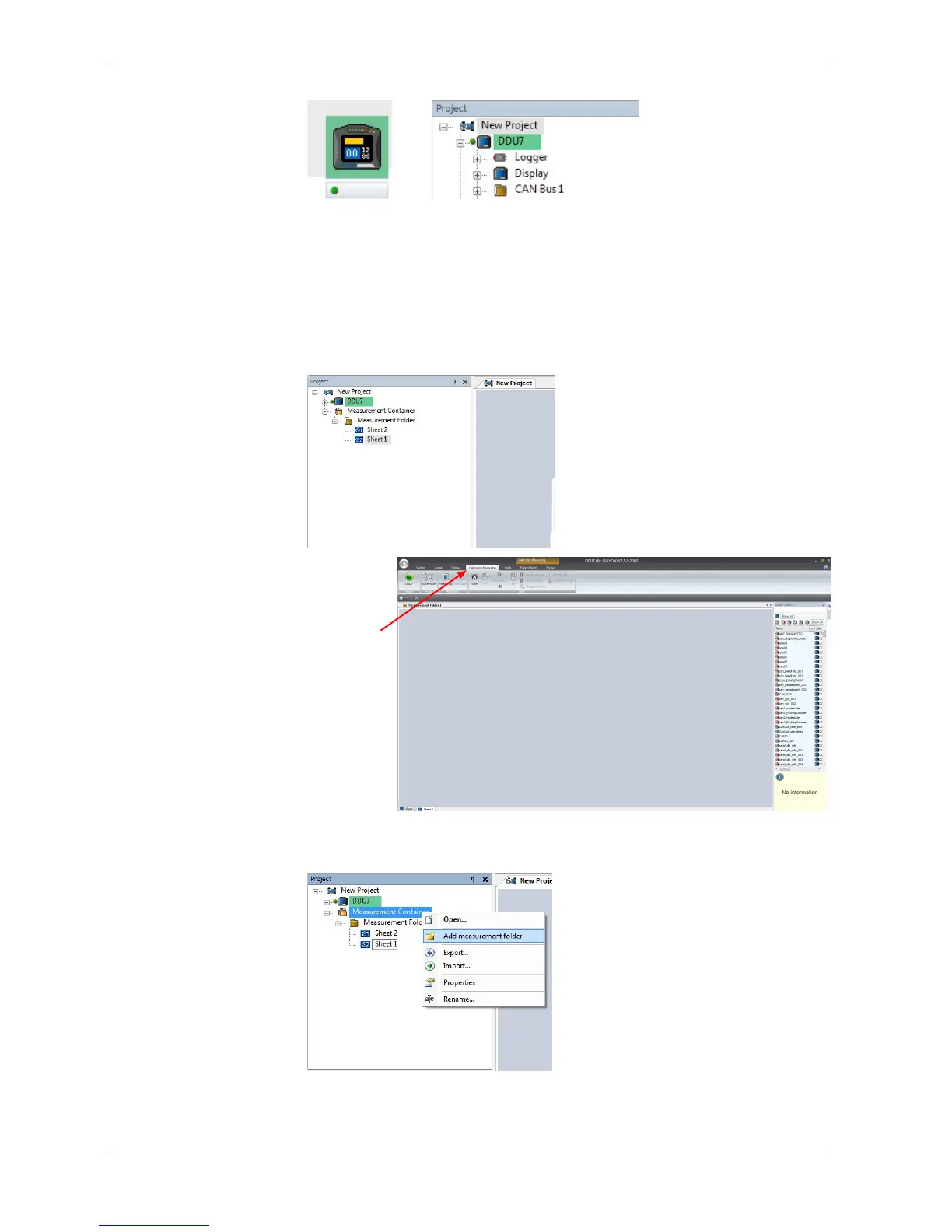
Expand ‘Measurement Container’ and ‘Measurement Folder 1’ in the Project Tree
and double‐click on ‘Sheet1’. ‘Sheet 1’ is opened in a new page (‘Calibration/
Measuring’).
RaceCon change
automatically
to "Calibration/
Measuring"
Back to page ‘System’, from the context menu of the project, new measurement
pages can be created.
From the context menu of a measurement page, the folder can be renamed and
deleted. It also allows the creation of measurement pages.
11.2
11 | Online Measurement
100 / 136 DDU S2 PLUS Manual Bosch Motorsport

Related product manuals