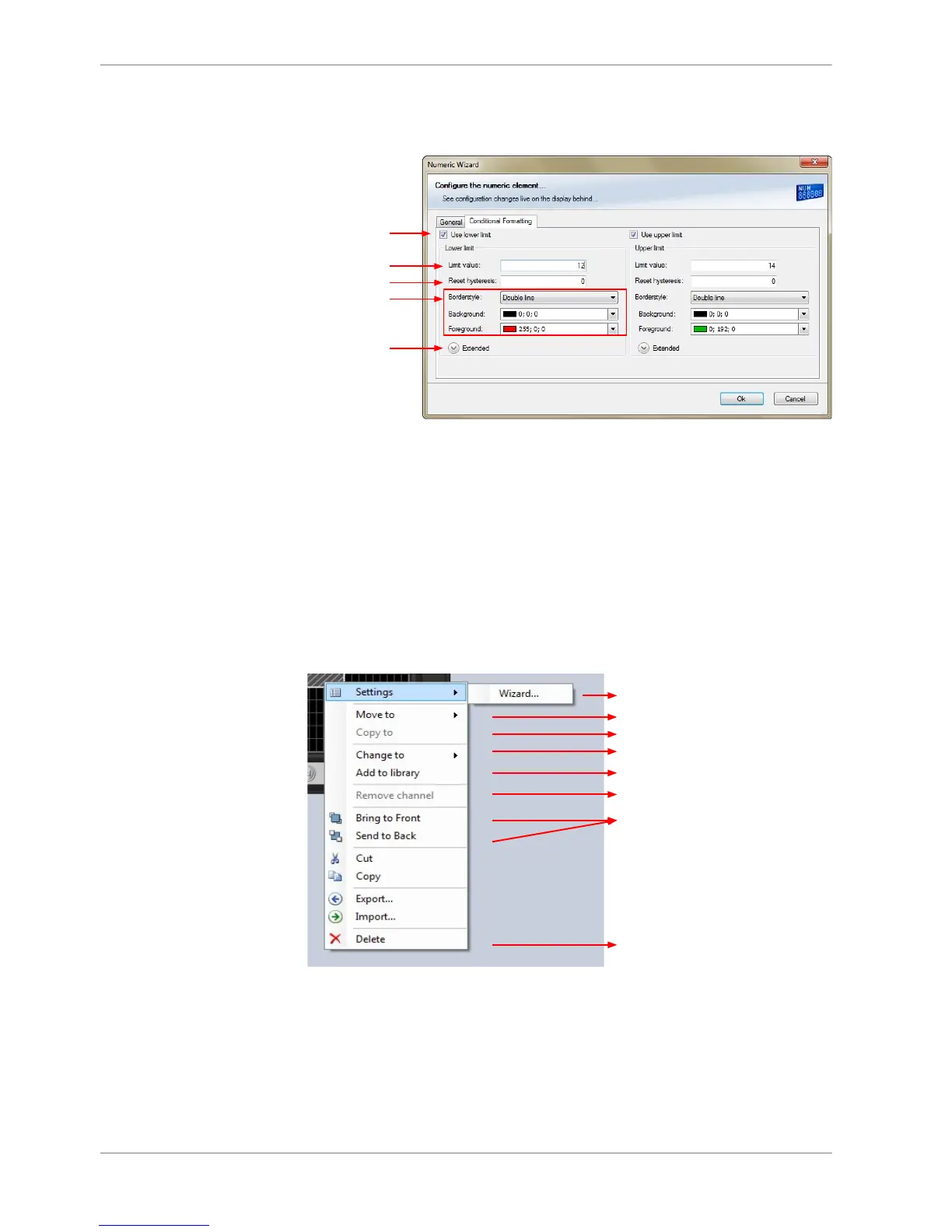
1. Double‐click on the display element. The Numeric Wizard window opens.
2. Switch to the tab ‘Conditional Formatting’.
a)
b)
c)
d)
e)
a) Check the box to activate the formatting at a lower limit.
b) Enter the limit value when the formatting is active.
c) Enter the limit value when the reset hysteresis function is active. The reset hysteresis function avoids
the high-frequent switchover of the measurement channel value.
d) Choose the borderstyle, background and foreground color of the numeric display element.
e) Click the Extended button to show further options to change the color of the title, border and text
individually. If a 'Bargraph' display element is used, its colors can also be changed.
The lower and the upper limits are configured in the same way.
3. Click ‘OK’ when done.
Context menu
The context menu appears by right‐clicking on a display element.
Show and edit properties
Move element to different page
Copy element to different page or all pages
Change type of display element
Insert element into library in toolbox
Remove assigned measurement channel
Manage overlapping elements
Delete element
LEDs
The LEDs are fully configurable to show the optimal shifting point. They can also
be configured to flash in case of a customized condition becoming ‘true’.
8.2.6
8.3
8 | Display Configuration
32 / 136 DDU S2 PLUS Manual Bosch Motorsport














 To Next Page