EasyManua.ls Logo

Bosch DDU S2 Plus - Page 81

Bosch DDU S2 Plus
136 pages
Print Icon
To Next Page IconTo Next Page
To Previous Page IconTo Previous Page
Loading...
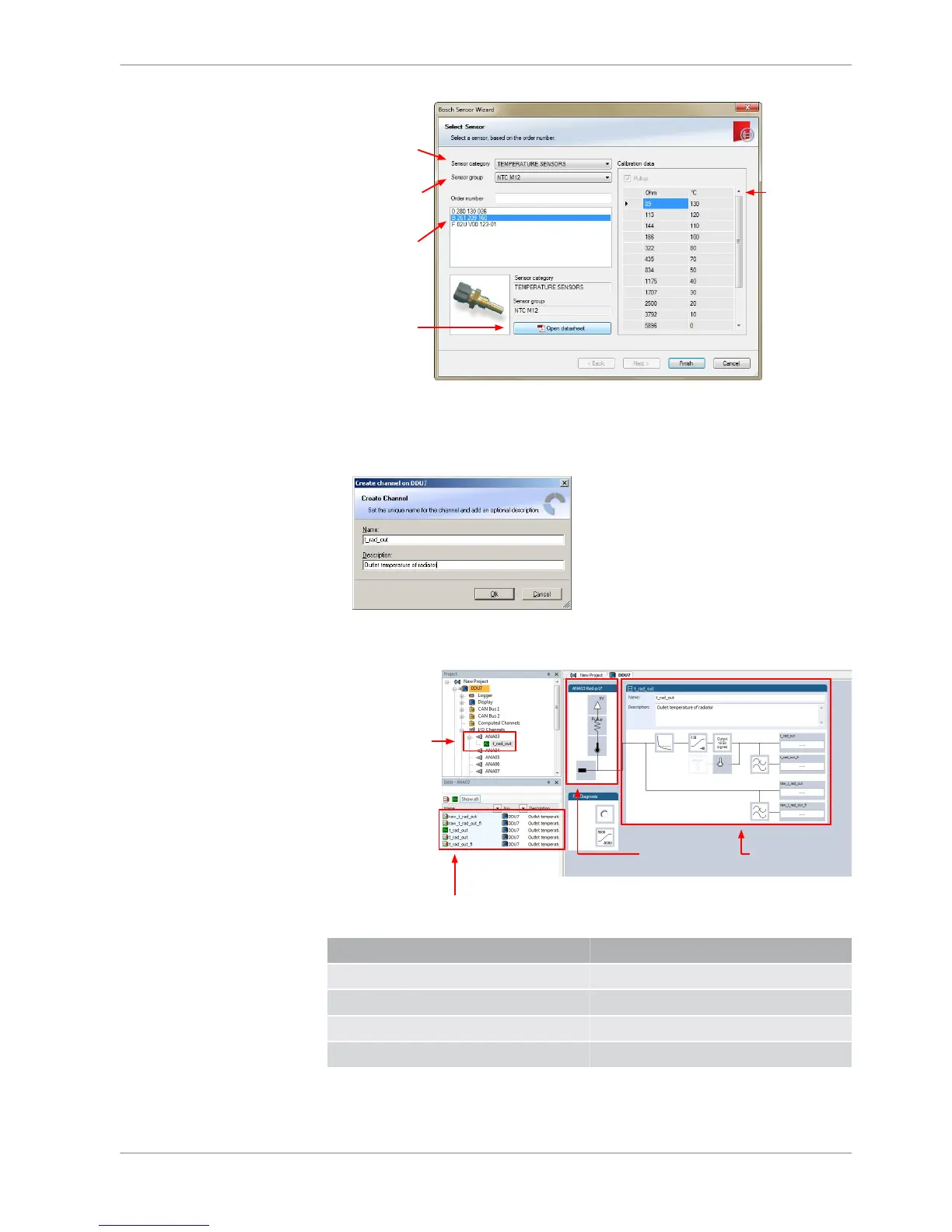
1st: Choose the
sensor´s category
2nd: Narrow your
choice by
choosing a type
3rd: Select the
exact type
Opens sensor´s
datasheet
These calibration
values will be used
4. Click ‘Finish’ when done.
The ‘Create channel’ window opens.
5. Enter channel name and description.
6. Click ‘Ok’ when done.
The channel is inserted into the DDU 8 Project Tree.
Channel is linked
to ANA03
Input pin Pull-up
resistor is activated
Calculation of
physical value with
characteristic curve
Available measurements for channel:
Measurement label Function
raw_name mV value of sensor
raw_name_fi Filtered mV value of sensor
name Physical value of sensor
name_fi Filtered physical value
Analog and Frequency Inputs | 10
Bosch Motorsport DDU S2 PLUS Manual 81 / 136


Related product manuals