EasyManua.ls Logo

Bosch DDU S2 Plus - Page 83

Bosch DDU S2 Plus
136 pages
Print Icon
To Next Page IconTo Next Page
To Previous Page IconTo Previous Page
Loading...
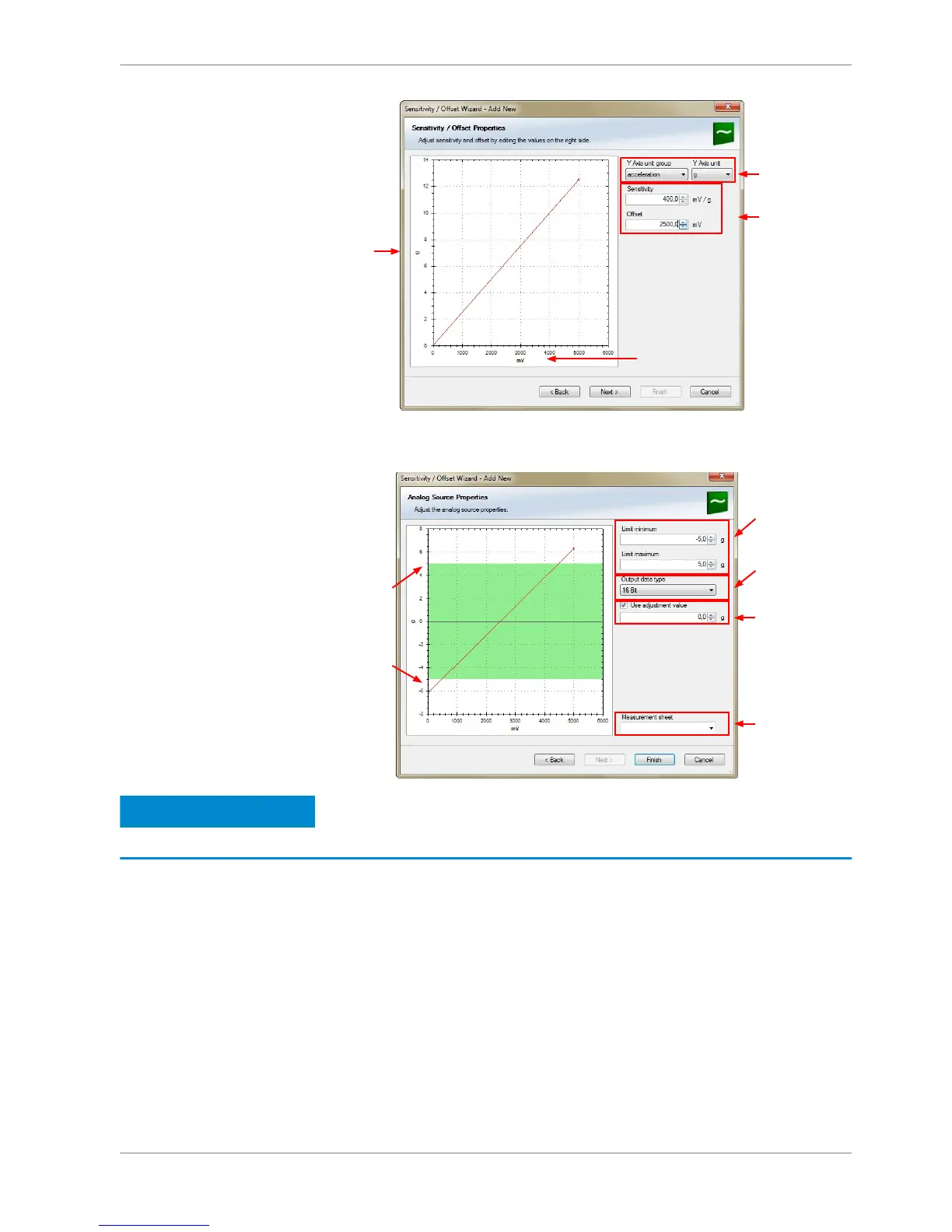
Physical
(channel)
value
Choose unit
group and unit of
physical value
Enter values from
sensor datasheet
Electrical (pin) value
6. Click ‘Next’ when done.
The third part of the ‘Sensitivity/Offset Wizard’ opens.
Physical limits
of channel
Enter physical
limits of the sensor
Choose data type
of the measurement
variable
Check box to enable
online calibration of
offset and enter
desired physical
offset value
Enter name to
automatically create
a new measurement
sheet
Notice
Working with automatically created measurement sheets is ex‐
plained in chapter ‘Setting up an online measurement [} 100]’.
7. Click ‘Finish’ when done.
8. Enter channel name and description.
9. Click ‘OK’ when done.
The channel is inserted into the DDU 8 Project Tree.
Analog and Frequency Inputs | 10
Bosch Motorsport DDU S2 PLUS Manual 83 / 136


Related product manuals