Principles of operation
Logamatic EMS – 6 720 801 387 (2011/05)
18
4
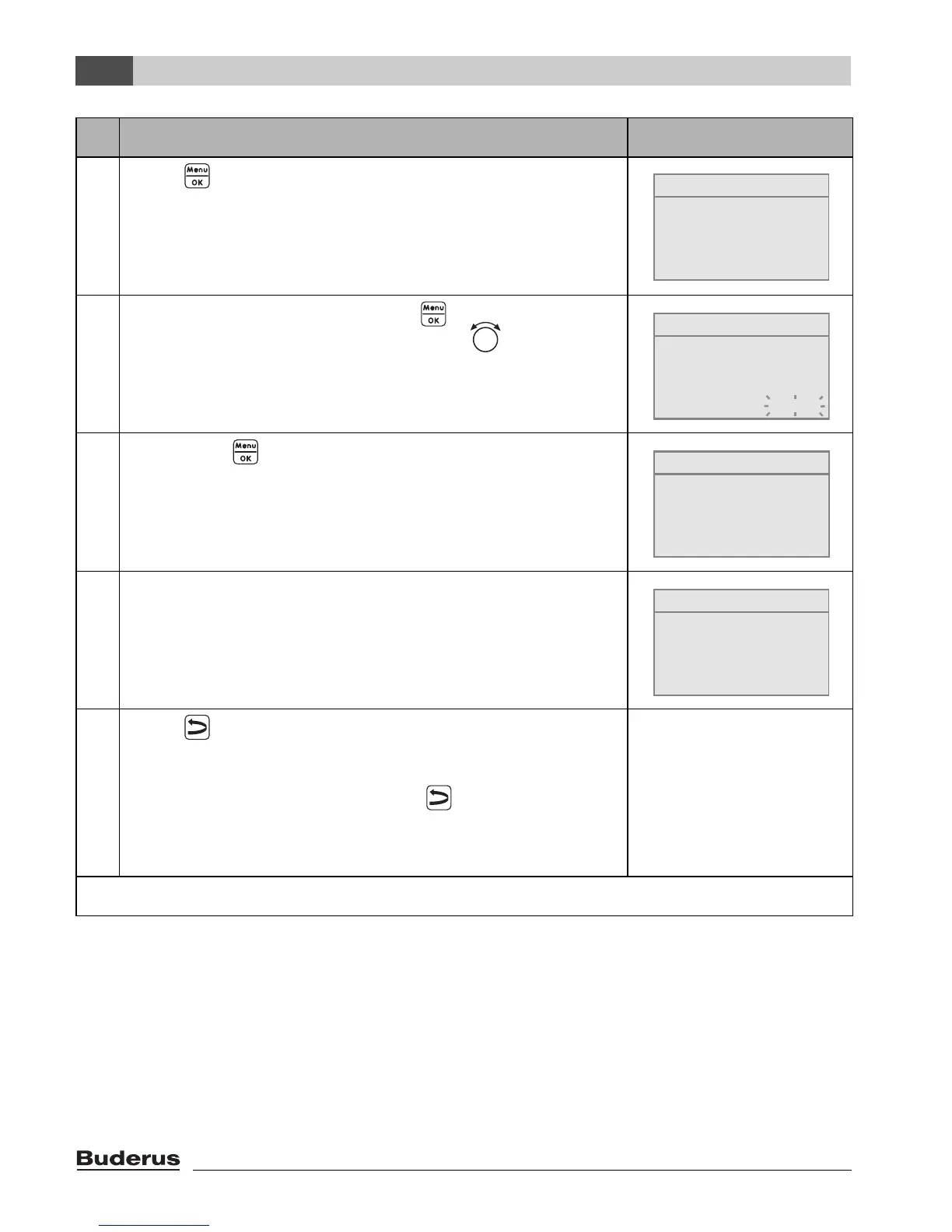
5. Press to select boiler data.
The menu SETTINGS\BOILER is opened.
6. To change the value, hold down the button (the value
starts flashing) and turn the rotary selector at the same
time.
7. Release the button.
The value stops flashing. The modified value is saved.
8. If you have carried out this example as practice only, make
sure that the original setting is retained.
To do so, repeat steps 6 and 7 if necessary.
9. Press to go back one step.
-or-
To finish entering the settings: press several times or
shut the flap.
The standard display reappears.
You can enter all settings in the SERVICE MENU using this procedure.
Operation Result
Table 5 How to use the service menu (example)
SETTINGS\BOILER
What type of building
do you have?
medium
SETTINGS\BOILER
What type of building
do you have?
medium
SETTINGS\BOILER
What type of building
do you have?
light
SETTINGS\BOILER
What type of building
do you have?
medium




 To Next Page