Commissioning
Logamatic EMS – 6 720 801 387 (2011/05)
20
5
5 Commissioning
5.1 General commissioning
Operation Result
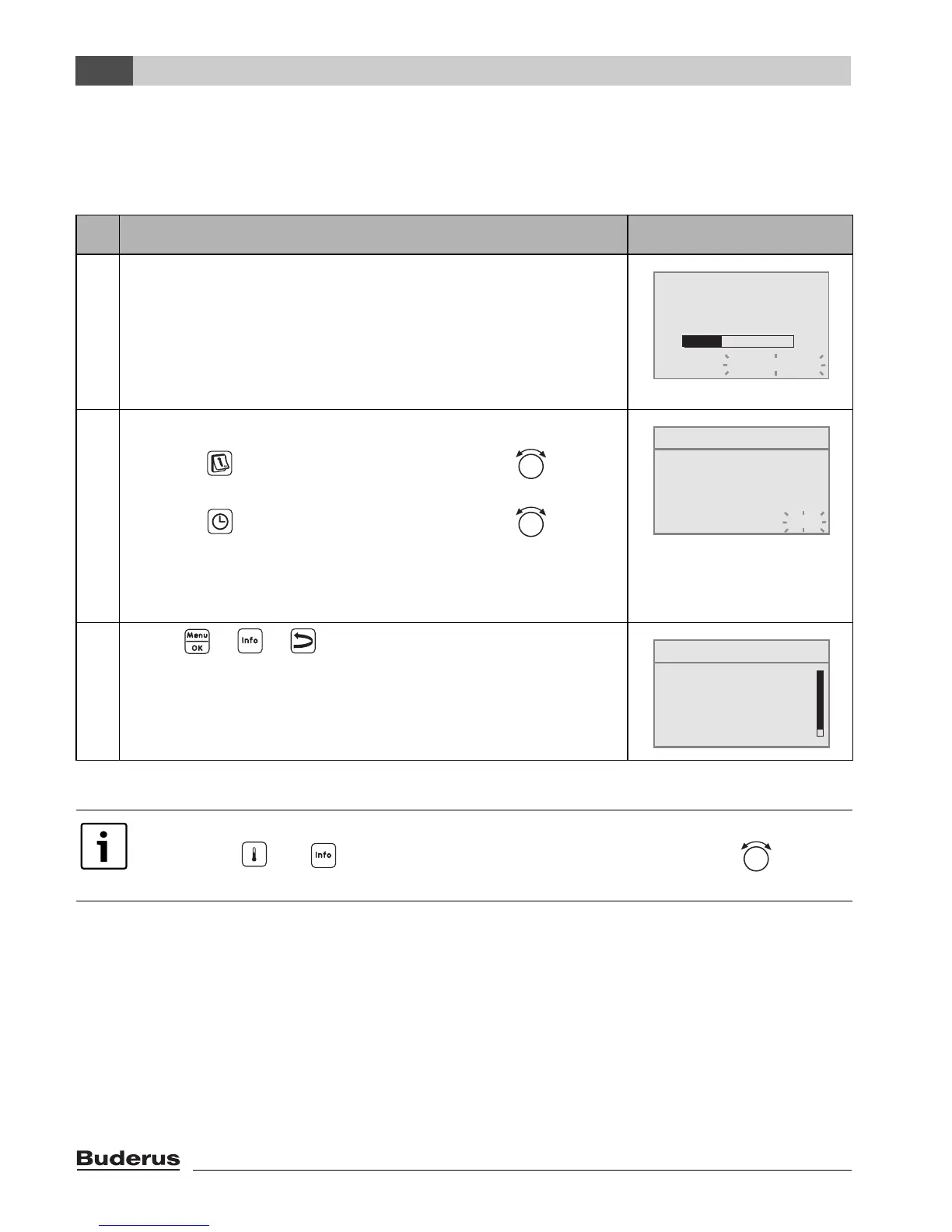
1. Switch on the heating system.
While setting up the connection between the RC35 and EMS
or UBA1.x, the display shows the message on the right.
If the display shows a different message, look it up in
Chapter 10, page 53.
2. Set the date and time:
Hold the button pressed down and with the rotary
selector set the respective flashing value. Release button.
Hold the button pressed down and with the rotary
selector set the respective flashing value. Release button.
In the event of a power failure, the date and time are retained
for up to 8 hours. All other settings are saved.
3. Press + + simultaneously,
to open the SERVICE MENU.
Table 7 General commissioning
If necessary, you can change the contrast on the display:
B Hold the and buttons pressed down and simultaneously turn the rotary
selector.
RC35 version:
connect to:
connection setup ...
please wait
SET DATE
set year
01.01.2000
SERVICE MENU
B
quick operation
settings
diagnosis
servicing




 To Next Page