Logamatic EMS – 6 720 801 387 (2011/05)
19
Principles of operation
4
4.3 Overview of the service menu
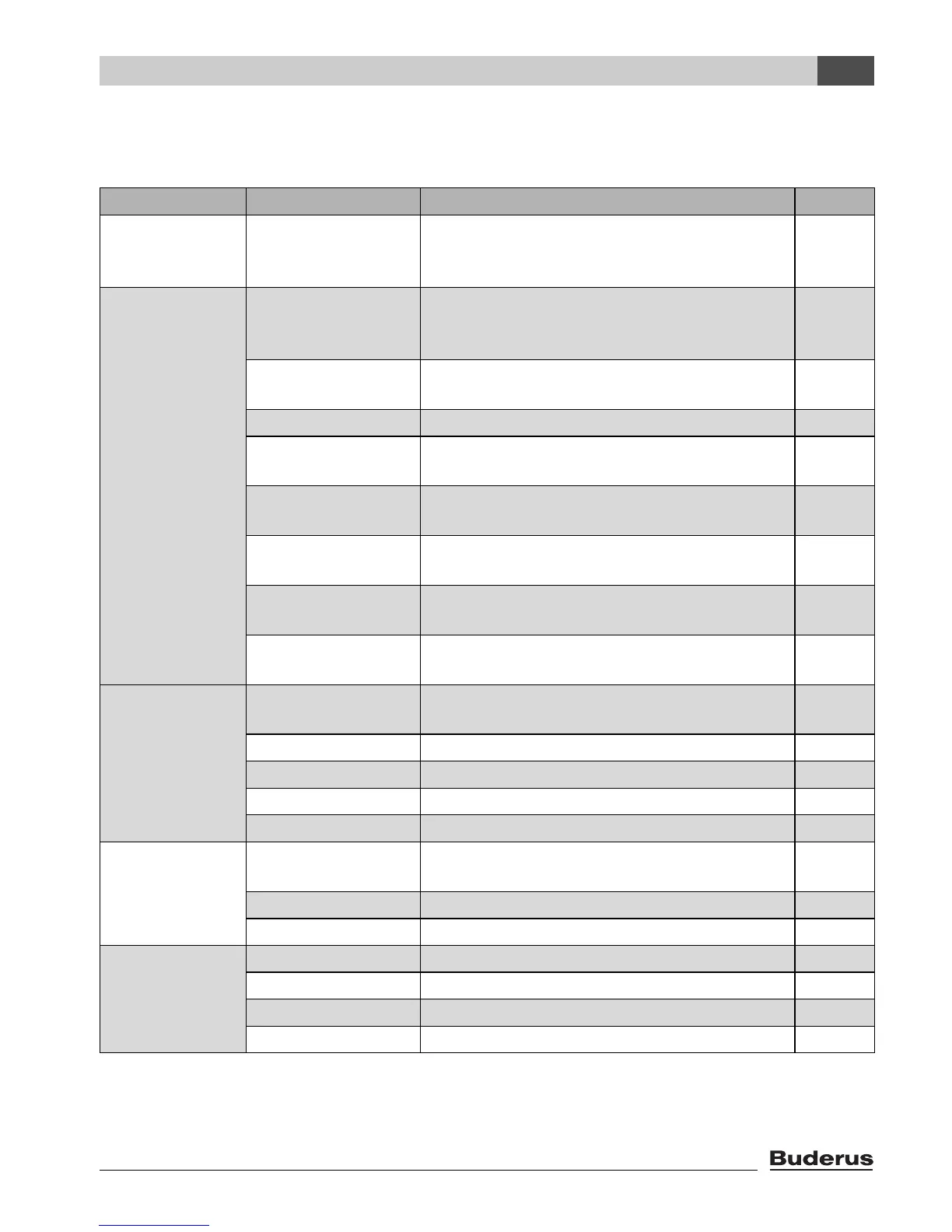
The SERVICE MENU is divided into the following menus and submenus:
Menu Sub-menu Contents/function Page
Quick operation The most important parameters from the
“settings” menu to configure the heating
system
22
Settings (all
parameters)
Plant data
1)
1) Limited use depending on the boiler used.
Parameters: language, number of heating
circuits, installed modules, building type,
minimum outside temperature
26
Hybrid If HM10 hybrid module is installed: see
documents on the hybrid system
29
Boiler data
1)2)
2) May not be available or possible, depending on the boiler used.
Parameters: pump run-on time and modulation 30
Heating circuit
data
1)
Parameters of the installed heating circuits 31
Domestic hot
water
1)
Parameters for DHW 40
Solar data
2)
If solar is installed: see documentation for the
solar module
43
RC35 calibration Parameters: calibration of the displayed room
temperature
44
Contact details Entering the heating contractor's name and
telephone number
45
Diagnosis Function test
1)2)
Activating individual components for test
purposes
47
Monitor value Viewing target values and actual values 48
Error message
1)
Viewing faults 49
Heating curve Display the set heating curve graphically 50
Versions Viewing software versions 50
Service
1)2)
Maintenance interval Setting times for maintenance, by hours run or
by date
51
Current messages Viewing service messages 51
RESET servicing Resetting service messages 51
Reset
1)
Factory setting Resetting of parameters to basic settings 52
Error list 52
Service message 52
Working hours 52
Table 6 Service menu navigator




 To Next Page