Logamatic EMS – 6 720 801 387 (2011/05)
17
Principles of operation
4
4.2 Introduction to the service menu
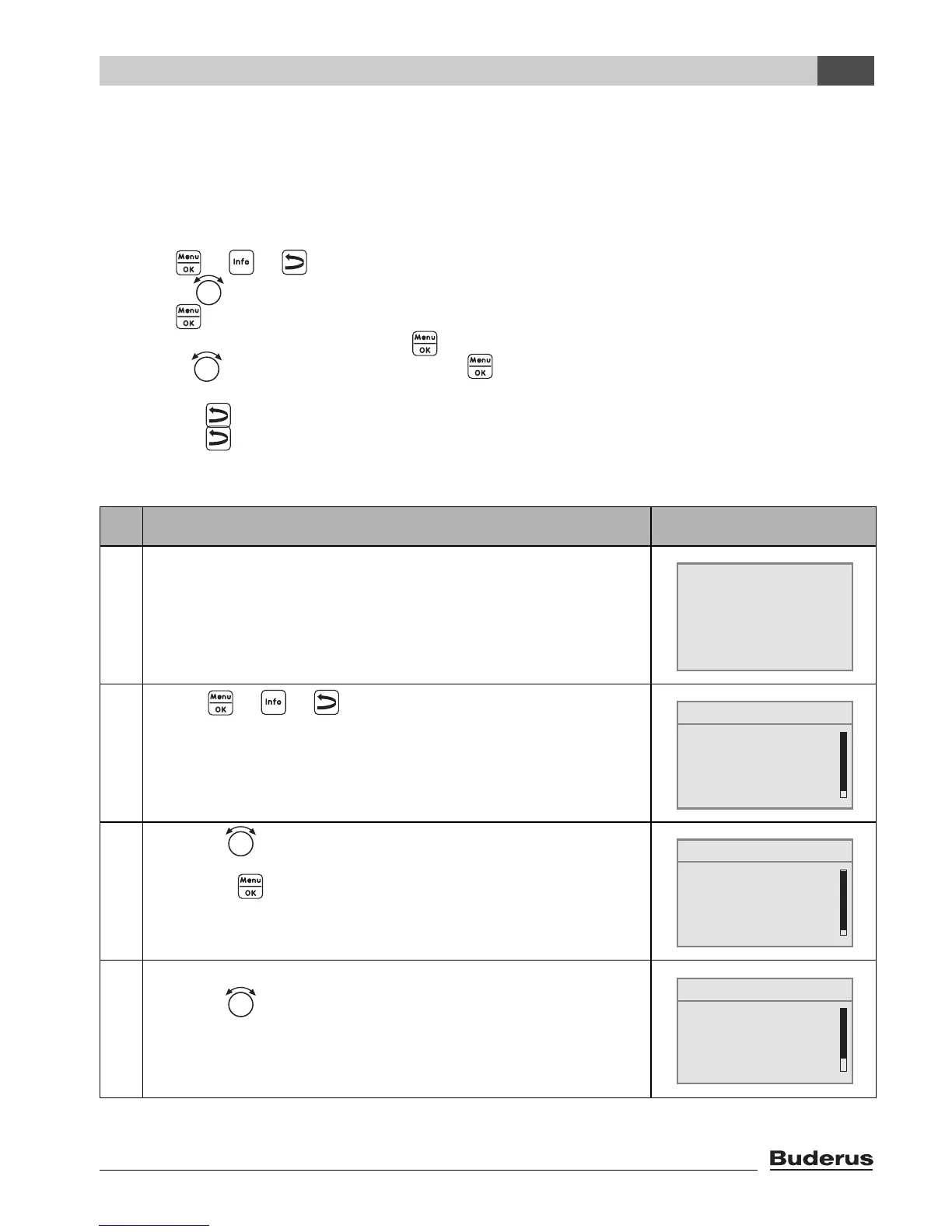
You can use the SERVICE MENU to set the parameters for the system. It also contains functions
for diagnosis, maintenance purposes, and carrying out a reset. The procedure for operation is
always the same:
1. Open the flap (by pulling the recessed grip on the left).
2. Press + + simultaneously to open the SERVICE MENU.
3. Turn the rotary selector to change the selection.
4. Press to make your selection.
5. To change the value, hold down the button (the value starts flashing) and turn the rotary
selector at the same time. Release the button.
The modified value is saved.
6. Press the button to go back one step.
Press the button several times or close the flap to show the standard display again.
Example: Setting the building type (adjusted time)
Operation Result
1. Open the flap (by pulling the recessed grip on the left).
2. Press + + simultaneously,
to open the SERVICE MENU.
3. Turn the rotary selector to the left until settings is
selected.
Press the button to confirm the selection.
4. The SERVICE\SETTINGS menu is opened.
Turn the rotary selector to the left until boiler data is
selected.
Table 5 How to use the service menu (example)
6° 02.12.2005 10:20h
Temp. Exterior -1°C
21.5°C
SERVICE MENU
B
quick operation
settings
diagnosis
servicing
SERVICE MENU
quick operation
settings
diagnosis
servicing
B
SERVICE\SETTINGS
B
plant data
boiler data
domestic hot water
heating circuit 1




 To Next Page