Commissioning
Logamatic EMS – 6 720 801 387 (2011/05)
22
5
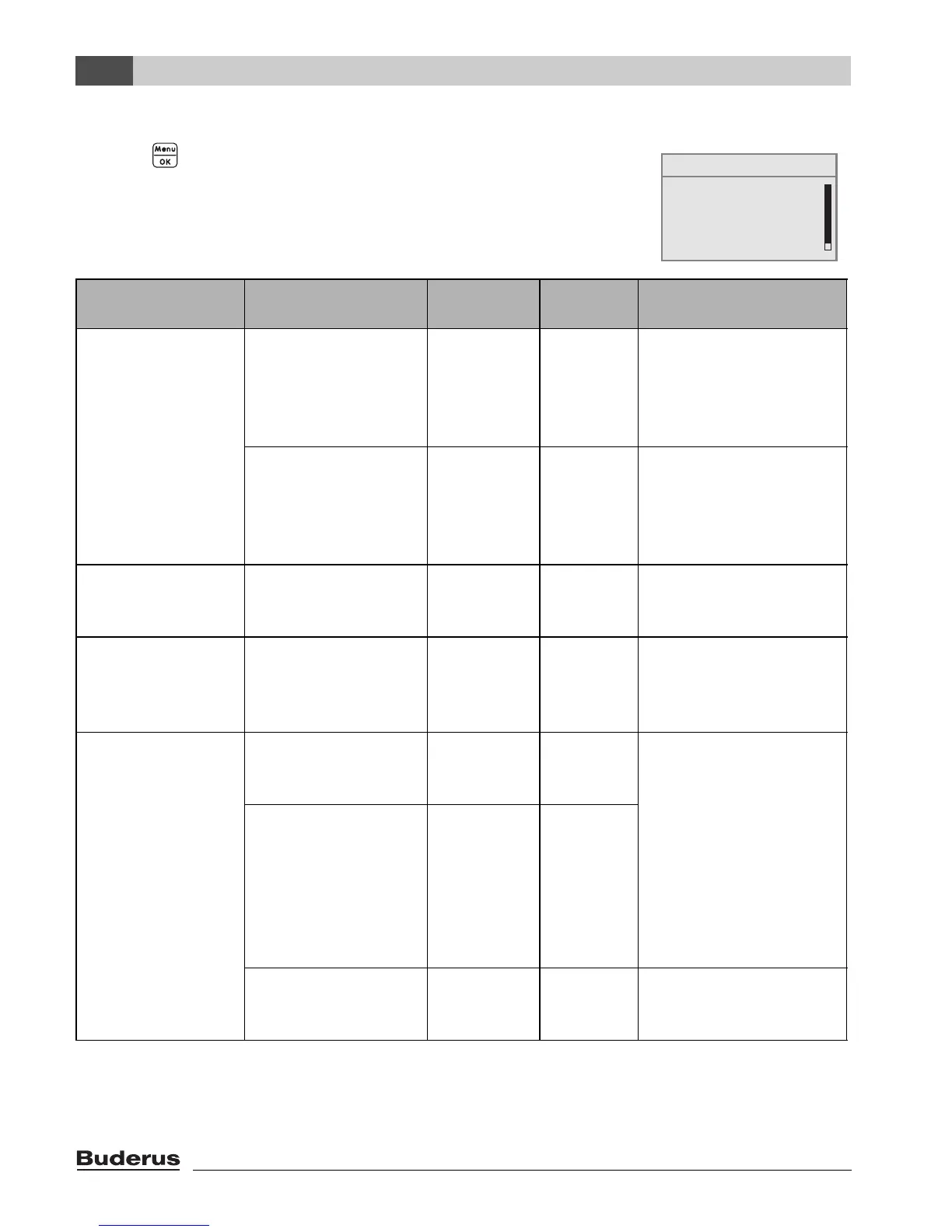
5.3 Quick start-up (quick programmer menu)
B Press button to open the quick operation menu.
SHORTPROG\ Menu item Input range
Standard
setting Other information
LOW LOSS
HEADER
Have you installed a
module for the
hydraulic low loss
header?
Yes, No no In association with
MCM10 the setting is
automatically set to
“Yes”the screen is
hidden.
1)2)
Is a sensor for the low
loss header
connected?
No, at the
boiler, at the
low loss
header
module
no If a low loss header
module is used, connect
the temperature sensor
to the low loss header
module.
3)
SYSTEM Is heating circuit 1
installed (unmixed
heating circuit)?
Yes, No Yes
NO. OF MIXERS How many mixed
heating circuits are
installed?
0 to 3 0 Set the address on the
rotary coding selector of
the mixer module (basic
setting HK2).
1)
HEATING CIRCUIT
1
(and other heating
circuits)
Which operating unit
is assigned to heating
circuit 1?
RC2x/
RC20/RF,
RC35, none
RC35 Assigning programming
units to heating circuits
(Æ page 35). General
heating circuit data (Æ
page 31).
Set up any other heating
circuits as per heating
circuit 1.
How should heating
circuit 1 be
controlled?
Outside
temperature
compensate
d, room
temperature
compensate
d
Outside
temperatur
e
compensat
ed
Which heating system
does heating circuit 1
have?
Radiator,
convector,
floor
Radiator Heating curve (Æ
page 36)
Table 9 Quick programmer menu navigator
SERVICE MENU
B
quick operation
settings
diagnosis
servicing




 To Next Page