M1 – M3 Display units
Page 35
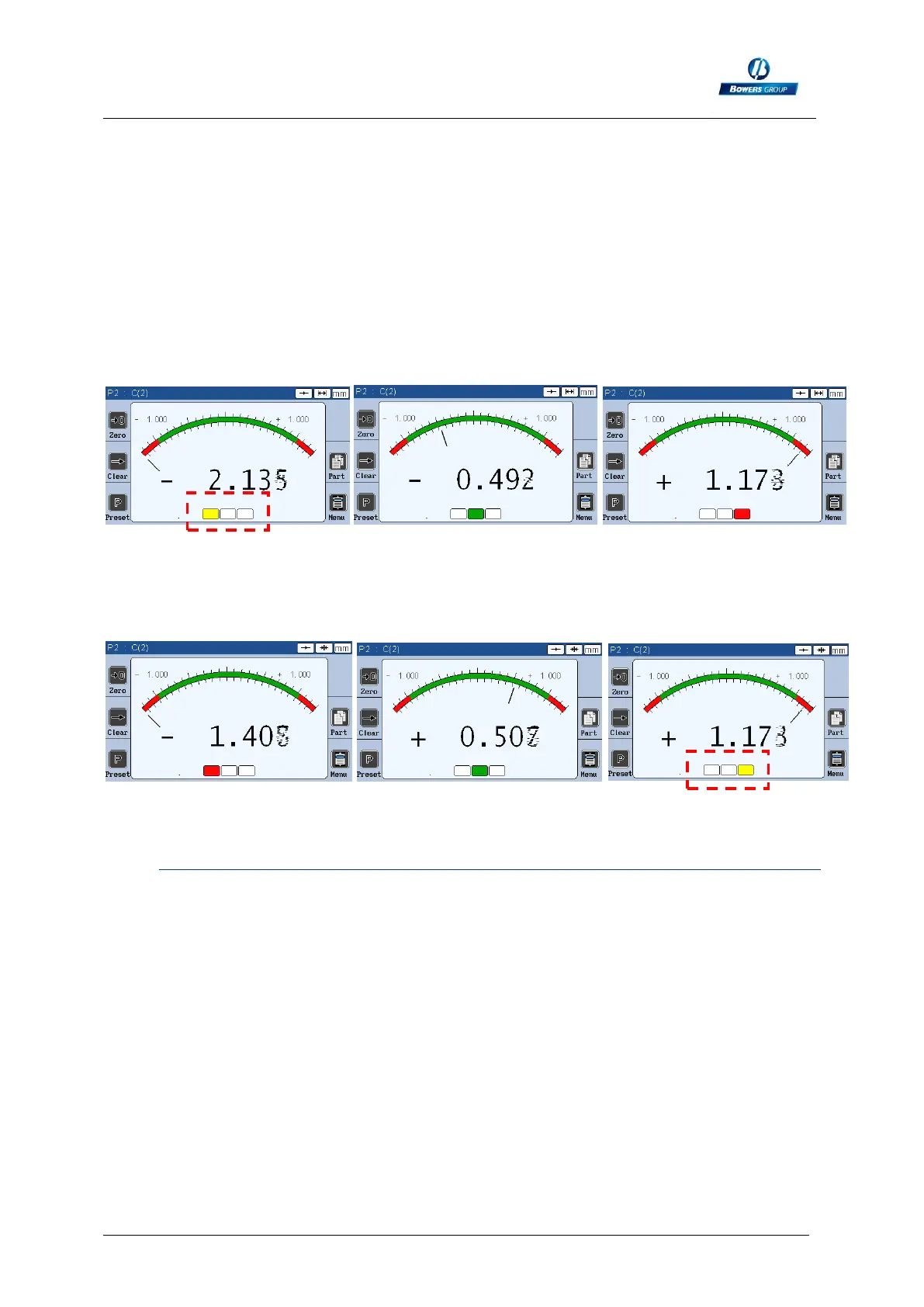
Direction: Internal diameter
The direction of measurement is used to measure internal or external diameters. The
difference between these two modes is that according to the part, the part might still
be rework. For example, the size of a bore in a part: if the bore is too big, there is no
way to rework the part, so the indicator is RED. However, if the bore is too small, it
can still be increased, and then the part could fit in the tolerance interval, so the
indicator is YELLOW. In this case, the internal diameter is used, as on the pictures
bellow.
On the measuring screen, a yellow indicator shows when the part is too small (so
possible to rework), and a red indicator if the part is too big (rejected)
REWORK PASS REJECT
Direction: External diameter
The opposite phenomena happens for the external diameter.
REJECT PASS REWORK
6.1.2. Part 2
This screen allows to input tolerances and the characteristics (nominal and master)
Just press on the corresponding edit box to input the needed values.
The tolerances are in relative from the nominal.
Example : diameter 8mm +/-20µm
upper tol : 0.020
nominal : 8
lower tol :-0.020
master : real value according to the calibration certificate.



 To Next Page