BBP
®
85 Label Printer
User’s Manual
8-5
Printer Maintenance
Cleaning the Printer
Cleaning the Sensors
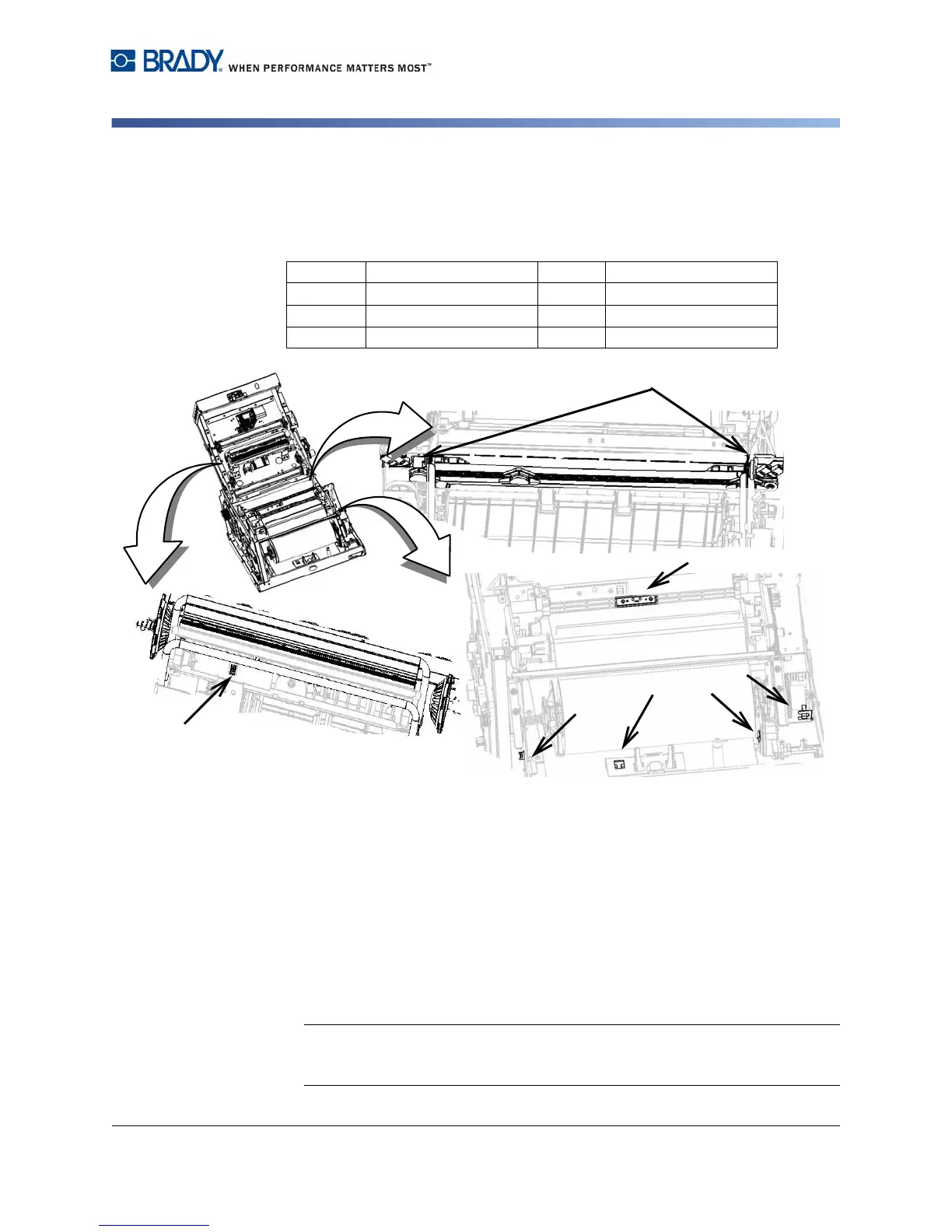
The sensors located inside the printer may be covered with dust that results from
cutting the media. Sensor locations are shown in the figure.
Materials Required
• BBP31 Cleaning Kit (Cat # B31-CCT)
• Isopropyl Alcohol (99% recommended)
To clean the sensors:
1. If necessary, remove power and media from the printer (see “Removing
Power and Media from Printer” on page 8-1).
2. With a pre-moistened foam swab, gently wipe the surface of the media
sensors at the locations shown in the figure. Do not allow the alcohol to drip
from the swab.
Note: Clean the color sensor every 12,000 inches (30,480 cm) with a cotton
swab to prevent color detection errors. To view the cumulative inches printed,
select Menu>More Tools>Diagnostics>Info.
1
Cutter Home
5
Door Open
2
Die Cut & leading Edge
6
Tape Wiper
3
Smart Cell
7
Color Calibration
4
Eject Home
8
Printhead



 To Next Page