BBP
®
85 Label Printer
User’s Manual
1-5
About Menus, Dialog Boxes and Screens
Home Page
About Menus, Dialog Boxes and Screens
The following information describes the menus, dialog boxes and screens used in
the BBP
®
85 Label Printer system.
Home Page
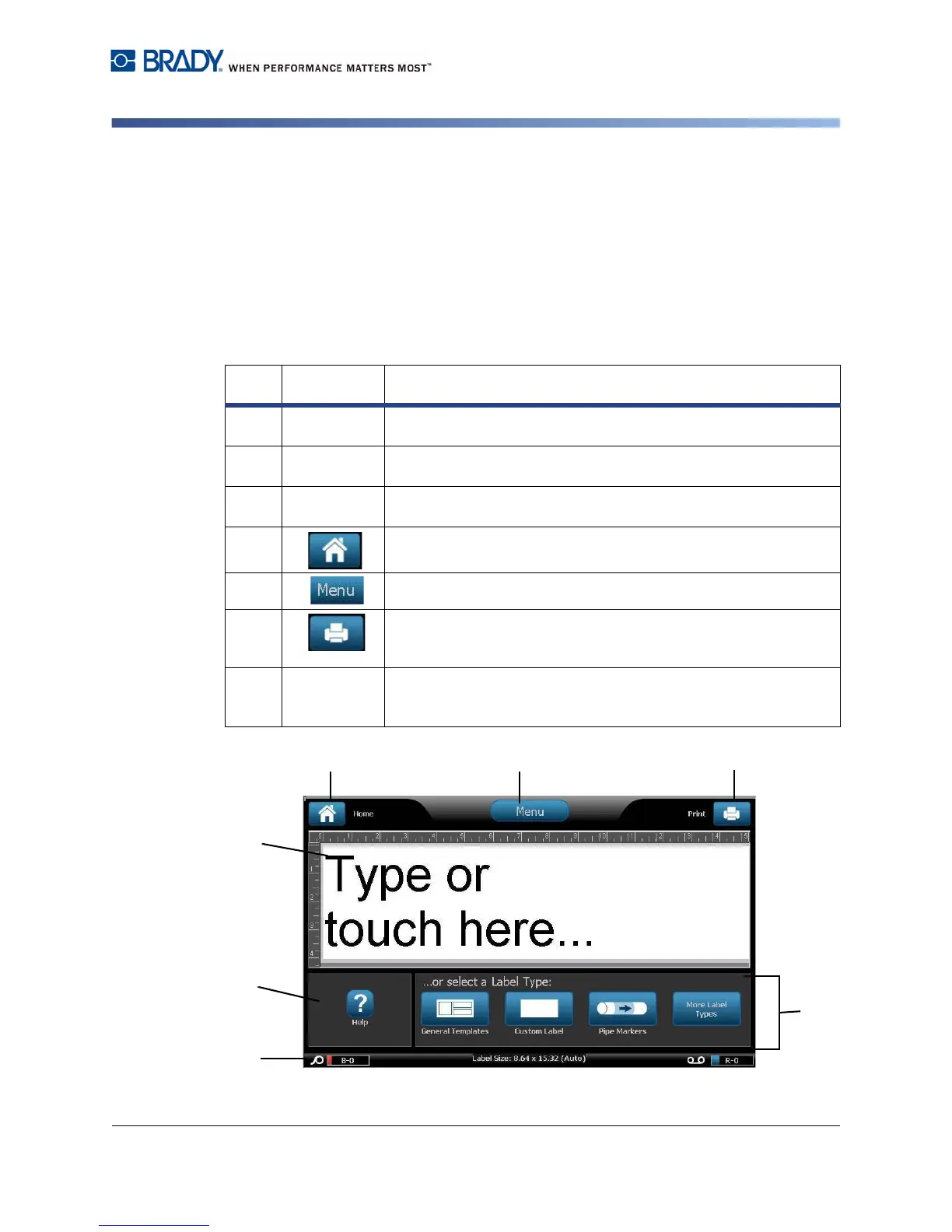
The Home page automatically displays when you first start the printer. The main
sections of the Home page are:
Item
#
Icon Description
1
Status Bar
Shows the current label size and indicators for the amount of
media and ribbon remaining.
2
Tools Panel
Depending on the option selected, provides buttons for Object
Sizing, Delete, Undo, Zoom In/Out, Color Selector and Help.
3
Editor
Text or object entry area. Type, touch or select objects to display
and edit in this area. Shows color of installed media and ribbon.
4
Home: Returns you to the Home page from anywhere in the
application. Button is greyed out on the Home page.
5
Menu: Displays File, Label and System options.
6
Print: Displays the Print dialog box where you can choose
options for printing the current label. Not available unless an
object is in the Editor.
7
Control
Panel
Primary area for selecting all of your options for creating, editing
and working with labels and objects. The panel changes
depending on what option is selected.



 To Next Page