ENGLISH 32 / 78 CAP. 7 - CALIBRATION
7.4 GAS WEIGHT CALIBRATION (SERVICE KIT)
From the SERVICE menu, password “BRN”, select the GAS WEIGHT CALIBRATION menu by
means of the keys and press .
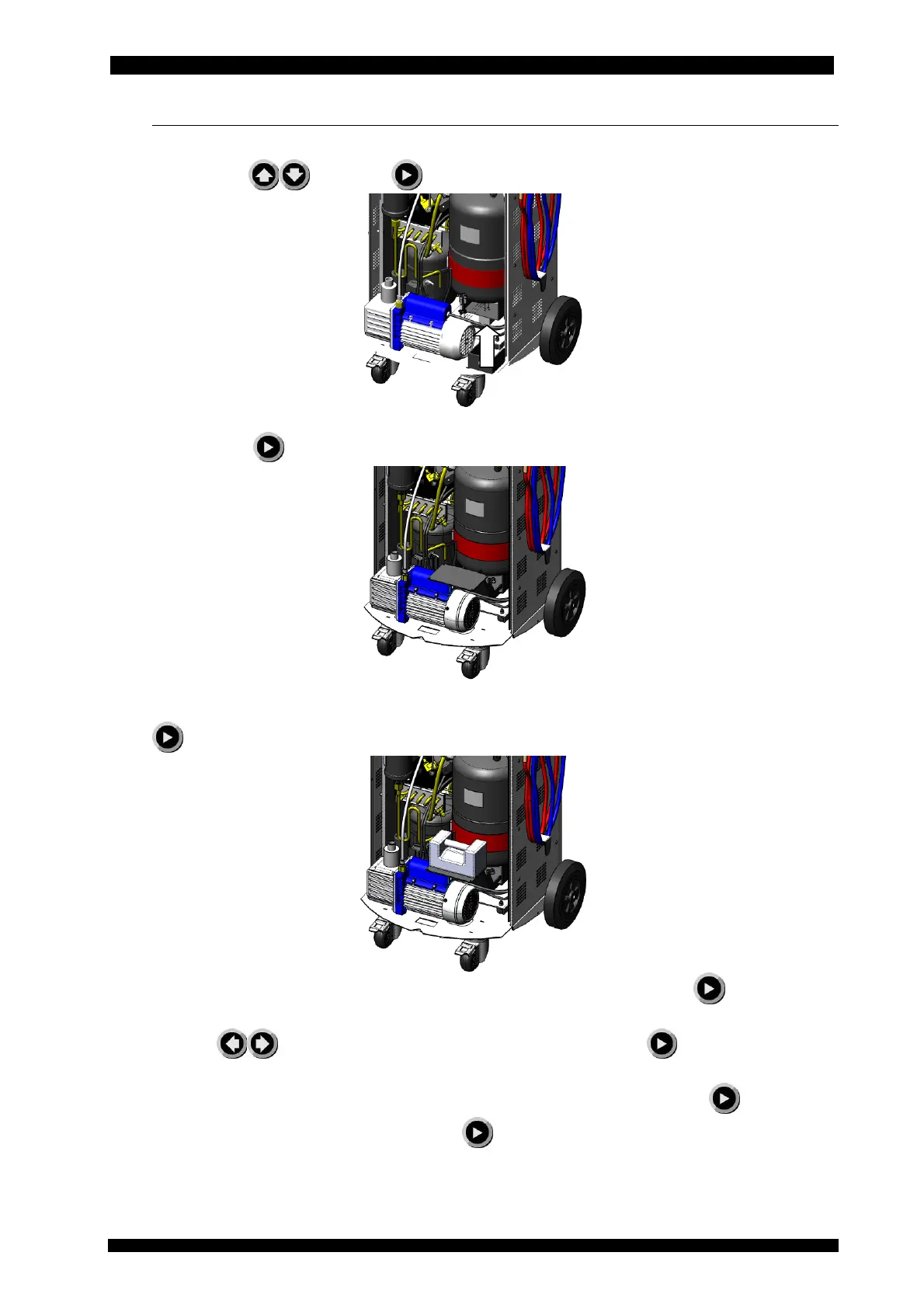
Unscrew the tank, lift it and insert below it the spacer bracket in order to keep it detached from
the load cell. Press to acquire the loadless cell signal.
Remove the spacer bracket and re-screw the tank to the load cell, insert the weight holder clamp
without the sample weight.
Press
to acquire the signal of the cell with tank and bracket.
Rest a sample weight of at least 10 kg on the weight holder bracket and press : you will be
asked to enter the value of the weight that has just been put onto the bracket
Press the keys
to set the value of the sample weight and press to acquire the signal
of the cell with tank, bracket and sample weight.
Subsequently remove the sample weight and the weight holder clamp and press
.
When required by the guided procedure, press
to confirm the calibration.
Note: verify that the sample weight support bracket (item no. 4) doesn’t touch any component; in
case of contact, use a reference weight of 5 kg.



 To Next Page