Gauges, Indicators, and Displays
Controls and Instruments 9
Gauges, Indicators, and Displays
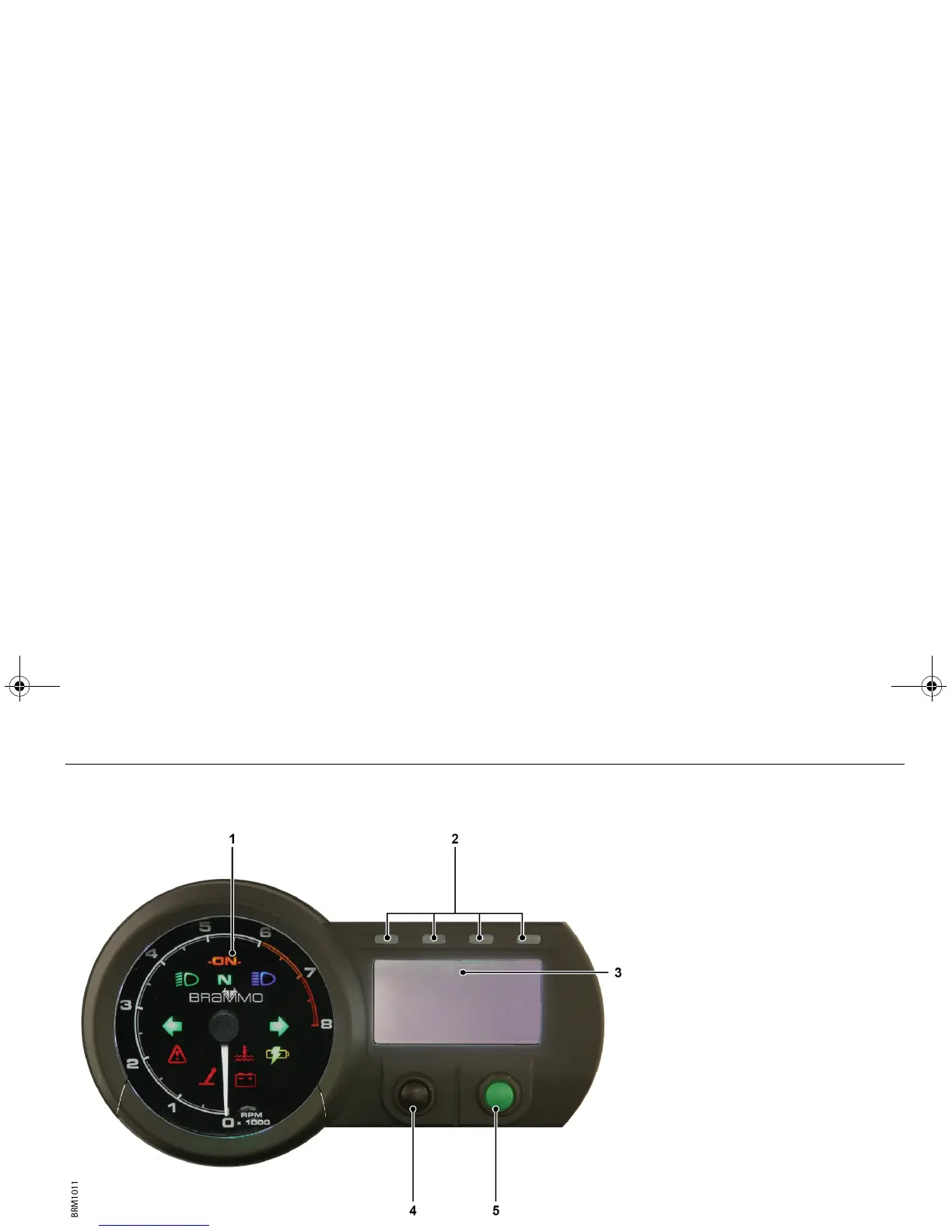
INSTRUMENT CLUSTER
1. Tachometer
The tachometer needle will swing to
maximum RPM and then zero when
the Empulse powers up.
Note: If the tachometer needle does not
zero, contact your Brammo Authorized
Dealer as soon as possible.
2. Drive-enabled/gear shift indicators
• Sequentially flash green when the
drive system is enabled and the
Empulse is stationary.
• Progressively illuminate if the motor
speed exceeds 6500 RPM to indicate
that a gear shift is recommended.
3. Liquid Crystal Display (LCD)
4. Mode button
Press to cycle between:
• Power consumption in kilowatts
• Air temperature
• Motor temperature
• Estimated range remaining
5. Odometer/Trip button
Press to cycle between the odometer
and trip displays. Press and hold to
reset the trip counter.
Empulse.book Page 9 Thursday, June 27, 2013 11:03 AM


 To Next Page