Body Panels
50 Servicing and Maintaining Your Empulse
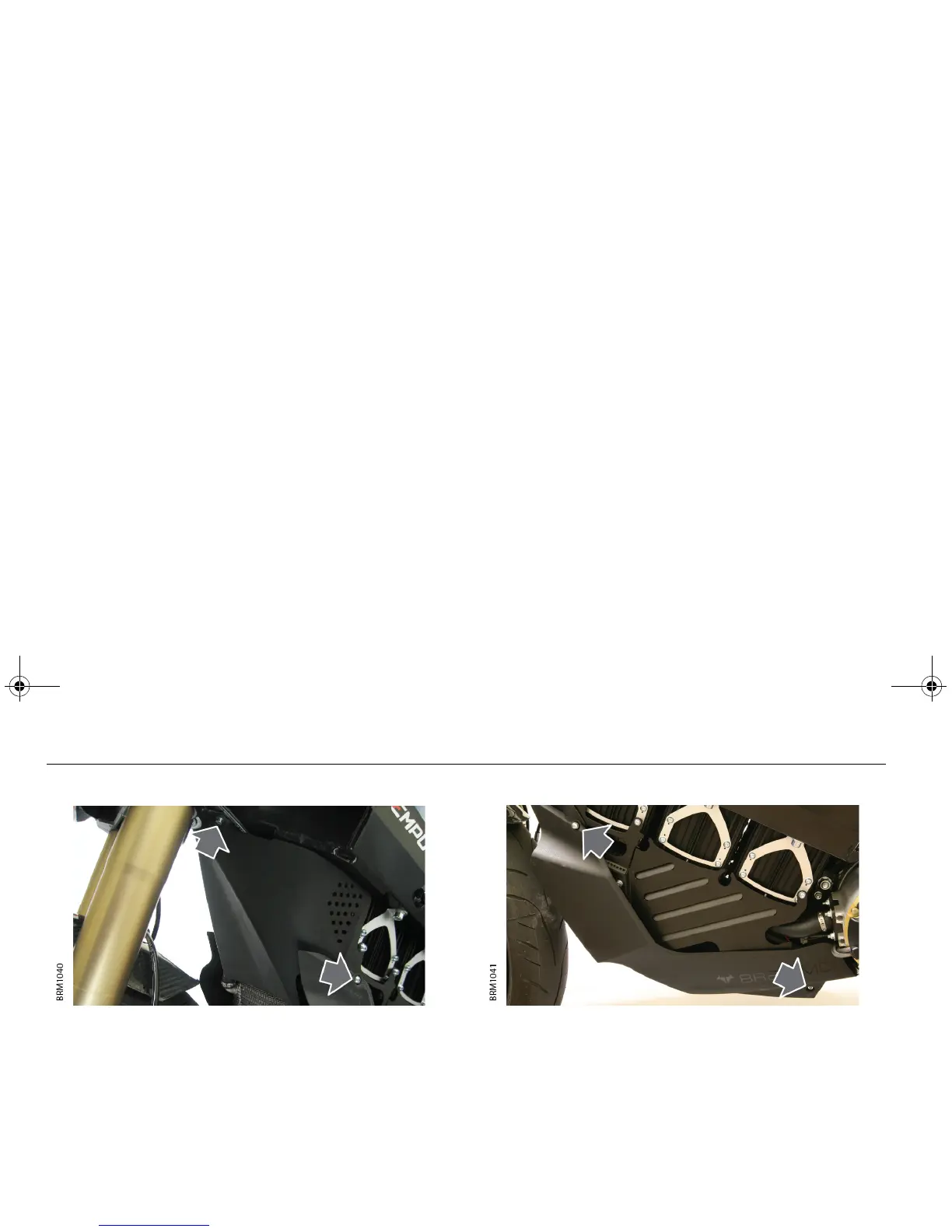
FRONT COVER
1. Remove the two upper bolts securing the front cover to the
frame.
2. Remove the two lower bolts securing the front cover to the
radiator mounting bracket.
3. Carefully release the front cover from the body panel and
remove.
Installation
1. Position the front cover and make sure it is correctly located
inside the body panel.
Note: When positioning the panel, make sure that no harnesses or
cables will be trapped between the panel and the frame.
2. Loosely install the retaining bolts to correctly align the panel to
the frame and body panel.
3. Tighten the four bolts to 1 Nm.
BODY PANEL
1. Remove the two upper bolts securing the body panel to the
radiator mounting bracket.
2. Remove the two lower bolts securing the body panel to the
motor controller mounting bracket.
3. Carefully remove the body panel.
Installation
1. Position the body panel and loosely install the retaining bolts to
correctly align the panel to the mounting brackets.
2. Tighten the four bolts to 1 Nm.
Empulse.book Page 50 Thursday, June 27, 2013 11:03 AM


 To Next Page