Gauges, Indicators, and Displays
Controls and Instruments 11
LIQUID CRYSTAL DISPLAY (LCD)
When the Empulse powers up, the LCD will temporarily show all
black so you can make sure it is functioning properly. The LCD
backlight is always illuminated when the Empulse is powered up.
Note: If any part of the display does not come on, or the backlight is not
illuminated, contact your Brammo Authorized Dealer as soon as
possible.
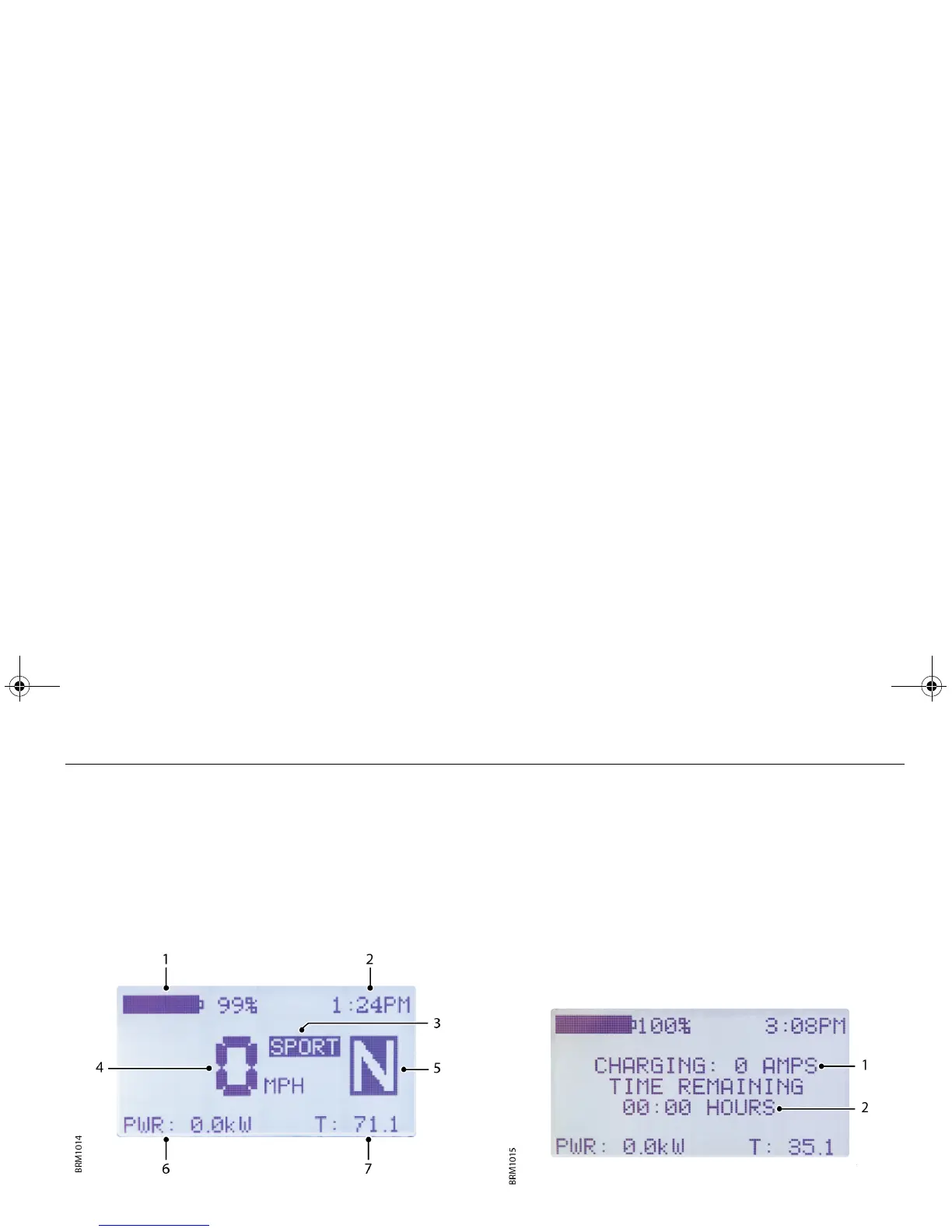
Drive mode
1. Battery State of Charge (SoC)
2. Current time
3. SPORT operating mode selected
4. Speed (mph or km/h)
5. Gear selected
6. Information - press the mode button to cycle through the
following functions.
• Power consumption in kilowatts
• Air temperature
• Motor temperature
• Estimated range remaining
7. Odometer/Trip display
Charge mode
1. Charging rate for the connected supply
2. Estimated time remaining to fully charge the Empulse
Empulse.book Page 11 Thursday, June 27, 2013 11:03 AM


 To Next Page