English
5 Functions and controls
HandyStep® touch, HandyStep® touch S 997486
Operating manual
71
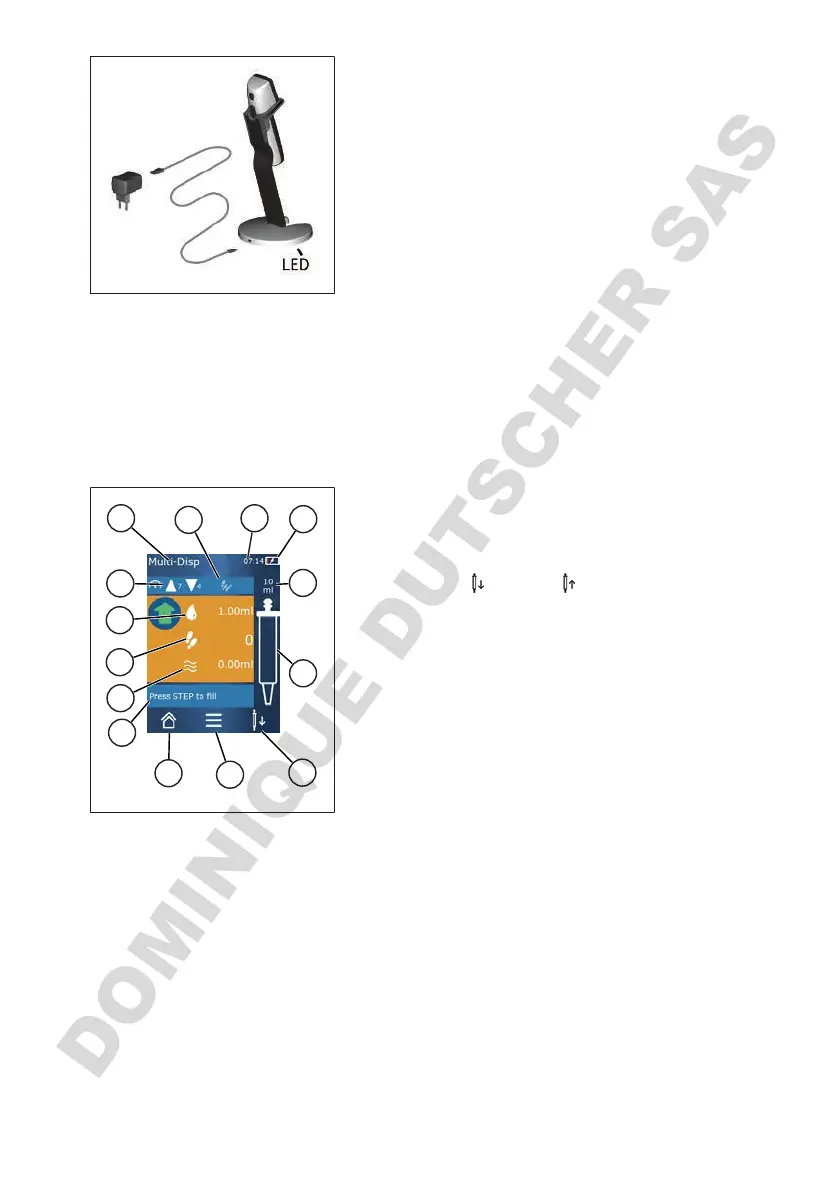
Using the charging stand
The charging stand requires the power adapter and the USB
cable of the HandyStep
®
touch or the HandyStep
®
touch S.
Charging stand indicators
• Charging stand light is blue: the battery is charging.
• Charging stand light is off: the battery is charged or
there is no device in the charging stand.
• Charging stand lights up intermittently: the battery can-
not charge. Place the device in the charging station
again.
5.8 Holding stand (accessory)
The holding stand is used to safely store the device. The holding stand does not function as a charger.
5.9 Layout of the touchscreen display (work area)
1
2
3
4
5
6
7
8
9
10
11
12
13
14
1 Time
2 Charging status
3 Nominal volume of the inserted tip
4 Fill level of the tip
5
Eject (
) or insert ( ) tip.
6 Open options
7 Open main menu (Home)
8 Information field
9 Available volume
10 Available STEPs in relation to the available volume
11 STEP volume
12 Aspiration and dispensing speed
13 Mode name
14 Area for specific functions.



 To Next Page