8 Settings
80
Operating manual HandyStep® touch, HandyStep® touch S 997486
Month MM (01 ... 12) M (1 ... 12)
Year YYYY (2019 ... 2050) YY (19 ... 50)
8.4 Display
Brightness Adjust the brightness level via the slide switch.
Display time out Set the amount of time before the display first dims and
then turns off.
Auto power off Set whether the device switches off by itself after 60 min-
utes in standby mode.
8.5 Sound
NOTICE
Event sound
When an event occurs, the device makes a sound. This event sound cannot be switched off.
Notification sound Enable sound alerts for program events.
STEP button sound Enable sounds when the STEP button is pressed.
8.6 Info/about
Version Firmware version
Date The date the firmware was generated.
Bootloader Software tool
8.7 Regulatory notes
Information about approvals can be found via this menu item.
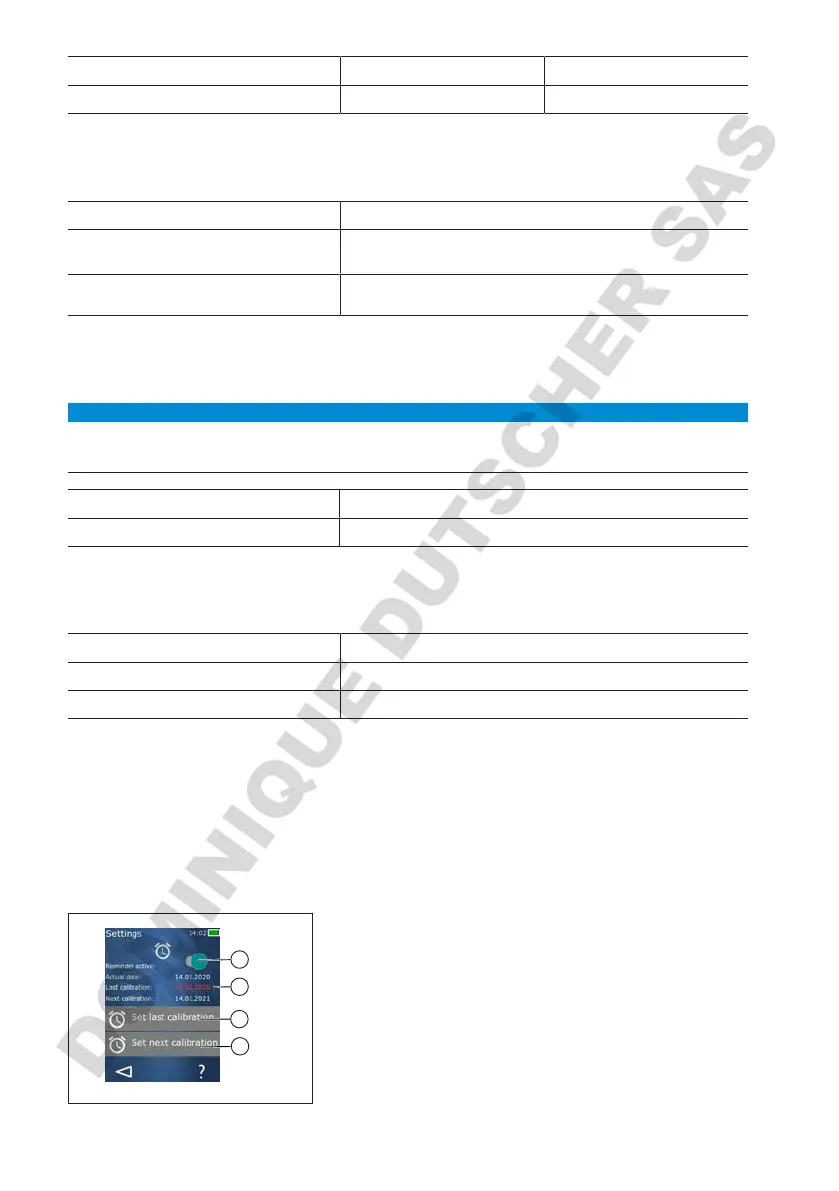
8.8 Calibration
1
2
3
4
1 Activate reminder
2 Illogical entries are shown in red. In this case, the last
test date lies in the future.
3 Set the last date on which the device was tested.
4 Set the next date on which the device is to be tested.
Prerequisite:



 To Next Page