13 Multi-Aspiration (MULTI-ASP)
90
Operating manual HandyStep® touch, HandyStep® touch S 997486
12.5 Interrupting and ending aliquoting
a. Tap on the or the button.
ð
The current aliquoting is ended.
12.6 Options
a. In the operating mode, tap on the symbol .
ð
The Options menu appears.
Option Meaning
‘Edit aliquots’ Edit an aliquot list.
‘Work Mode’ Shows the help text for the mode.
13 Multi-Aspiration (MULTI-ASP)
For information on the function of this mode, see Overview of modes,p.72. For information on setting
the volume, speed, and other steps found in all modes, see Operation,p.73.
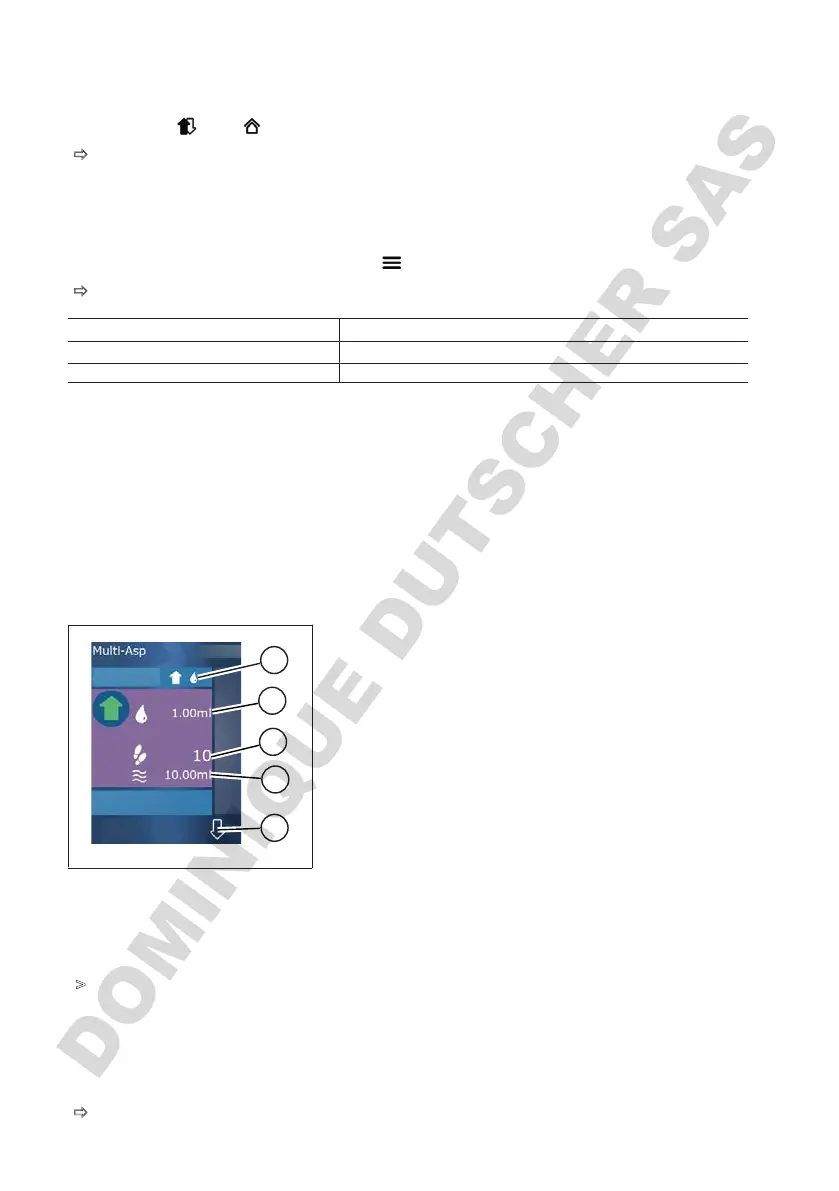
13.1 Multi-Aspiration in detail
5
1
2
3
4
1 Switch to filling mode. The selected filling mode is
displayed here.
2 Set volume
3 Possible STEPs
4 Aspirated volume
5 Switch between dispensing and aspirating liquid.
You can also switch to dispensing if the nominal vol-
ume has not been reached. In addition, you can also
continue filling the tip after an interruption.
13.2 Preparing liquid aspiration
Prerequisite:
>
Tip is empty and outside the liquid.
a. Press the STEP button.
b. The piston of the tip moves to the start position.
c. Select filling mode.
d. Press and hold the STEP button.
ð
Liquid is aspirated.



 To Next Page