14 Titration
92
Operating manual HandyStep® touch, HandyStep® touch S 997486
13.5 Creating and editing an aliquot list for liquid aspiration
a. Select ‘Sequential’ filling mode.
b. Select Options > ‘Edit aliquots’ or tap on #1 ... #10.
c. Create and edit the aliquot list as described in the ‘Sequential Dispensing’ operating mode in the
section Editing an aliquot list,p.89.
13.6 Switching the operating mode
a. Tap on the button.
b. If the tip is filled, a message appears asking if you would like to switch modes with the filled tip.
c. If only a residual amount is still present, a message then appears asking if you would like to dis-
card the liquid. Once you confirm the message, the liquid is dispensed.
13.7 Options
a. In the operating mode, tap on the symbol .
ð
The Options menu appears.
Option Meaning
Edit aliquot list Edit an aliquot list.
Select filling mode Select a filling mode.
Operating Mode Help Shows the help text for the mode.
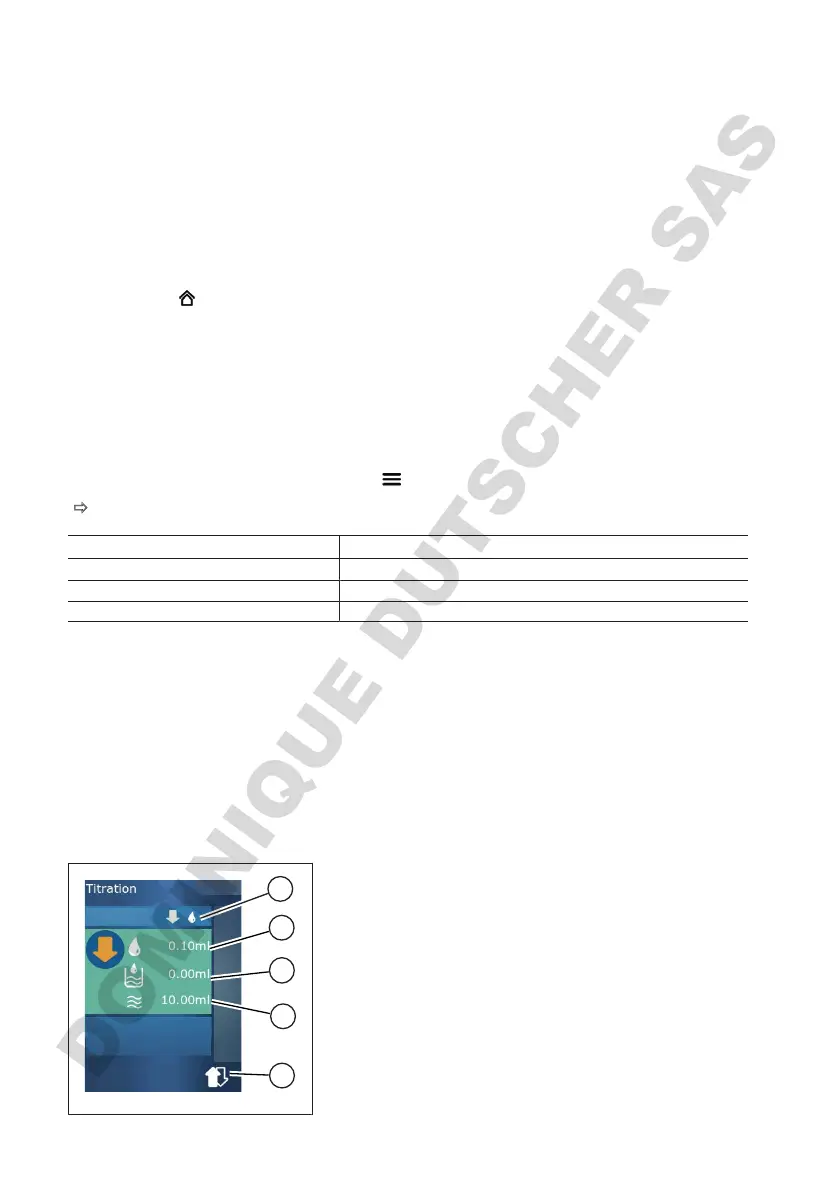
14 Titration
For information on the function of this mode, see Overview of modes,p.72. For information on setting
the volume, speed, and other steps found in all modes, see Operation,p.73.
14.1 Titration in detail
1
2
3
4
5
1 Switch between ‘Manual‘ and ‘STEP Volume’ titration
mode.
2 Set the STEP volume. This is possible in “STEP volume”
titration mode.
3 Volume already titrated.
4 Amount remaining in the tip.
5 Discard remaining amount or aspirate liquid.



 To Next Page