FT800 Series Programmer Guide
Version 2.1
Document Reference No.: BRT_000030 Clearance No.: BRT#037
197
Product Page
Document Feedback Copyright © Bridgetek Limited
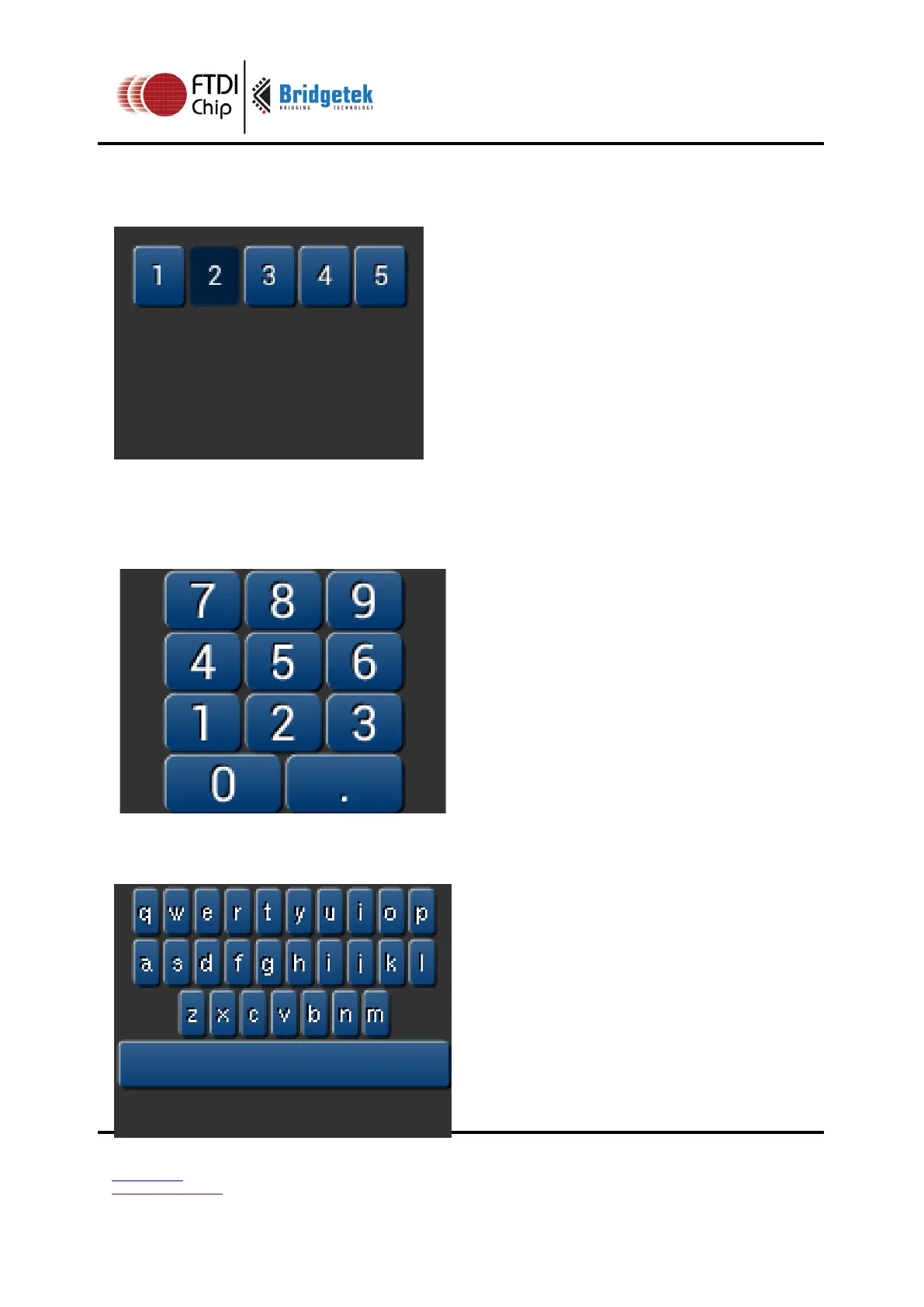
Setting the options to show '2' key pressed ('2' is ASCII code 0x32):
cmd_keys(10, 10, 140, 30, 26, 0x32,
"12345");
A calculator-style keyboard using font 29:
cmd_keys(22, 1, 116, 28, 29, 0, "789");
cmd_keys(22, 31, 116, 28, 29, 0, "456");
cmd_keys(22, 61, 116, 28, 29, 0, "123");
cmd_keys(22, 91, 116, 28, 29, 0, "0.");
A compact keyboard drawn in font 20:
cmd_keys(2, 2, 156, 21, 20,
OPT_CENTER, "qwertyuiop");
cmd_keys(2, 26, 156, 21, 20,
OPT_CENTER, "asdfghijkl");
cmd_keys(2, 50, 156, 21, 20,
OPT_CENTER, "zxcvbnm");
cmd_button(2, 74, 156, 21, 20, 0, "");



 To Next Page