Monitor
This section will review the most important pages of the Monitor tool use to
troubleshooting problems with the radio.
Ports
Selecting from the navigation pane Switch>Monitor>Ports will open the
following screen:
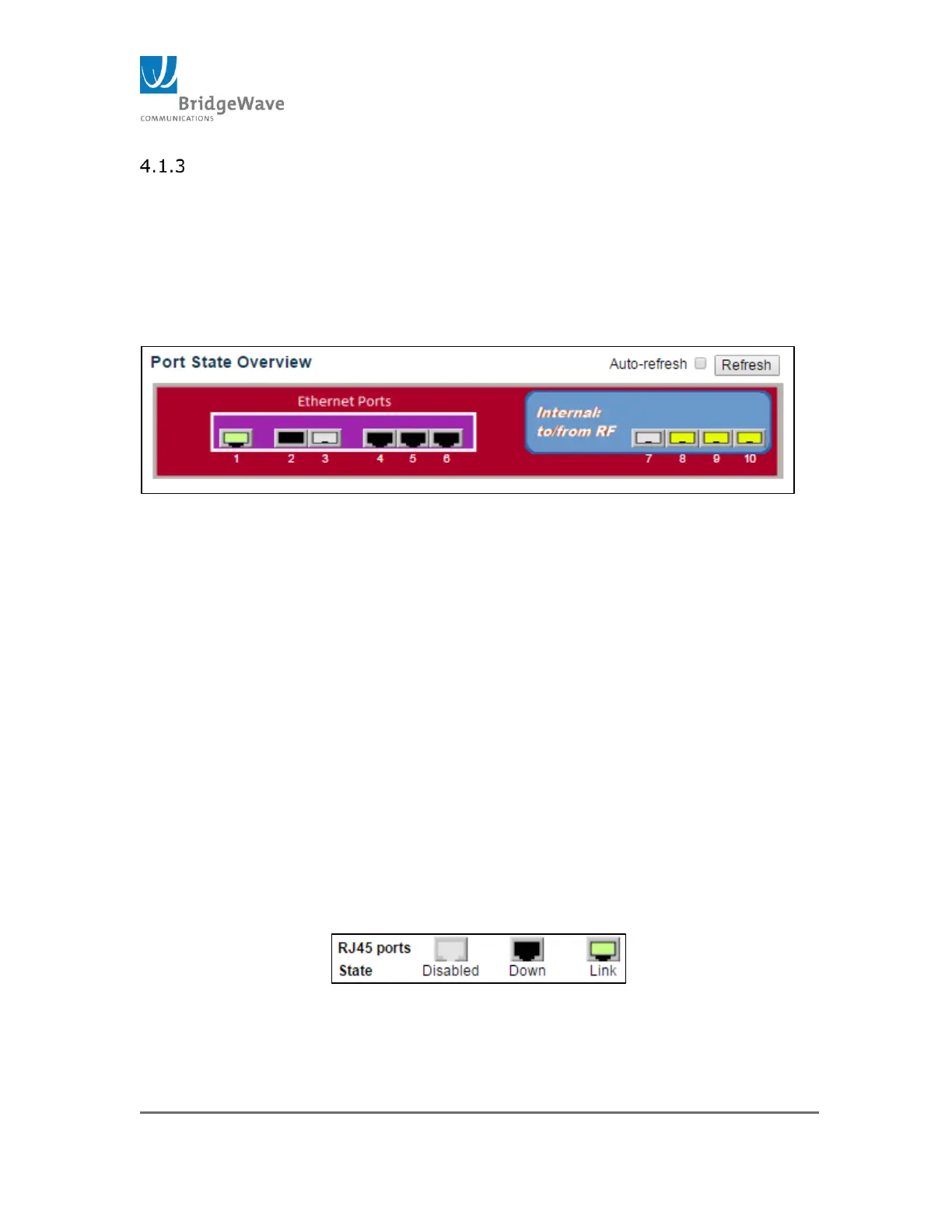
Figure 47: Port State Overview
The Port State Overview identifies which ports are active, down, or not
connected. The radio has 10 ports, 6 LAN ports and 4 Wireless ports.
LAN Ports: Ports 1 – 6
1. Ports 1, 4 – 6 are 10/100/1000Mbps ports
2. Ports 2 & 3 are SFP cages.
These ports can be used with Fiber (MM or SM), Cupper, and/or
CPRI SFP modules.
Wireless Ports: 7 – 10
1. Each port is 1000Mbps/1Gbps ports capable
2. Each port receives a fraction of the total available wireless
bandwidth. Examples:
1. 2Gbps wireless link, Port 7, 8, 9 & 10 are on
Each port gets 500Mbps. 2000Mbps /4 ports.
2. 3Gbps wireless link, Port 7 & 8 are on
Each port only gets 1000Mbps. That is because each
port is 1000Mbps port only.
Port States: The port states are illustrated as follows:
Figure 52: Port State status
Auto-refresh: The Auto-refresh checkbox, when selected, it will
automatically refresh the state every 3 second.



 To Next Page