Port Selection: This pull down menu allows the selection of any of the
other 10 ports.
Auto-refresh check box: Selecting this box, will refresh the page every
3 seconds.
Refresh button: Refresh the page manually/immediately
Clear button: Clears all counters for the selected port.
Traffic Overview
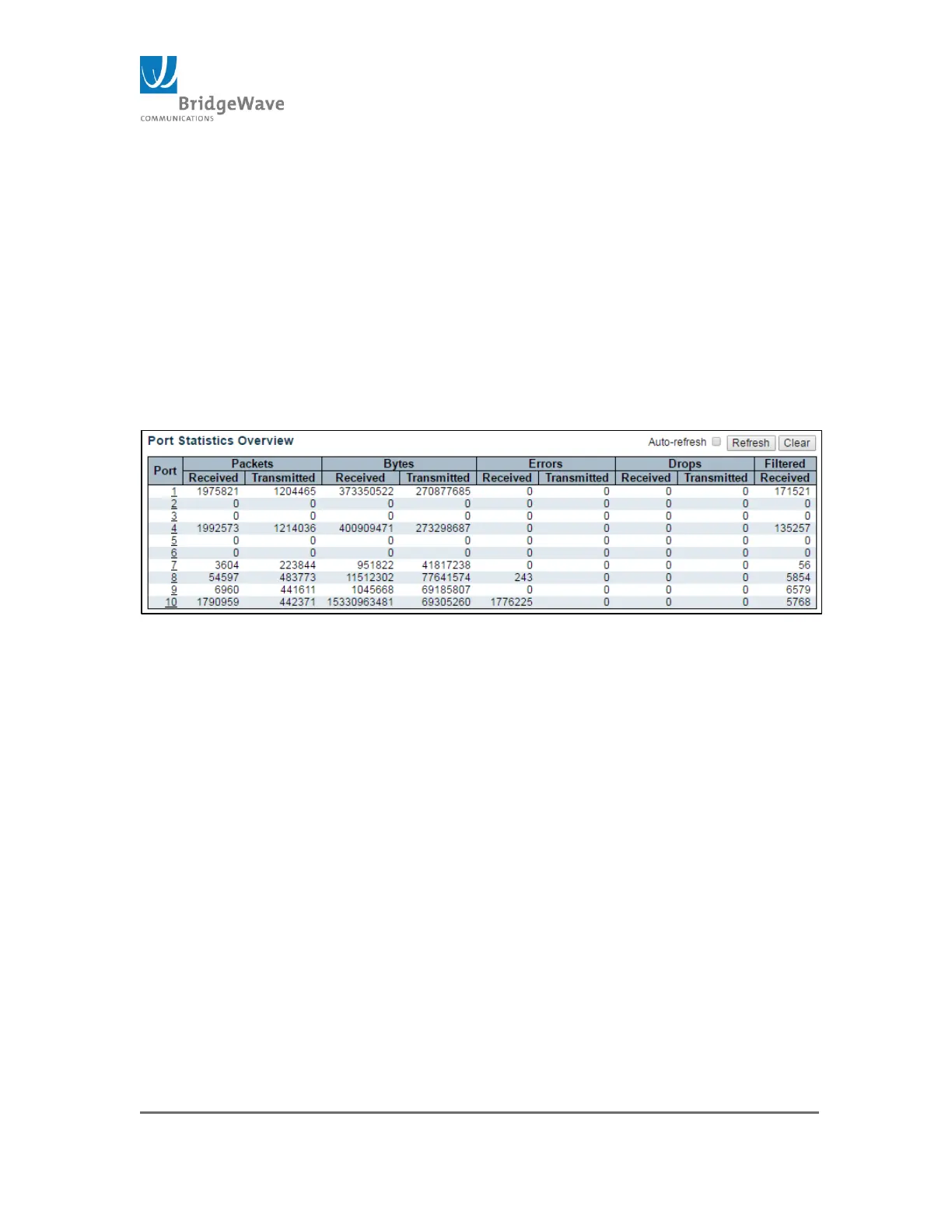
Selecting from the navigation pane Switch>Monitor>Traffic Overview will
open the following screen:
Figure 50: Example Port Statistics Overview
This page provides a quick analysis of all the ports. The page is divided into 6
columns and is describe as follow:
Port: The logical port for the settings contained in the same row.
Packets: The number of received and transmitted packets per port
Bytes: The number of received and transmitted bytes per port
Errors: The number of frames received in error and the number of
incomplete transmission per port
Drops: The number of frames discarded due to ingress or egress
congestion
Filtered: The number of received frames filtered by the forwarding
process.
Auto-refresh check box: Selecting this box, will refresh the page
every 3 seconds.
Refresh button: Refresh the page manually/immediately
Clear button: Clears all counters for the selected port. (Refer to
previous section for an image of this page.)



 To Next Page