Confidential
2-54
■ Error Code AF00
CIS positioning abnormal (Home position cannot be found)
■ Error Code BF00
Document scanning position sensor detects that the document’s length does not fit
duplex scanning.
< User Check >
- Check whether the document scanned is longer than the specified limit.
- Remove the jammed document.
■ Error Code D100
Modem PCB initialization failed.
Error Code D200
SDAA communication failure
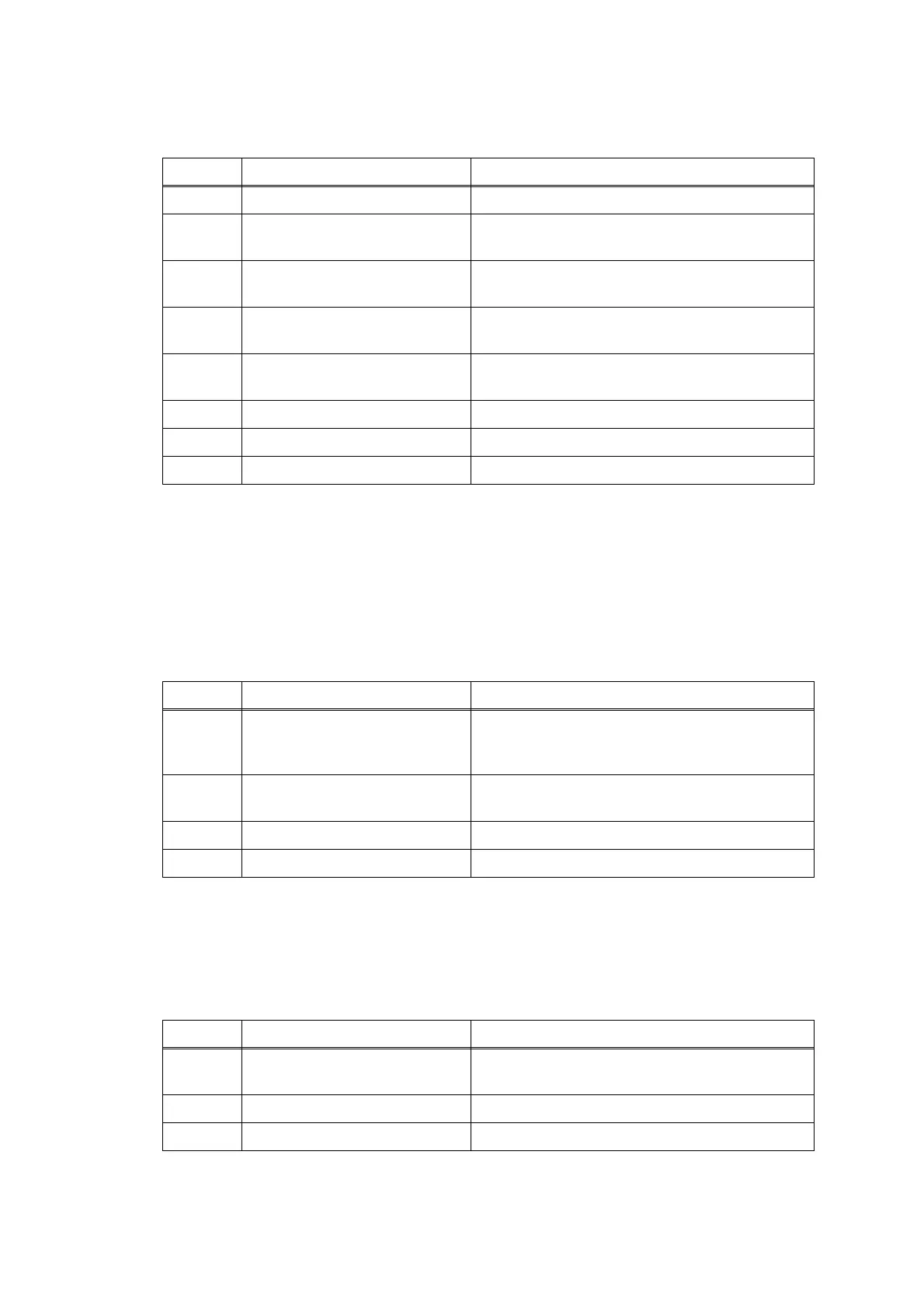
Step Cause Solution
1 Scanner belt out of place Set the scanner belt into place.
2 Scanner motor harness
connection failure
Reconnect the scanner motor harness.
3 First side CIS flat cable
connection failure
Reconnect the first side CIS flat cable.
4 Black reference film stained Clean document cover glass at black reference
film.
5 First side CIS flat cable
defective
Replace the first side CIS flat cable.
6 First side CIS unit defective Replace the first side CIS unit.
7 Scanner motor defective Replace the document scanner unit.
8 Main PCB defective Replace the main PCB.
Step Cause Solution
1 Document scanning position
actuator caught on the
surrounding parts
Set the document scanning position actuator
into place.
2 Document scanning position
sensor defective
Replace the document scanning position
sensor PCB.
3 Document feed roller worn out Replace the ADF unit.
4 Main PCB defective Replace the main PCB.
Step Cause Solution
1 Modem PCB harness
connection failure
Reconnect the modem PCB harness.
2 Modem PCB defective Replace the modem PCB.
3 Main PCB defective Replace the main PCB.



 To Next Page
 Loading...