Device Configuration and Numbering
SMART MATRIX FEEDER 2-10
Device Configuration and Numbering
This function allows you to univocally identify each ULTRAFEEDER/ROLLING FEEDER/UNIFEEDER device
connected.
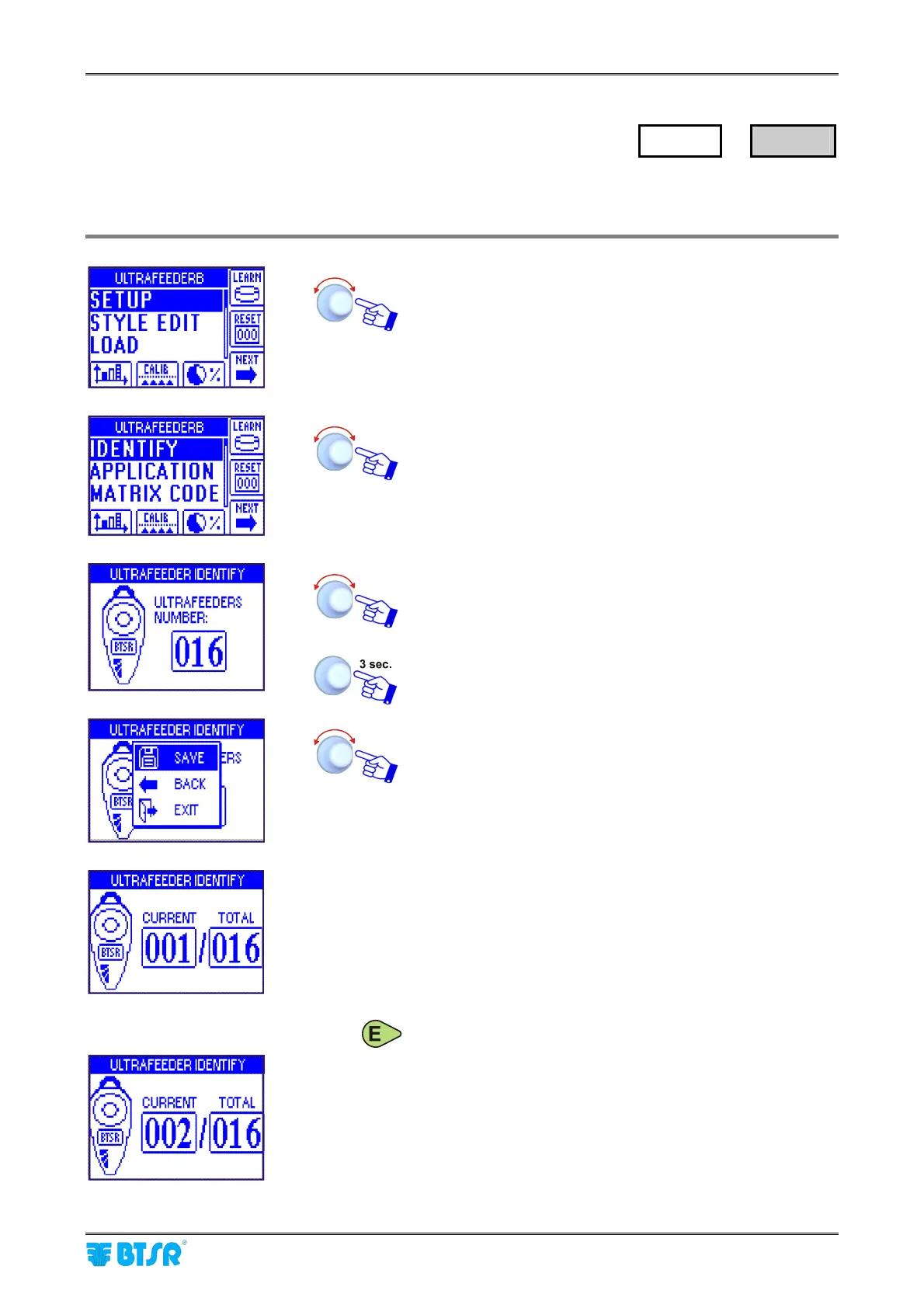
Enter the SETUP menu.
Select IDENTIFY.
Set the number of connected ULTRAFEEDER/ROLLING
FEEDER/UNIFEEDER devices [1..240] (e.g. 16 devices).
To continue.
SAVE to save the setting.
• The example shown here indicates that the numbering
(identification) procedure of the 16 devices is going to
start.
• The LEDs of Control, Enter and Reset buttons toggle
(red and green). In addition, the display of all
ULTRAFEEDER/ROLLING FEEDER/UNIFEEDER
devices shows the IDENTIFY FEEDER message.
• Press Enter on the device you want to assign the
number indicated on the CURRENT field of SMART
MATRIX FEEDER terminal. Check that:
a) the LEDs of Control, Enter and Reset buttons
remain steady green.
b) the display of numbered device shows the
assigned number.
c) the CURRENT field on SMART MATRIX FEEDER
terminal increases by 1.
SETUP
→
IDENTIFY



 To Next Page