Efficiency Data
SMART MATRIX FEEDER 2-48
Efficiency Data
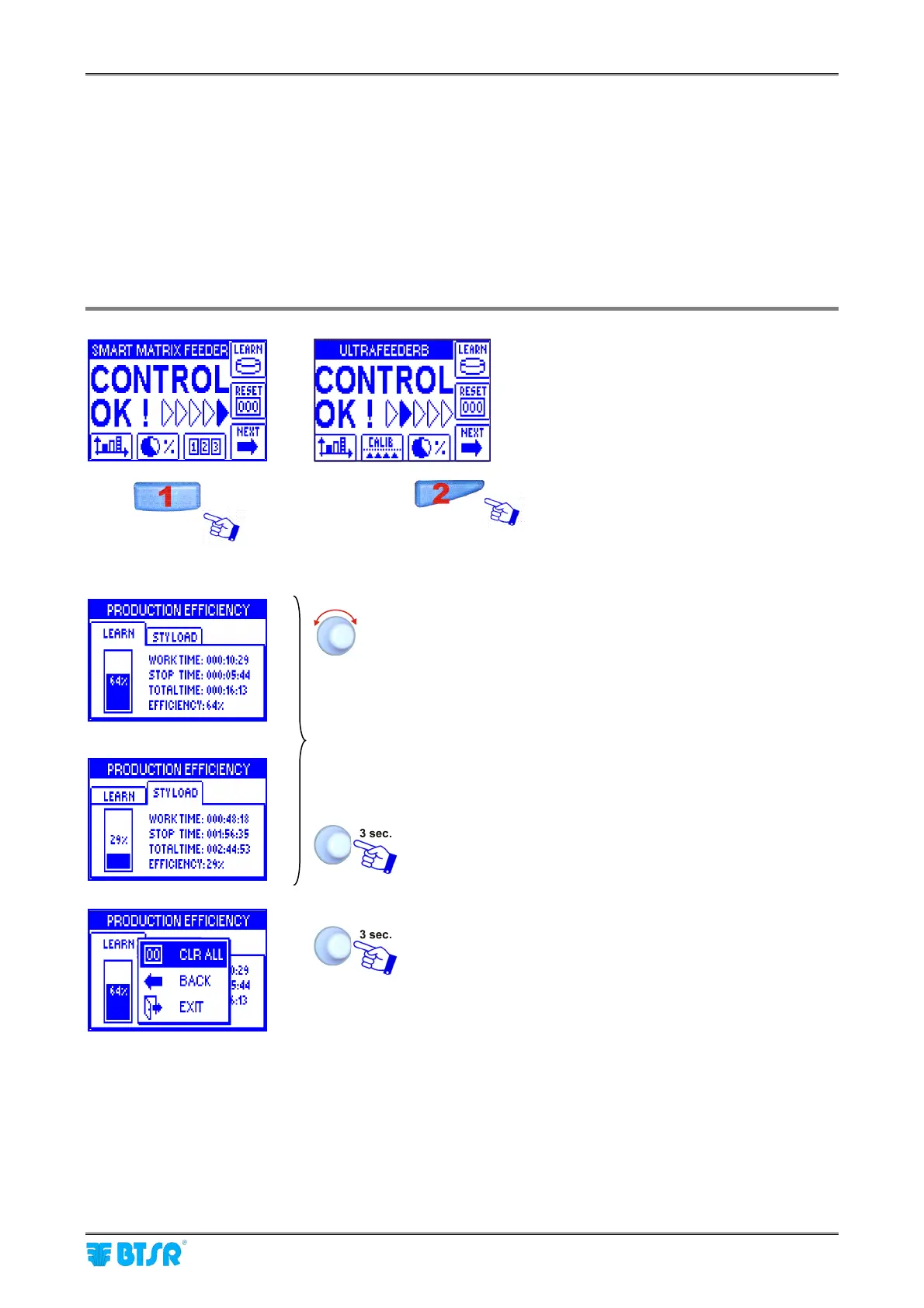
This function allows you to display the production efficiency values (work time, stop time, total time and
efficiency index %).
The efficiency index calculation depends on the setting carried out with the EFFICIENCY function within the
SETUP menu.
The button used to directly access the efficiency data changes depending on the option configured within the
CALIBRATION item of the SETUP menu.
By selecting the relevant window (LEARN, STYLOAD) you
will see the data that summarize:
• The work time
• The stop time
• The total time
• The efficiency rate:
• from the last LEARN operation
• from the last article loading operation (STYLOAD)
To leave the function.
CLR ALL to clear the timers of current window,
BACK to return to the efficiency visualization screen,
without clearing the timers,
EXIT to return to main menu without clearing the
timers.
1 if CALIBRATION OFF
2 if CALIBRATION ON



 To Next Page