Style Loading
SMART MATRIX FEEDER 2-39
Style Loading
The LOAD function varies depending on the option set on STYLE LOAD MODE (STYLE OPT menu): if on
STYLE LOAD MODE you have previously set the SINGLE option, then he LOAD function allows you to load
one of the database styles to the ULTRAFEEDER/ROLLING FEEDER/UNIFEEDER device.
If, on the contrary, the previously set option was MULTIPLE, then when activating the LOAD function, you
will be requested to fill-in the MULTIPLE STYLE SETUP sequence, in order to specify the name of styles
that shall be loaded according to the synchronization activated by he STC signal.
The LOAD function also allows you to remove from the devices the currently loaded style (UNLOAD
function), and to view the map of styles loaded to the ULTRAFEEDER/ROLLING FEEDER/UNIFEEDER
device (MAP function).
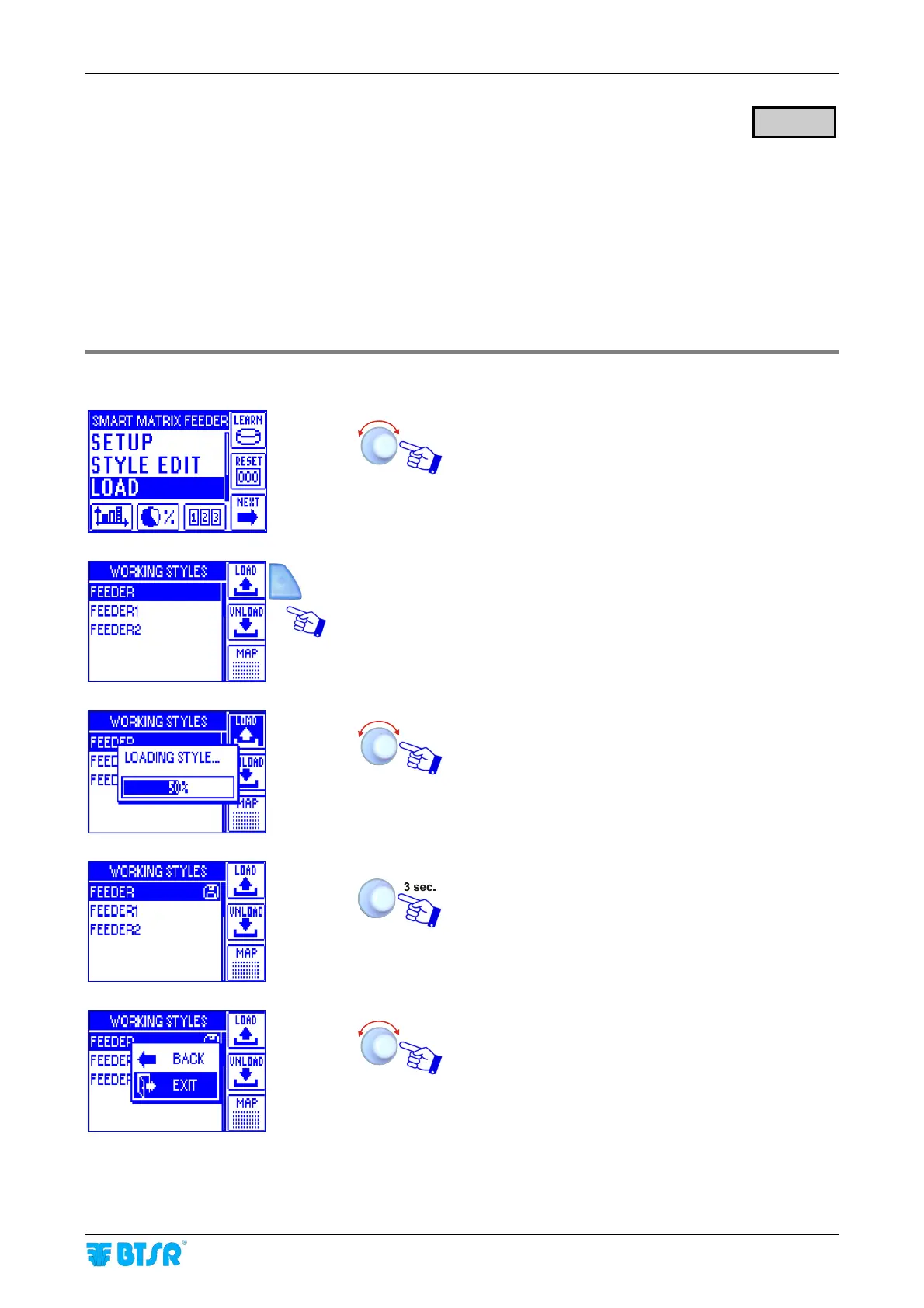
Style Load (Single)
Select the LOAD menu item
Once you have activated the LOAD function from
main menu, choose the style you want to load (e.g.
FEEDER) and press LOAD.
A temporary LOADING STYLE window will appear.
At the end of the loading operation the style list will
automatically re-appear.
To leave the function.
EXIT to return to CONTROL status.
LOAD



 To Next Page