Setting the Calibration Options
SMART MATRIX FEEDER 2-19
Setting the Calibration Options
This function allows you to either enable or disable the Calibration option and to establish the Calibration
execution mode, if enabled. For more details about the Calibration function, please refer to Section 3.
The Calibration stage with the parameters setup here will be activated pressing the short cut button
.
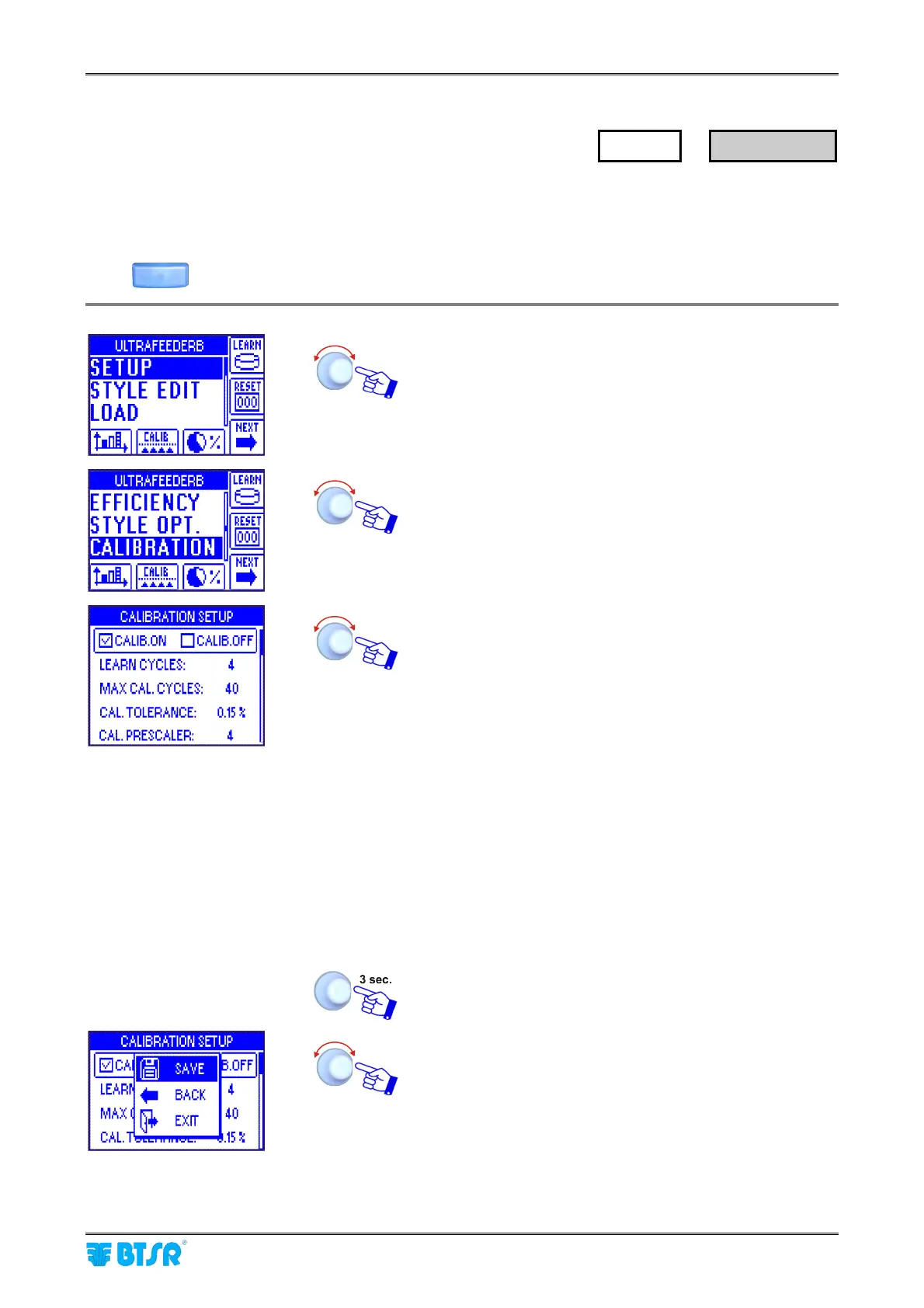
Enter the SETUP menu. The CALIB icon shows that the
Calibration option is enabled.
Select CALIBRATION.
Enable (ON) or disable (OFF) the Calibration function and
set the relevant parameters:
LEARN CYCLES: number of machine cycles used to
perform the calculation of the
average absorption values related
to the various yarn feeds
MAX CAL. CYCLES: number of cycles after which an
alarm will be generated when the
set tolerance cannot be achieved
CAL. TOLERANCE: Calibration tolerance (the higher is
set value, the more quickly the
Calibration process will be
completed)
CAL. PRESCALER: PRX signal divisor, used to correct
the tension value when the
tolerance reached is < 4% of the
value set in CAL.TOLERANCE.
To activate the saving function of the previously set
parameters.
SAVE to save the choice, BACK to return to the previous
screen without saving, EXIT to return to main menu.
SETUP
→
CALIBRATION



 To Next Page