SMART MATRIX FEEDER Operation
SMART MATRIX FEEDER 2-1
SMART MATRIX FEEDER Operation
All the Configuration, Parameter Setting, Data & Error Display operations, etc. can be managed by the
Operator in quick and intuitive way, using the SMART MATRIX FEEDER control terminal.
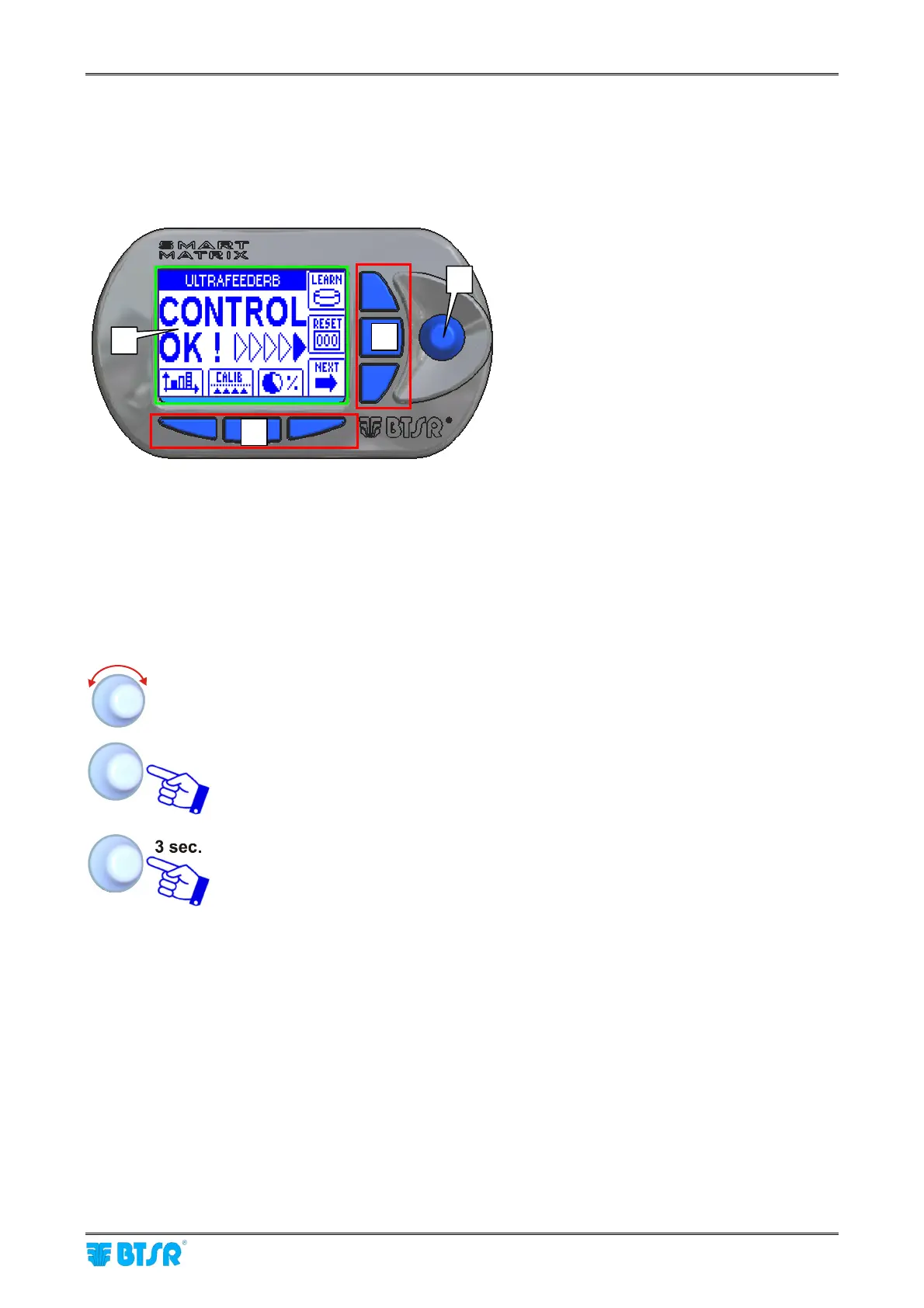
The SMART MATRIX FEEDER ↔ Operator interface consists of:
A - Graphic display showing:
• menus,
• operating states,
• operation parameters,
• error messages, etc.
• graphic information
B - 6 buttons for:
• immediate activation of particular
functions
• increment/decrement speed-up
(shortcuts)
C - Multi-function rotary selector.
How to Use the Rotary Selector
The selector provides both: “pointing” and “data entry” functions.
Turn the selector to select a menu item / function / parameter within the configuration
screens, etc.
Rapid click: to confirm the selection.
Hold (3 seconds): keep the button pressed to switch from Control status to Interactive
status and vice versa, return to the previous menu level, activate the data setting
window, etc.
B
B
C
A



 To Next Page