Communication Test
SMART MATRIX FEEDER 2-22
Communication Test
This function allows you to check:
- The efficiency level of communications between SMART MATRIX FEEDER and all the
ULTRAFEEDER/ROLLING FEEDER/UNIFEEDER devices connected.
- The correct communication with the individual devices.
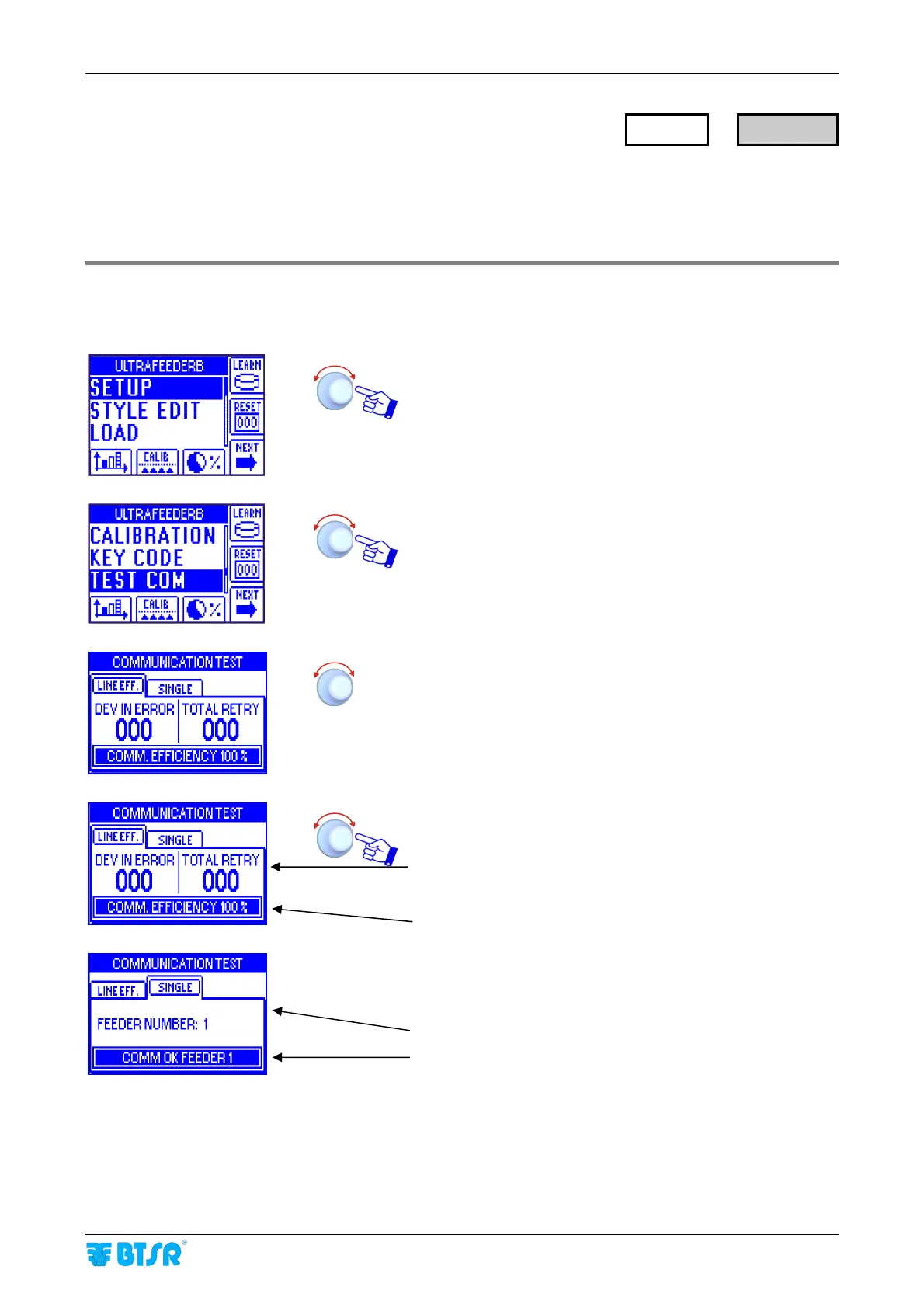
Communication Efficiency
Enter the SETUP menu.
Select TEST COM.
Select LINE EFF (global communication efficiency) or
SINGLE (communication efficiency with the individual
ULTRAFEEDER/ROLLING FEEDER devices).
Number of devices on which communication errors
occurred (DEV IN ERROR) and total number of
transmissions repeated against detected errors (TOTAL
RETRY). A maximum of 5 transmissions are repeated for
each device.
Global efficiency rate.
Number of the selected device (1)
Status of communication between SMART MATRIX and
selected ULTRAFEEDER/ROLLING
FEEDER/UNIFEEDER device
(COMM OK or COMM ERROR).
During the communication efficiency test, the COM label shall blink on the relevant device.
SETUP
→
TEST COM



 To Next Page