Selecting the Display Language on ULTRAFEEDER/ROLLING FEEDER/UNIFEEDER Devices
SMART MATRIX FEEDER 2-24
Selecting the Display Language on ULTRAFEEDER/ROLLING
FEEDER/UNIFEEDER Devices
This function allows you to setup the language used by the ULTRAFEEDER/ROLLING
FEEDER/UNIFEEDER devices to display messages and menu items.
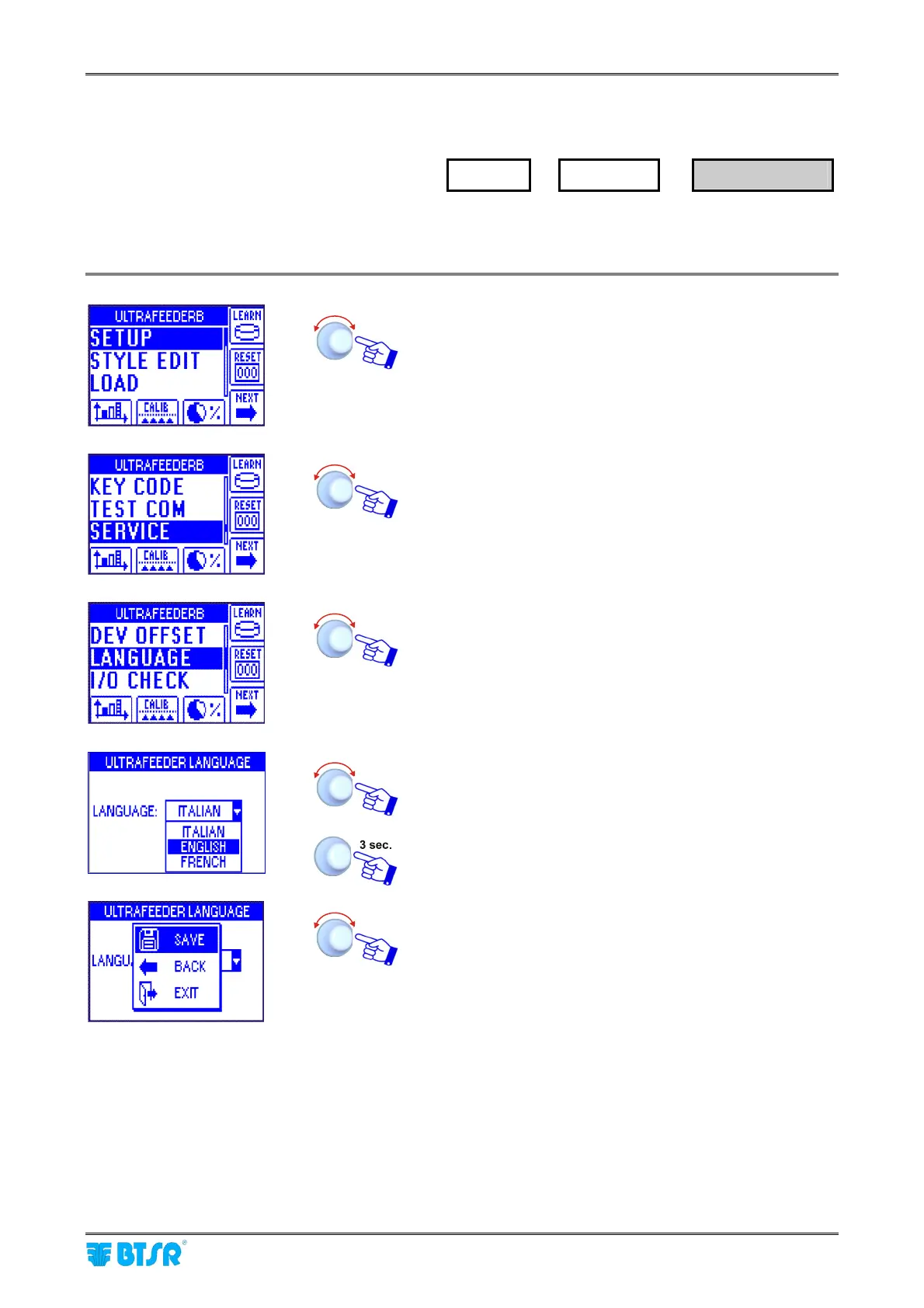
Enter the SETUP menu.
Select SERVICE.
Select LANGUAGE.
Choose the desired language: ITALIAN, ENGLISH,
FRENCH, SPANISH, GERMAN, JAPANESE, CHINESE.
To confirm the selection.
SAVE to save the choice, BACK to return to the previous
screen without saving, EXIT to return to main menu.
The selected language will be immediately configured on all the ULTRAFEEDER/ROLLING
FEEDER/UNIFEEDER device recognized by the system (i.e. connected and identified with the
IDENTIFY function).
SETUP
→
SERVICE
→
LANGUAGE



 To Next Page