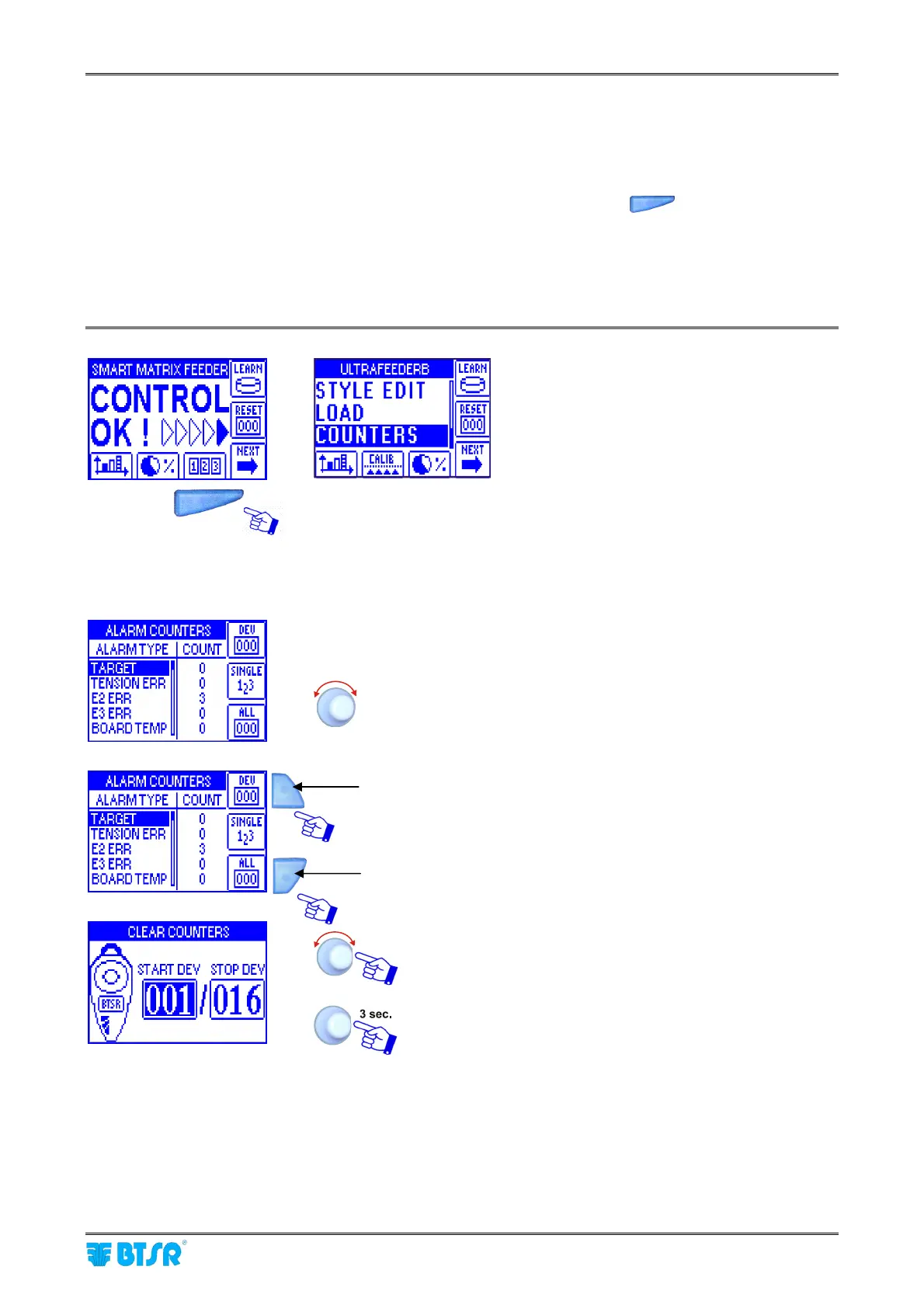
Alarm Counter Display
SMART MATRIX FEEDER 2-49
Alarm Counter Display
This function allows you to display the alarm counters.
The button used to directly access the alarm counters changes depending on he option configured within the
CALIBRATION item of the SETUP menu: if the calibration function has not been enabled (CALIBRATION
OFF), then the access to counters occurs by pressing the short cut button
; if on the contrary the
Calibration function has been enabled (CALIBRATION ON), then the access to counters occurs through the
additional item COUNTERS within the main menu.
For more details about the meaning of each alarm, please refer to Section 3 of this manual and to
the ULTRAFEEDER, ROLLING FEEDER and UNIFEEDER manuals.
For each alarm type, the COUNT column will show the total
number of detected events on all devices.
To scroll throughout the alarm list.
Press this button to clear the counters for the desired device
range.
Press this button to clear the alarm counters for all devices.
Select the range of devices for which you want to clear the
counters.
To confirm.



 To Next Page