Style Loading
SMART MATRIX FEEDER 2-41
Style Unload (Multiple)
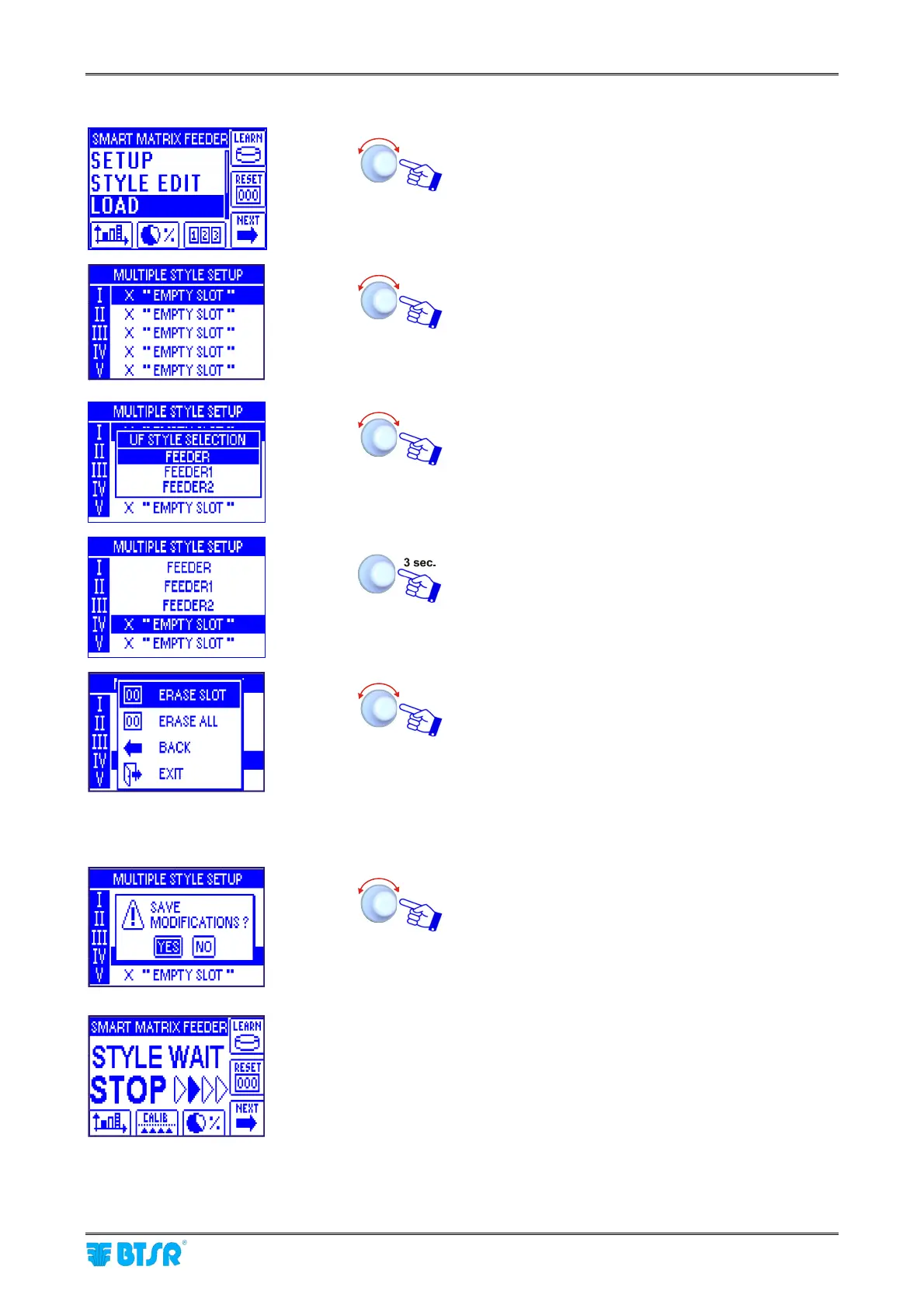
Select the LOAD menu item.
Set the sequence of styles (max 5) that shall be
loaded to the ULTRAFEEDER/ROLLING
FEEDER/UNIFEEDER devices according to the
synchronization provided by the STC signal.
(See STYLE OPT on page 2-17)
For instance set FEEDER in slot I, FEEDER 1 in slot
II and FEEDER 2 in slot III.
To leave the function once you have setup the
multiple desired styles.
ERASE SLOT to remove the article from the
selected slot
ERASE ALL to remove all the styles from the list.
BACK to return to the previous screen
EXIT to leave the function and enter the
style loading status that will depend
on the sequence of STC signals.
Once you have pressed EXIT, confirm the changes
made to the list.
This screen indicates that the system is waiting for
STC synchronization signals to load the desired styles
to the ULTRAFEEDER/ROLLING
FEEDER/UNIFEEDER devices.
(See SETUP-STYLE OPT function).



 To Next Page