Home
Buffalo
I/O Systems
TS1400D
Page 29
Buffalo TS1400D - Page 29
129 pages
Manual
Save Page as PDF
To Next Page
To Next Page
To Previous Page
To Previous Page
Loading...
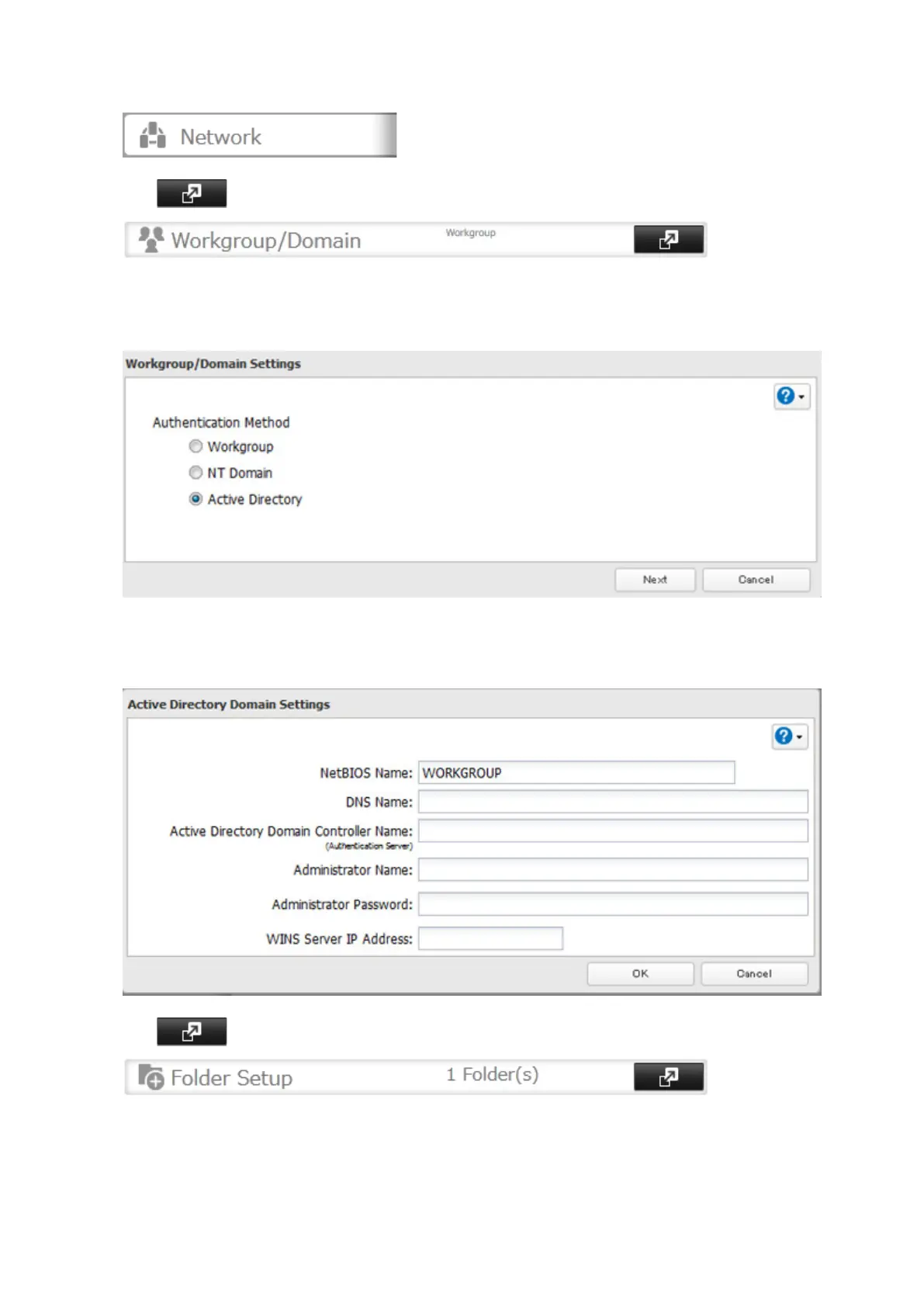
1
I
n Settings, click
Network
.
2
Click
to the right of "Workgr
oup/Domain"
.
3
Click
Edit
.
4
S
elect "
Active Director
y"
, then click
Next
.
5
Click
Ye
s
.
6
Enter the desired settings, then click
OK
.
7
Click
to the right of "F
older Setup"
.
28
28
30
Table of Contents
Main Page
Default Chapter
2
Table of Contents
2
Chapter 1 Getting Started
7
Diagrams
7
Turning the Terastation on and off
9
Changing the Administrator Password
9
Chapter 2 Configuration
12
Opening Advanced Settings
12
Opening Easy Admin
14
Chapter 3 Sharing Files
16
Configuring Shared Folders
16
Adding a Shared Folder
16
Recycle bin
19
Read-Only Shares
19
Hidden Shares
19
Configuring Users
19
Adding a User
19
Importing User Information
22
Creating Sequential Users
22
Adding a Group
24
Configuring Access Restrictions
26
Local Users and Groups
26
Active Directory
28
NT Domain
31
Chapter 4 Managing Storage
34
RAID Modes
34
Working with RAID Arrays
35
Using JBOD
35
Changing RAID Mode
36
RMM (RAID Mode Manager)
38
RAID Scanning
40
Adding an External Hard Drive
41
Connecting an External Drive
41
Compatibility
41
Dismounting Drives
42
Dismounting with the Function Button
42
Dismounting from Settings
42
Checking Drives
43
Formatting Drives
44
Encrypting Drives
46
Erasing Data on the Terastation Completely
46
Drive Quotas
47
Quotas for Users
47
Quotas for Groups
47
Hard Drive Replacement
48
Step 1 - Replacing a Hard Drive
49
Step 2 - Rebuild the RAID Array
53
Chapter 5 Remote Access
57
Webaccess
57
Ftp
59
Chapter 6 Backup
62
Back up from the Terastation
62
Preparing a Backup Destination
62
Configuring a Backup Job
64
Replication
68
Preparing a Replication Destination
68
Configuring a Replication Task
69
Backing up Your Mac with Time Machine
72
Copying from a USB Device
76
Chapter 7 Multimedia
78
Dlna
78
Playing Files
79
Connected DLNA-Compatible Devices
79
Streaming to DLNA-Compatible Devices
80
Disabling Playback from Specific Devices
81
Itunes Server
82
Bittorrent
84
Chapter 8 Advanced Features
87
Email Notification
87
Sleep Mode
88
UPS (Uninterruptible Power Supply)
90
Connecting a Printer
91
Offline Files
92
Accessing from an NFS Client
93
Encrypting Data Transmission
96
Encrypting Settings Data
96
Encrypting FTP Transfer Data
96
SSL Keys
96
Web Server
97
Mysql Server
98
Saving and Applying Settings
100
Saving Settings
100
Applying Settings
101
Restoring Factory Defaults
102
Initializing with Function Button
102
Initializing from Settings
103
Logs
103
Updating the Firmware
105
Name, Date, Time, and Language
105
Jumbo Frames
107
Changing the IP Address
109
Chapter 9 Utilities
111
NAS Navigator2 for Windows
111
Mount as Network Drive
113
Changing the IP Address
114
NAS Navigator2 for Mac
115
Mount as Network Drive
117
Changing the IP Address
118
Novabackup
118
Installing from CD
118
Installing from Website
119
Chapter 10 Appendix
120
When the LED Blinks Red
120
When the LED Blinks Amber
121
Default Settings
122
Specifications
123
Chapter 11 Regulatory Compliance Information
125
For Customers in the United States
125
For Customers in Europe
126
Related product manuals
Buffalo TS1200D
129 pages



 To Next Page