Drive Quotas
You can set a drive quota to limit drive space for each user or group. You can also set a threshold. If the drive space
exceeds the set threshold, an email notification will be sent. To configure email notifications for drive quota, refer to
the "Email Notification" section in chapter 8.
Notes:
• When using quotas, disable the recycle bin or empty the trash folder often. The limited space includes the space
used for trash.
• Quotas apply per drive or per array. If a quota is set to 1 GB, each array or drive can use a maximum of 1 GB.
• If both user and group quotas are configured for a user, the most restrictive quota will always apply.
• Make sure that SMB2 is disabled before using quotas on the TeraStation.
Quotas for Users
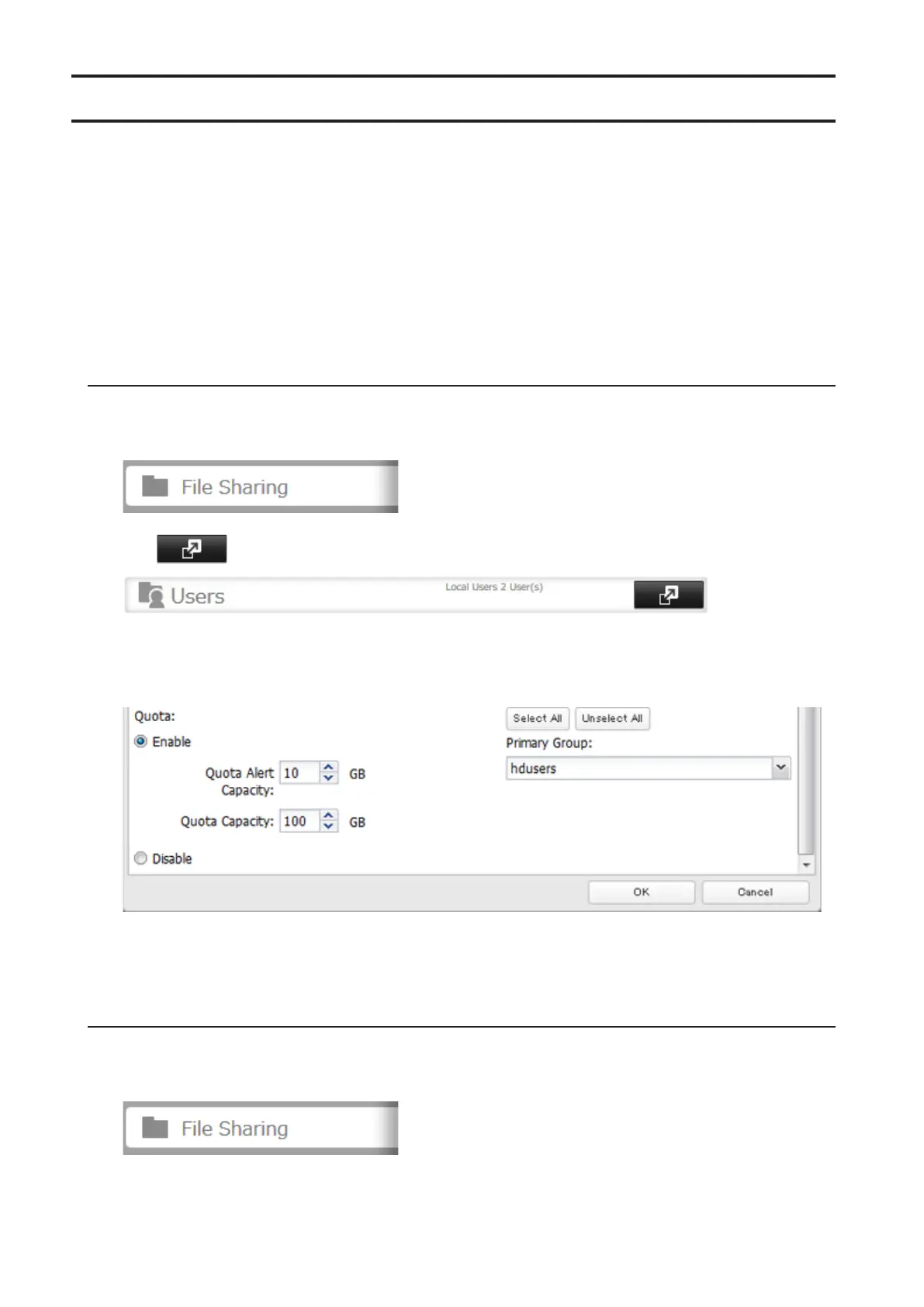
Follow this procedure to limit the shared folder drive space available for a user.
1 In Settings, click File Sharing.
2 Click to the right of "Users".
3 Select the user whose space will be limited.
4 Enable quotas, choose the maximum space the user will be allowed to use, and click OK.
Note: If you change the primary group, restart the TeraStation to apply the quota settings.
5 Click OK.
Quotas for Groups
Follow the procedure below to limit the space for shared folders that each group can use.
1 In Settings, click File Sharing.
46



 To Next Page