WZR-HP-AG300H User Manual 76
Chapter 4 Conguration
Web Access
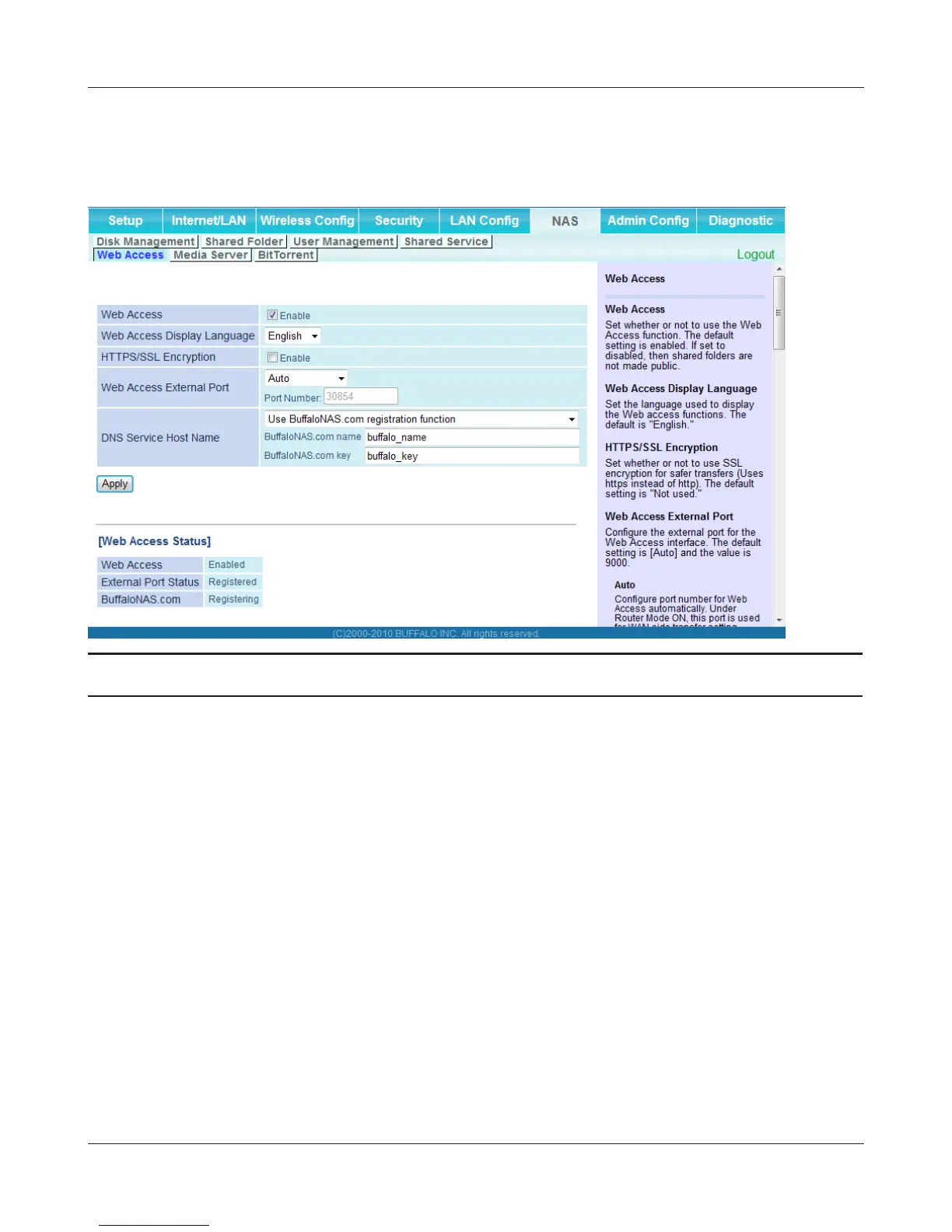
The screen to congure Web Access.
Parameter Meaning
Web Access Check [Enable] to use Web Access.
Web Access Display Language Set the language to be used with Web Access.
HTTPS/SSL Encryption Check [Enable] to use SSL encryption for protected data transfer.
Web Access External Port Automatically sets the external port used for Web access. To select
the port manually, select [Manual].
DNS Service Hostname Sets the DNS Service Hostname when the Web access function
is activated. Select [Use BualoNAS.com registration function]
to use the Web access function easily. You’ll have to congure
a [BualoNAS.com name] and [BualoNAS.com key] to use
BualoNAS.com. 3 - 0 alphanumeric characters, spaces, hyphens
(-), underscores (_) and period (.), may be used in the BualoNAS.
com name. 3 - 20 alphanumeric characters, spaces, hyphens (-),
underscores (_) and period (.), may be used in the BualoNAS.com
key.
Note: The registered name is deleted from the server if the AirStation is
disconnected from power, even for a moment.


 To Next Page
 Loading...








