52
Maintenance and troubleshooting
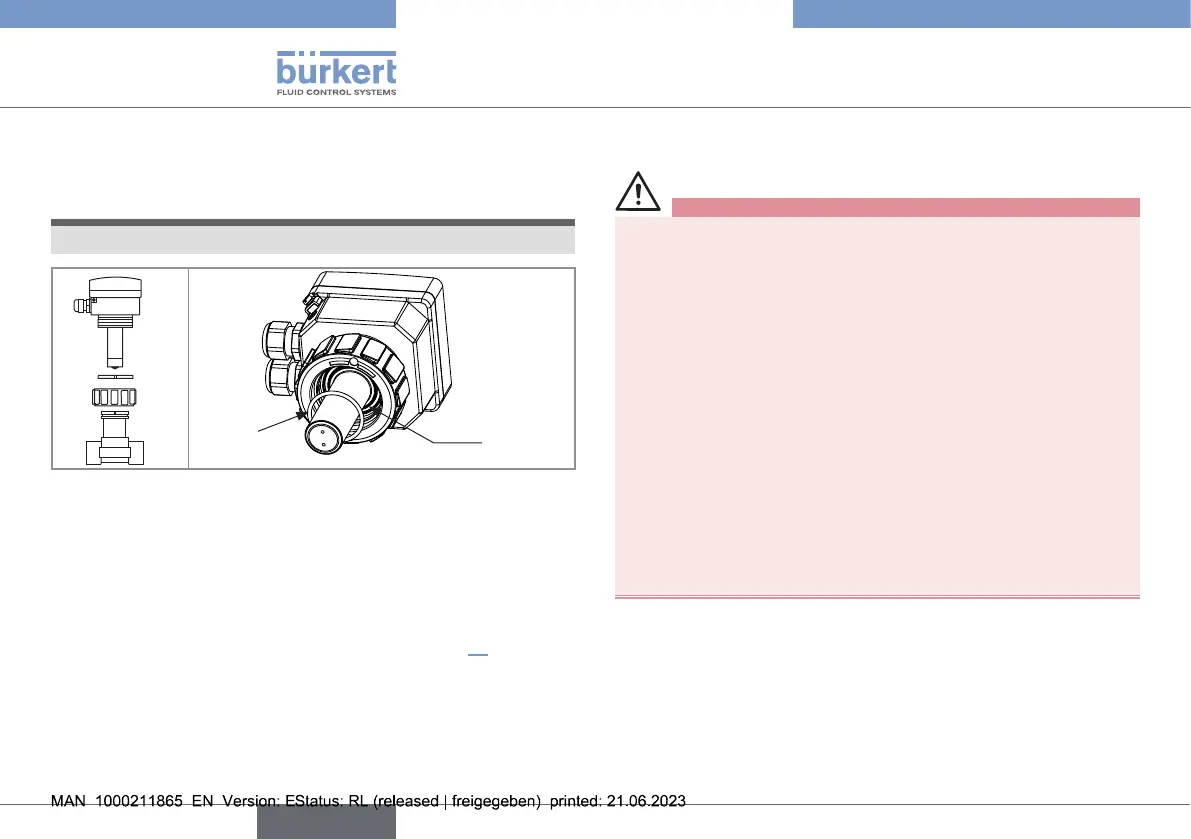
10.4. Replacing the seal on a device
with G2" nut
NOTE
Do not scratch the seal groove.
1
2
3
Seal
Groove
Fig.46: Dismountingthedeviceandlocationoftheseal
→ Loosen the nut of the device (mark2).
→ Remove the device from the tting (mark1).
→ Remove the seal from the groove.
→ Clean the seal groove.
→ Insert the new O-ring in the groove (see chapter11).
→ Insert the device into the tting.
→ Tighten the nut (mark2) by hand on the device.
10.5. If you encounter problems
Risk of injury due to high pressure in the installation.
▶ Stop the circulation of uid and cut o the pressure before
loosening the process connections.
Risk of injury due to electrical voltage.
▶ Shut down the electrical power source of all the conductors
and isolate it before carrying out work on the system.
▶ Observe all applicable accident protection and safety regula-
tions for electrical equipment.
Risk of injury due to high uid temperatures.
▶ Use safety gloves to handle the device.
▶ Stop the circulation of uid and drain the pipe before loosen-
ing the process connections.
Risk of injury due to the nature of the uid.
▶ Respect the prevailing regulations on accident prevention and
safety relating to the use of aggressive uids.
english
Type 8041



 To Next Page