35
Adjustment and commissioning
9.4. Selecting the frequency of the
main supply
Switch1 is used to select the frequency of the current provided
by the electricity network.
→ Position switch1 to ON or OFF depending on the frequency
of the main supply (see Fig.25, chapter9.2, and the following
table).
Frequency of the power
supplied by the network
Position of switch1
50Hz OFF
60Hz ON
9.5. Filter selection
The lter is used to attenuate the uctuations in the ow indi-
cated by the bargraph and on the current and frequency outputs.
The device can operate with or without lter.
→ Position switch 2 (see Fig.25, chapter9.2, and the following
table) to activate or deactivate the lter feature.
Filter Position of switch2
Disabled OFF
Enabled ON
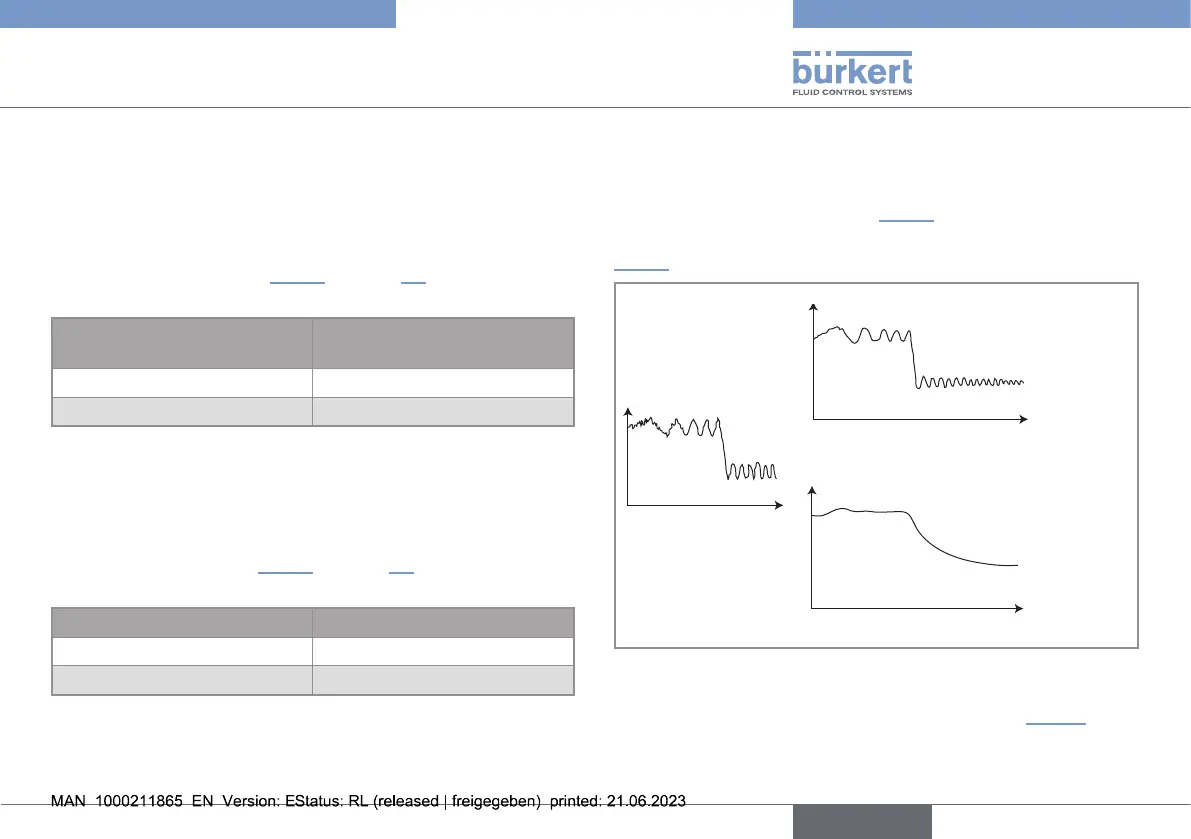
When the lter is enabled, switch 3 is used to select the lter
level: slow or fast.
"Slow" lter is used to even out high variations in ow (example:
uid containing air bubbles), see Fig.26.
"Fast" lter is used to even out low variations in ow (see
Fig.26).
t (s)
t (s)
t (s)
Actual ow rate
Flow attenuated with fast lter
Flow attenuated with low lter
Fig.26: Flowlters
→ Position switch3 to the lter level selected (see Fig.25, and
the following table).
english
Type 8041



 To Next Page