28
Fluid installation
Attaching the rotating Remote Sensor with mounting bracket
for push actuators with columnar yoke:
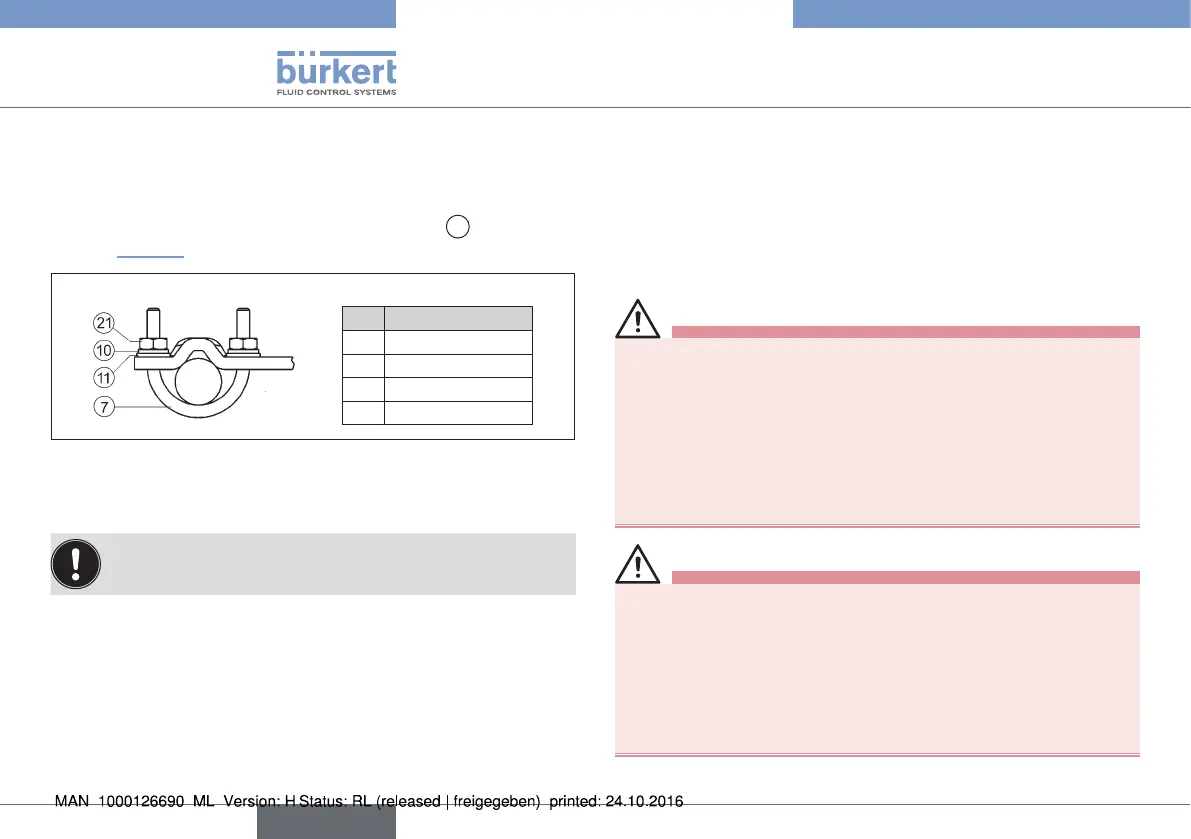
→ Attach mounting bracket to the columnar yoke with the U-bolt
⑦, circlips ⑩, washers ⑪ and hexagon nuts
21
(see “Fig. 30”).
Legend:
No. Name
7 U-bolt
10 Circlip
11 Washer
21 hexagon nuts
Fig. 30: Fit mounting bracket to columnar yoke
Aligning lever mechanism:
The lever mechanism cannot be correctly aligned until the
device has been connected electrically and pneumatically.
→ Move the actuator in manual mode to half stroke (according to
the scale on the actuator).
→ Adjust the height of the position sensor until the lever is
horizontal.
→ Fix the position sensor in this position on the actuator.
9 FLUID INSTALLATION
The dimensions of the Remote Sensor and the different complete
device models, consisting of Remote Sensor, actuator and valve, can
be found in the relevant data sheets.
9.1 Safety instructions
DANGER!
Risk of injury from high pressure in the equipment/device.
▶ Before working on equipment or device, switch off the pressure
and deaerate/drain lines.
Risk of electric shock.
▶ Before working on equipment or device, switch off the power
supply and secure to prevent reactivation.
▶ Observe applicable accident prevention and safety regulations
for electrical equipment.
WARNING!
Risk of injury from improper installation.
▶ Installation may be carried out by authorized technicians only
and with the appropriate tools.
Risk of injury from unintentional activation of the system and
an uncontrolled restart.
▶ Secure system from unintentional activation.
▶ Following installation, ensure a controlled restart.
english
Type 8798


 To Next Page