COPYRIGHT © 1999 CANON INC. CANON DADF-B1 REV.0 APR. 1999 PRINTED IN JAPAN (IMPRIME AU JAPON)
3-9
CHAPTER 3 MECHANICAL SYSTEM
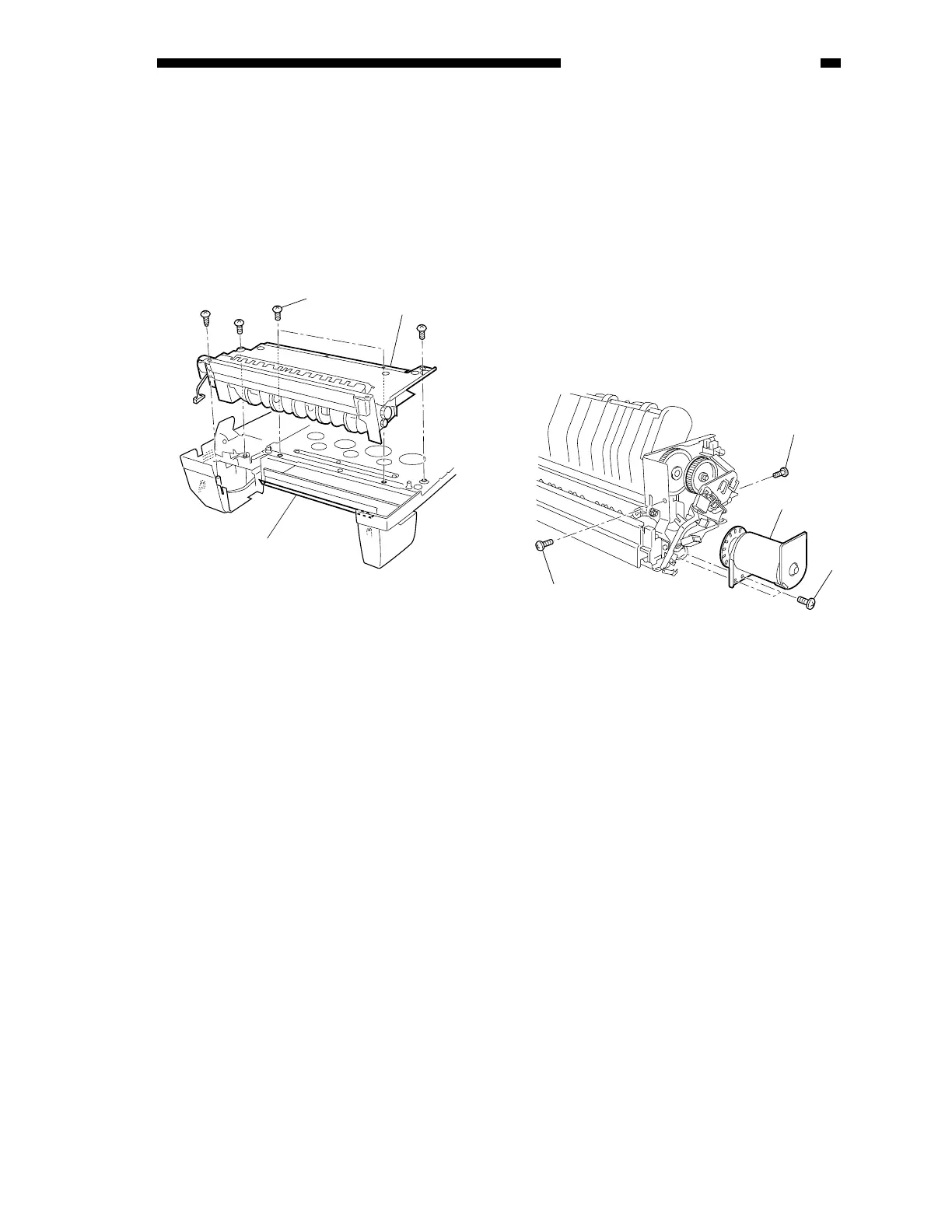
2. Mounting the Reversal Delivery Unit
When mounting the reversal delivery unit
to the feeder, take care so that the unit will not
interfere with the plastic film shown in the
figure.
If deformed, the plastic film [1] can cause
jams in the reversal delivery assembly.
Figure 3-209-1
E. Removing the Reversal
Delivery Motor (M3)
1) Remove the reversal delivery unit.
2) Remove the two mounting screws of the
harness guide [1].
3) Disconnect the connectors connected to
the reversal delivery motor and the reversal
delivery motor clock sensor.
4) Remove the two mounting screws [4], and
detach the reversal delivery motor [3].
Figure 3-210
[4]
[3]
[1]
[2]
[4]
[3]
[2]











 To Next Page