COPYRIGHT © 1999 CANON INC. CANON DADF-B1 REV.0 APR. 1999 PRINTED IN JAPAN (IMPRIME AU JAPON)
3-19
CHAPTER 3 MECHANICAL SYSTEM
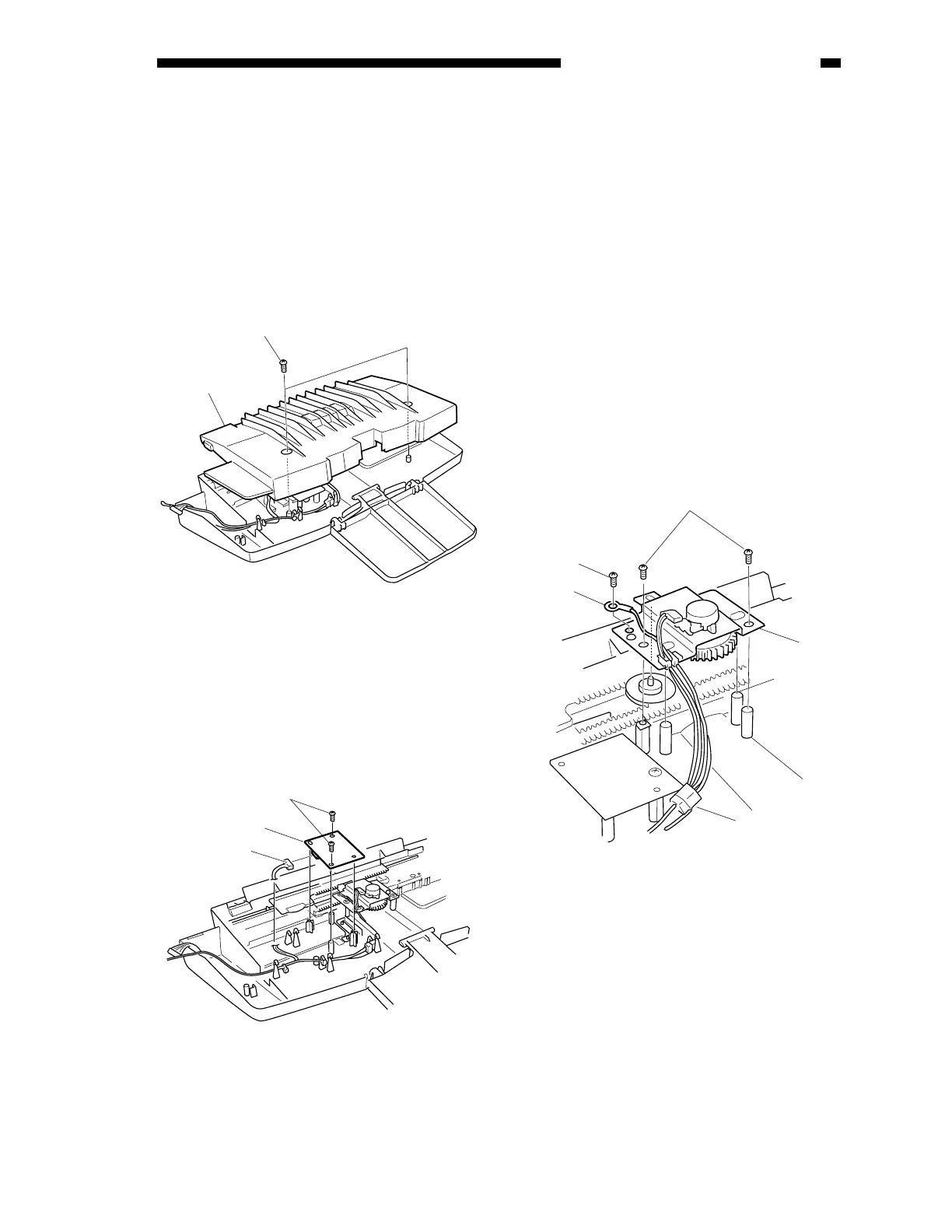
C. Removing the Last Original
Sensor PCB (U504)
1) Remove the original tray. (See 1.
“Removing the Original Tray” under I.
“Basic Construction.”)
2) Remove the two mounting screws [2], and
detach the original tray cover [1].
Figure 3-403
3) Disconnect the connector [5].
4) Remove the two mounting screws [4], and
detach the last original sensor PCB [3].
figure 3-404
D. Original Width Detecting
Volume (VR)
1. Removing the Original Width
Detecting Volume
1) Remove the original tray. (See 1.
“Removing the Original Tray” under I.
“Basic Construction.”)
2) Remove the cover of the original tray. (See
C. “Removing the Last Original Sensor
PCB (U504).”
3) Disconnect the connector [3].
4) Remove the screw [5], and remove the
grounding wire [4].
5) Remove the two mounting screws [2], and
detach the original width detecting volume
PCB [1].
Figure 3-405
[1]
[2]
[4]
[3]
[5]
[1]
[2]
[5]
[3]
[4]











 To Next Page