COPYRIGHT © 1999 CANON INC. CANON DADF-B1 REV.0 APR. 1999 PRINTED IN JAPAN (IMPRIME AU JAPON)
3-13
CHAPTER 3 MECHANICAL SYSTEM
D. Mounting the Separation
Roller Unit
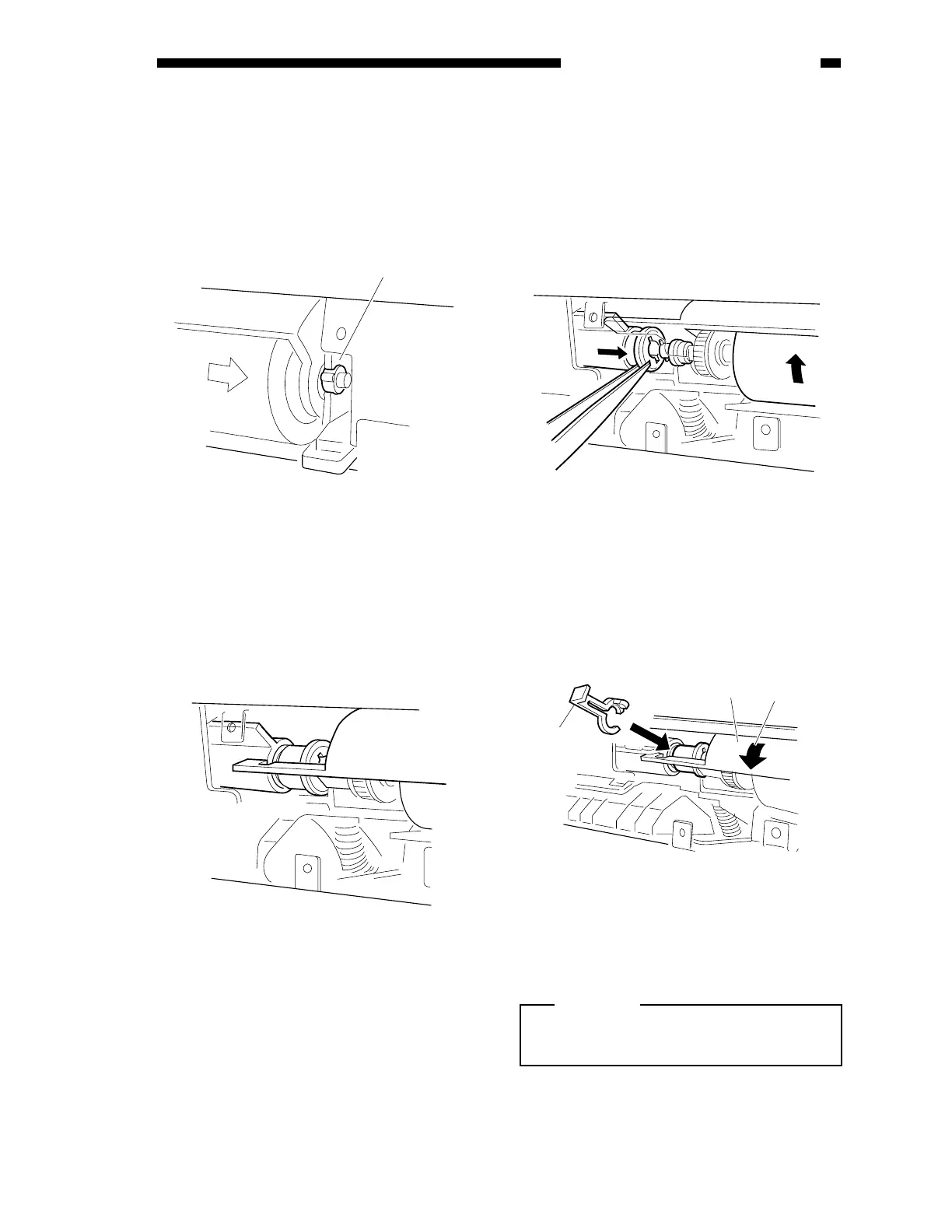
1) While paying attention to the position of
the bushing, fit the separation roller unit
into the pickup unit.
Figure 3-307
2) Check to make sure that the separation
roller holder lever is under the joint shown
in the figure.
Figure 3-307-1
3) Move the bushing [2] to the right.
4) Pick the tip of the coupling [3] with
tweezers, slide it to the right, and engage it
with the separation roller shaft.
5) While holding the tip of the coupling to the
right with tweezers, rotate the separation
roller [4] in the direction shown in the
figure to engage the spring pin and the
coupling.
Figure 3-308
6) Move the separation roller holder [5] in the
direction of [A] in the figure.
7) Fit in the stopper [7].
Figure 3-309
Caution:
Be sure to mount the stopper from above
the separation roller holder lever.
[3]
[6]
[5]
[A]











 To Next Page