COPYRIGHT
©
1999 CANON INC. CANON DADF-B1 REV.0 APR. 1999 PRINTED IN JAPAN (IMPRIME AU JAPON)
5-1
CHAPTER 5 TROUBLESHOOTING
I. STANDARDS AND
ADJUSTMENTS
A. Mechanical System
The major adjustments of the ADF are
made using its host copier's service mode. For
all adjustments using the DIP switch on the
ADF controller PCB, see V.C. "DIP Switch
Functions."
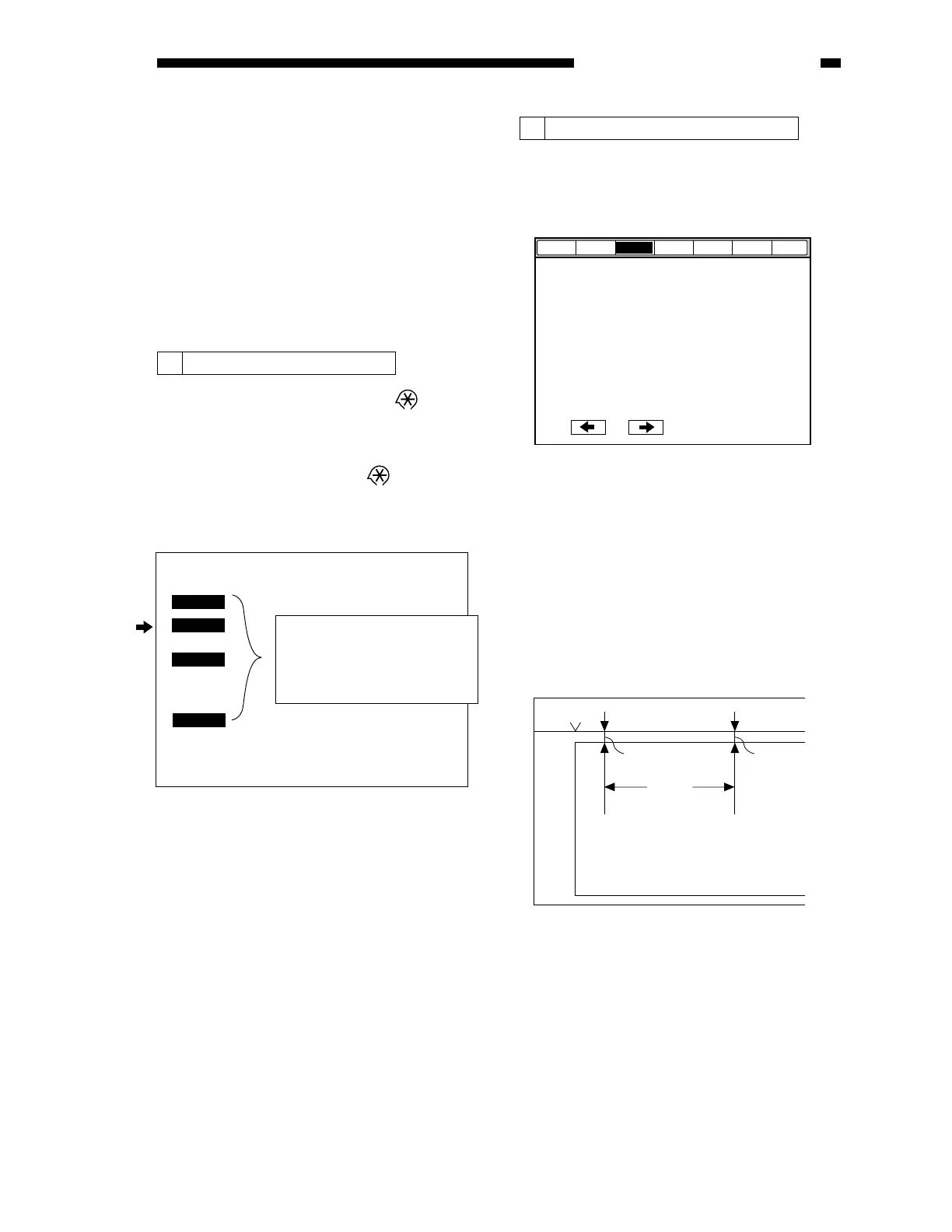
1 Selecting Service Mode
1) Press the User Mode key '
' on the
control panel.
2) Press '2' and '8' on the keypad at the same
time.
3) Press the User Mode key '
' once again.
· The display will show the following
screen.
2 Correcting the Original Skew
1) Set the copier to service mode.
2) Select FEEDER>ADJUST>DOCST (for
functions).
Figure 5-101
Figure 5-101-1
3) Place one original (A3 or 11x17) on the
original tray, and press 'OK'.
The original will be moved to and stopped
on the copyboard glass.
4) Open the ADF, and check the position of
the original on the copyboard glass.
Check to make sure that the difference
between L1 and L2 in the figure is 1 mm or
less.
Figure 5-102
COPIER
FEEDER
SORTER
FAX
COPIER copier service mode
FEEDER ADF service mode
SORTER finisher service mode
FAX fax service mode
< 1/1 >
< READY >
DOCST
DOCST-RP
Display
Adjust
Function
Option Test
Counter
I/O
150mm
L2
Horizontal size plate
Copy paper
L1 may be anywhere as long as
it is on the copy paper.
*











 To Next Page